WR3000N 300M Wireless N Router
- 46 -
3. Delete all or disable all entries if there are any entries already.
4. Click the
Add New...
button.
1) Enter the MAC address
00-0A-EB-B0-00-0B/00-0A-EB-00-07-5F
in the MAC Address field.
2) Enter wireless station A/B in the Description field.
3) Select Enabled in the Status drop-down list.
4) Click the Save button.
5) Click the Back button.
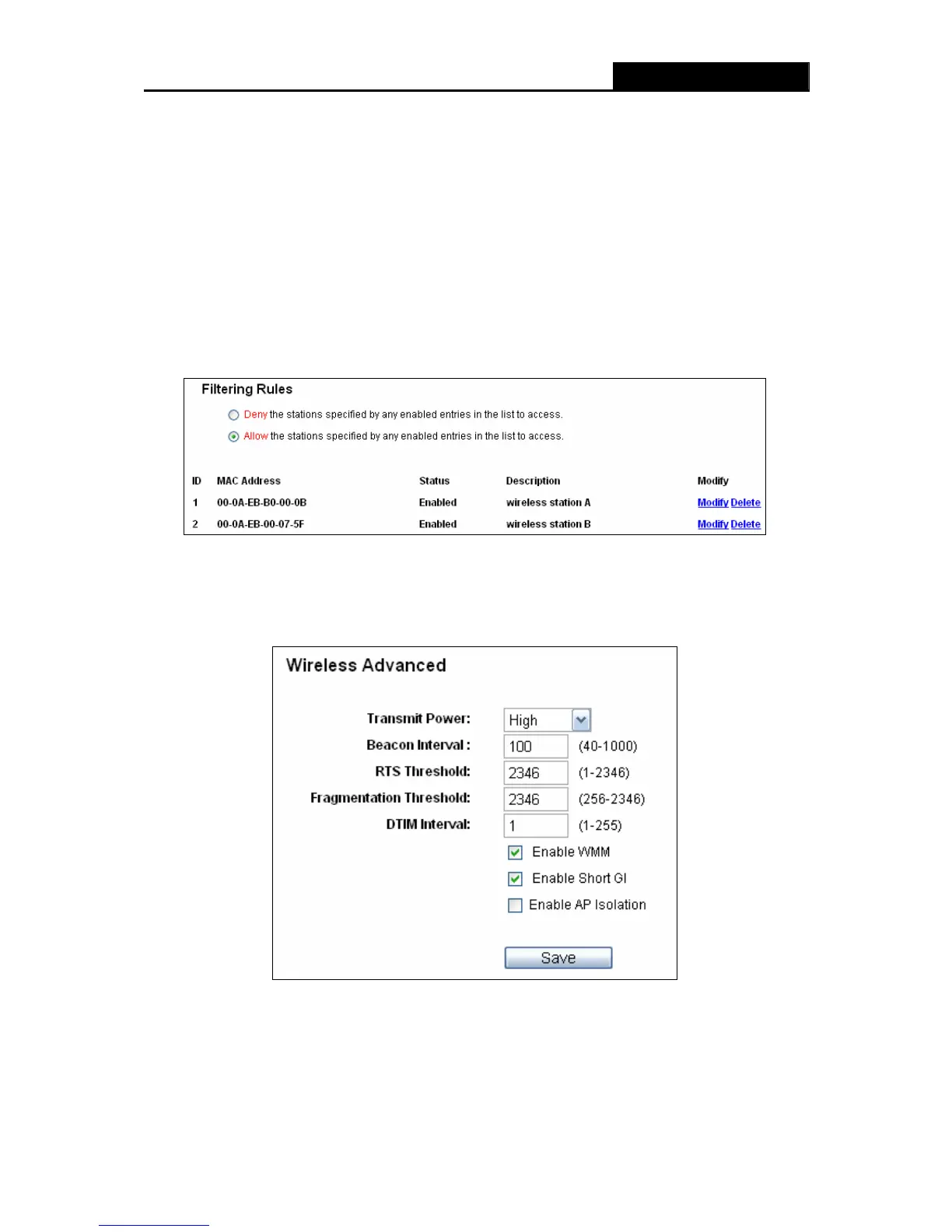
The filtering rules that configured should be similar to the following list:
4.6.4 Wireless Advanced
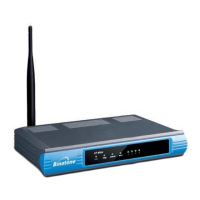
Choose menu “Wireless → Wireless Advanced”, you can configure the advanced settings of
your wireless network.
Figure 4-23 Wireless Advanced
¾ Transmit Power - Here you can specify the transmit power of Router. You can select High,
Middle or Low which you would like. High is the default setting and is recommended.


 To Next Page