III. SPECIFICATIONS, CONNECTIONS AND USER INTERFACE- CONT.
19
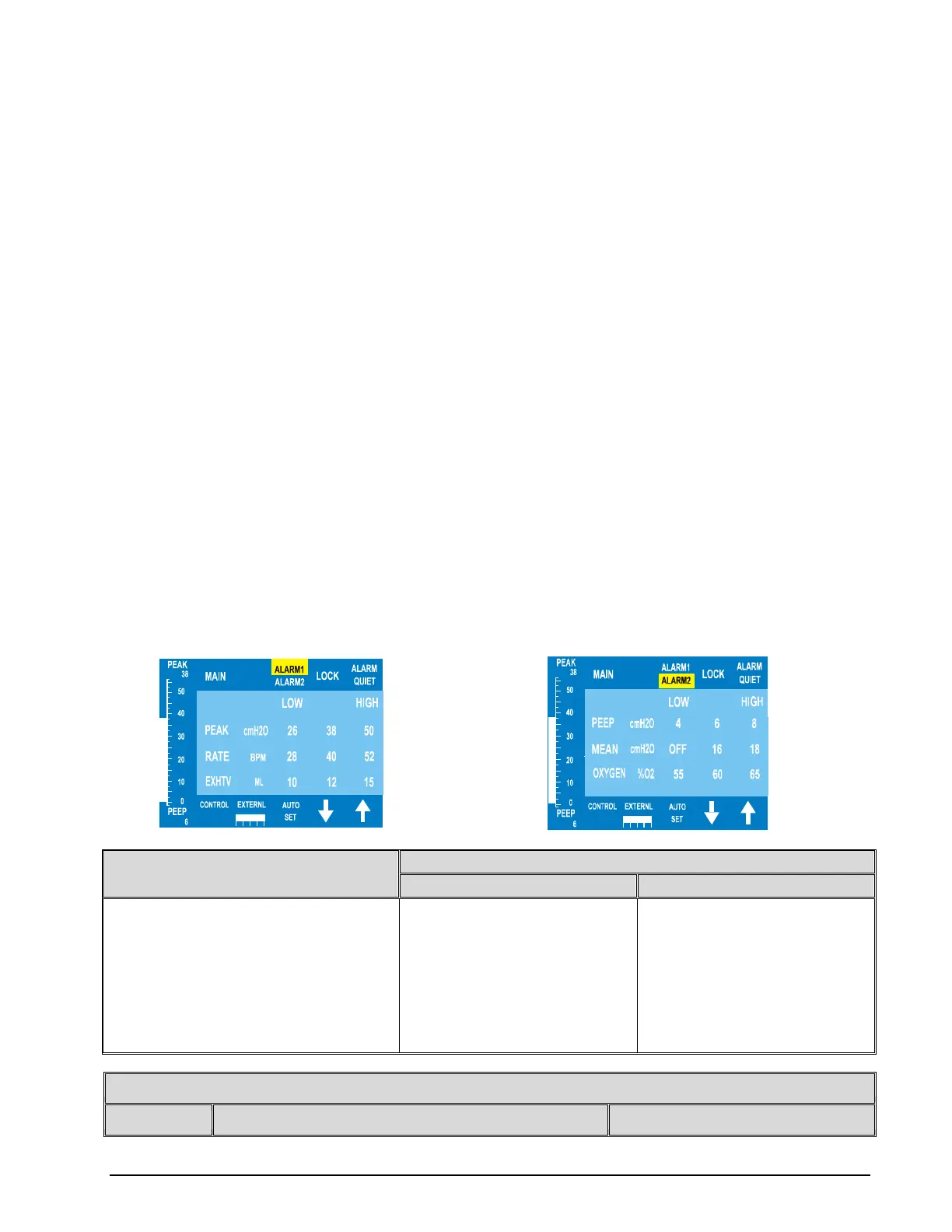
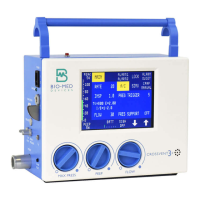
4- ALARM MENUS
ALARM KEY
Although there are three Alarm screens, only Alarm 1 and Alarm 2 are accessible by pressing a corresponding key. The Alarm
3 screen only appears when a specific condition, as explained later in this section, occurs. The Alarm 1 and Alarm 2 menus are
available through a shared key. To access these alarm menus, press the ALARM 1/ALARM 2 key once for ALARM 1 and
press it again for ALARM 2. Whichever alarm menu is currently displayed is indicated by the corresponding half of the
ALARM1/ALARM2 being highlighted. When an alarm menu is displayed, pressing the ALARM1/ALARM2 key will display
the other alarm menu.
When an alarm condition occurs, the appropriate alarm menu will automatically be displayed, unless it occurs while a
parameter is being scrolled or if ALARM QUIET was activated with no alarm condition occurring. To change menus during
an alarm condition, Alarm Quiet must be activated (see ALARM QUIET).
HIGH & LOW ALARM LIMITS- The high or low limits of an alarm parameter may be selected by pressing the
corresponding
key for that value. The value is changed using the UP and DOWN Arrows. The low limit may not be scrolled above the
high limit and vice versa. When an alarm sounds, the display shifts to the appropriate alarm menu and flashes the alarm
parameter that is out of limit. If more than one alarm sounds simultaneously, they each flash. If alarms occur in more than
one menu, the menus are prioritized. The CROSSVENT shifts first to the Alarm 1 menu and when these alarms are
rectified, it shifts to the Alarm 2 menu. Whenever an alarm is active in another menu while the Alarm Quiet is active, the
corresponding menu key(s) flashes.
NOTE
Pressing Alarm Quiet allows control of the menus while alarms are active.
MONITORED ALARM VALUE- the actual monitored value for an alarm is displayed in the center column between the
high and low limits for that alarm.
PRIMARY ALARM MENU (ALARM1) monitored parameters and alarms- Standard Alarms are Peak Pressure and Rate.
Alarms that can be turned off are Exhaled Tidal Volume and Exhaled Minute Volume.
SECONDARY ALARM MENU (ALARM2) monitored parameters and alarms- PEEP and CPAP, Mean Pressure, O
2
.
The last two may be turned off.
TERTIARY ALARMS (ALARM3) These alarms are not displayed in a menu, but rather only as they occur. Therefore,
there is no menu key. The monitored parameters and alarms are- Low Battery, and Ventilator Failure. These messages can
be displayed singularly or in any combination.
PARAMETER
2
2
2
2
ADDITIONAL ALARMS OUTSIDE OF THE ALARM MENUS
1


 To Next Page