Electrocardiograph (Ver 1.0)
16 Description of Product Symbols Description of Product Symbols 17
BCM-600
3. Description of Product Symbols
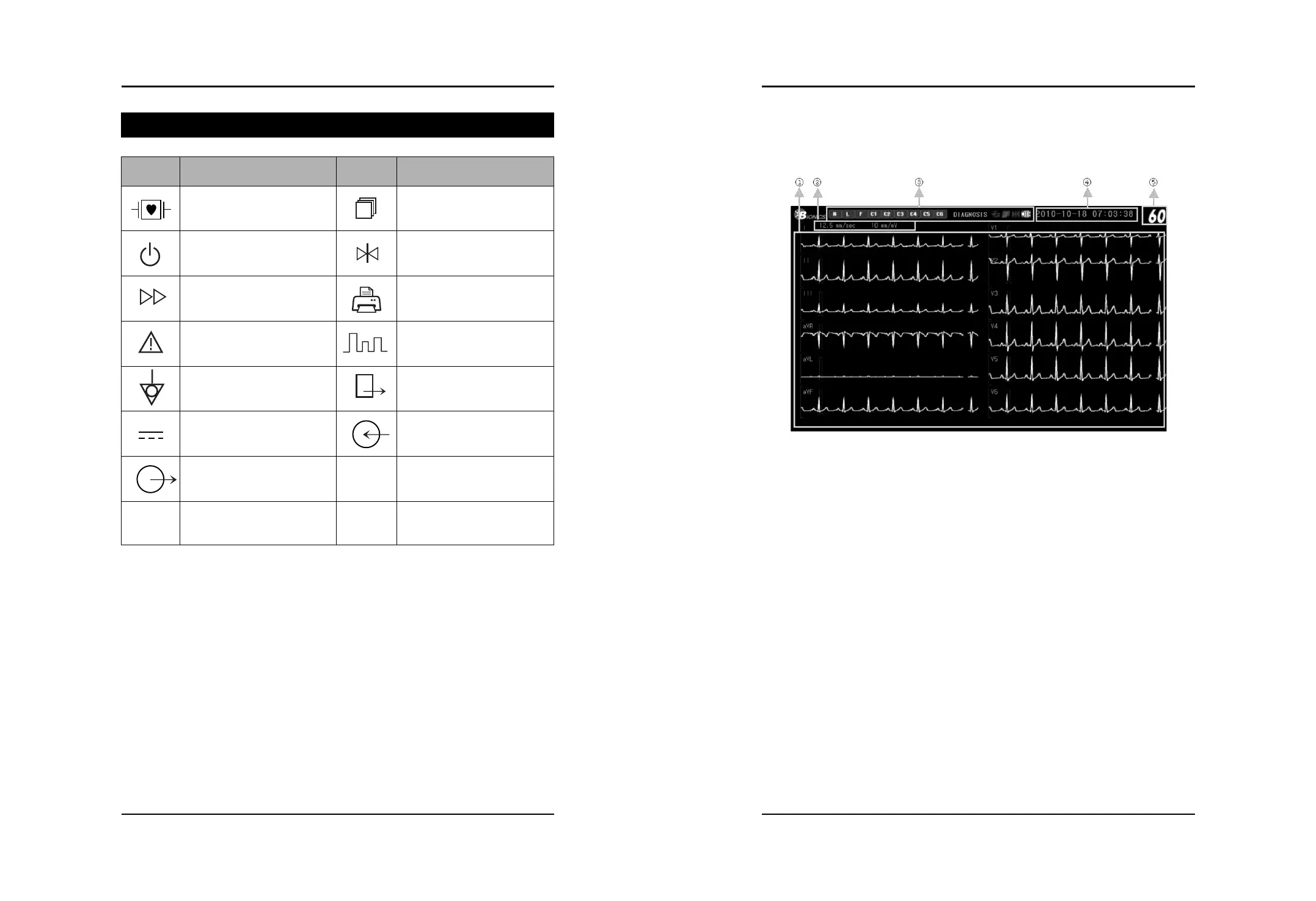
(1) Screen Configuration
①
WAVE Area : Display the graph of electrocardiogram
②
Wave Property Area : Display the Speed and Size of electrocardiogram
③
Each measuring Mode icon : Display the status of measurement, printing and so on.(Refer the
following page (Table 1) Explanation of Screen Icons)
④
Time : Display the present time
⑤
HR : Display the Heart Rate of a Patient
(Fig1. Main Screen)
Symbol Comments Symbol Description
Type CF Product,
Defibrillation protected
Power stand-by switch
Wave speed change
Attention, consult accompanying
documents
Equipotentiality
Direct Current
Signal On/Off
RS-232C Port
LAN Port
Screen Shift
Wave Freeze
Start Printing (Printer)
Wave size change
Initial Screen (Exit)
Signal Output
Use for Program Upgrade
Use for Central Monitoring


 To Next Page