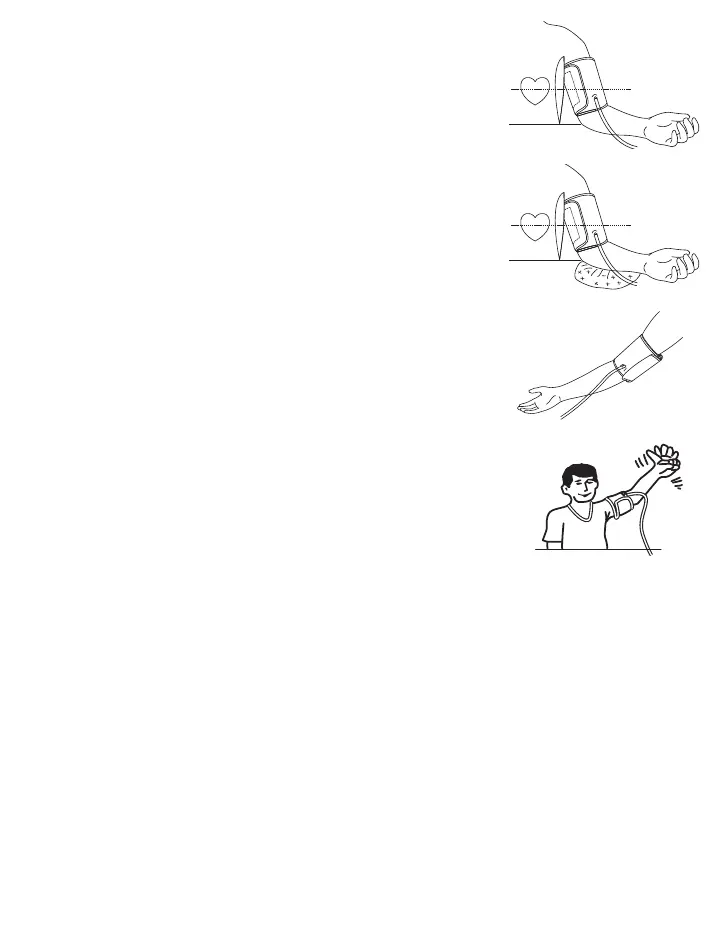
e) Place the arm on the table (palm facing upwards) so that the cuff is at
the same level as the heart. Make sure there is no kink in the hose.
f) You can adjust the level of your arm by putting a cushion under your
arm. Ideally the cuff should be at heart level.
g) Remain seated in a comfortable room temperature for at least 5
minutes, then start the measurement.
h) For those who cannot put the cuff on the left arm, put it on the right arm
as shown.
i) Consecutive measurements will cause blood accumulation in the
lower arm which will affect the measuring results. To improve
reading accuracy, raise the arm being measured, squeeze and relax
your hand several times, then take another measurement. Another
option is to take the cuff off and wait at least 5 minutes before
repeating measurement.
j) If this device was stored in low temperature, it is necessary to leave it in room temperature for at least 1 hour,
otherwise the measurement can be inaccurate.
Comment:
Continue to use the same arm for comparisons. It is not unusual for there to be a difference in blood pressure
between arms.
Comparable blood pressure measurements always require the same conditions (Relax for several minutes before
taking a measurement).
ATTENTION: Do not use a cuff other than the original cuff contained in this kit!
3.4 Protocol Software (7D Mode)
7D Mode is used in consultation with your physician for assessing white coat hypertension or sustained hypertension,
based on a protocol of measurements taken at home. The protocol calls for 2 measurements to be taken in the morning
(AM) and 2 measurements in the evening (PM) for 7-days consecutively. The blood pressure monitor will automatically
average the measurements according to the protocol and will indicate whether all data was fulfilled, at the proper times.
7D Mode simplifies the process for users and provides physicians with clear data from home measurement.
e)
f)
h)
i)














 To Next Page