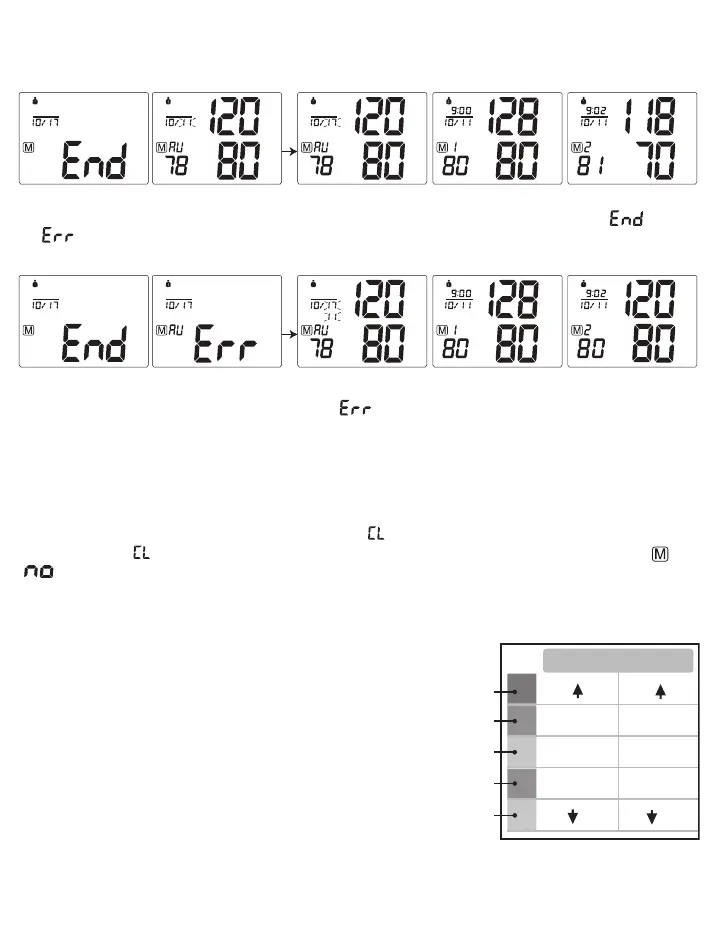
because the Protocol disregards the first day of measurements and averages the last 6 days of measurements, see
section 3.4 for more explanation.
Press the MEM button to display the subsequent measurements.
mmHg
SYS
DIA
mmHg
PUL
/min
Mode
7D
mmHg
AM
SYS
DIA
mmHg
PUL
/min
Mode
7D
mmHg
AM
SYS
DIA
mmHg
PUL
/min
Mode
7D
mmHg
SYS
DIA
mmHg
PUL
/min
Mode
7D
B. If the Protocol was done incorrectly or if any measurements were missed, the monitor will display “ ” then
“ ” then the average measurement and then display the subsequent measurements.
mmHg
AM
SYS
DIA
mmHg
PUL
/min
Mode
7D
mmHg
AM
SYS
DIA
mmHg
PUL
/min
Mode
7D
mmHg
SYS
DIA
mmHg
PUL
/min
Mode
7D
Mode
7D
Reasons why the Protocol Software is displaying :
- Not enough measurements have been saved in memory. For the Protocol Software to work correctly there needs to
be 28 measurements saved in memory, 4 measurements taken for 7 days.
3.9 Clear Measurements From Memory
If you are sure that you want to permanently remove all stored memories, first choose the mode you want to delete
the memory from, then press the SET button 14 times until “ ” appears when the power is off. Press the START/
STOP button until “ ” flashes 3 times to clear the memory. After this, press the MEM button, the symbols “ ” and
“ ” will appear on the screen. This means that the memory has successfully cleared.
3.10 Blood Pressure Assessment Indicator
The bars on the left hand side of the display show you the range
within which the indicated blood pressure values lies. Depending on
the height of the bar, the readout value is either within the normal
(green), borderline (yellow) or danger (red) range.
The classification is based on standards adopted by Hypertension
Canada.
The indicator bar rises according to your measurement.
• If your measurement has only one or two bars, your measurement
is in the green zone, or “Normal”.
• If your measurement has three bars, it is in the yellow zone, or
“High Normal”.
• If your measurement has four bars, it is in the red zone “High Blood Pressure with Self / Home Monitoring”.
• If your measurement has five bars, it is in the red zone or “Moderate to Severe Hypertension”.
SYS
145
135-145
95
85-95
81-84
70-80
70
121-134
110-120
110
(mmHg)
DIA
Red
Red
Yellow
Green
Green














 To Next Page