Chapter 3: UEFI BIOS & Soware | 21
B450MX / B450MX-S
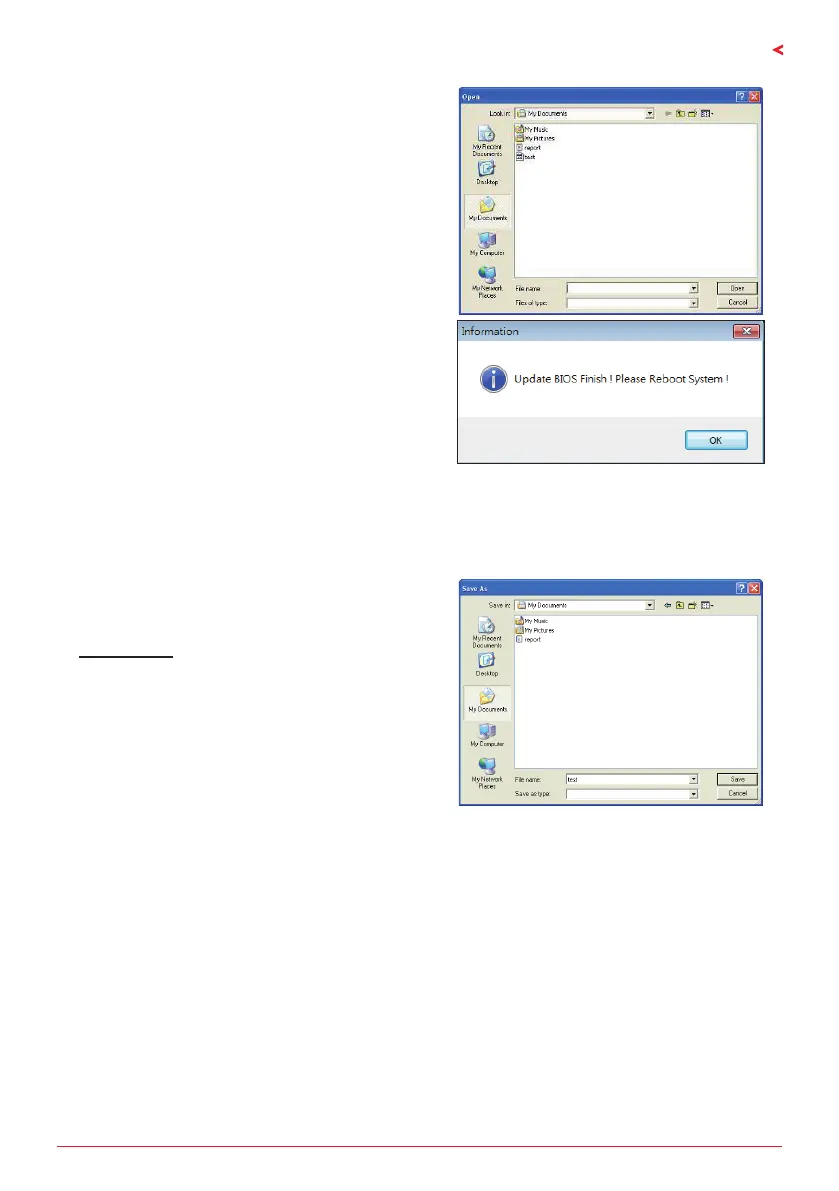
5. Choose the locaon for your BIOS le in the
system. Please select the proper BIOS le, and
then click on “Open”. It will take several minutes,
please be paent.
6. Aer the BIOS Update process is nished, click
on “OK” to reboot the system.
7. While the system boots up and the full screen logo shows up, press <DEL> key to enter BIOS
setup.
Aer entering the BIOS setup, please go to the <Save & Exit>, using the <Restore Defaults>
funcon to load Opmized Defaults, and select <Save Changes and Reset> to restart the
computer. Then, the BIOS Update is completed.
Backup BIOS
Click the Backup BIOS buon on the main screen
for the backup of BIOS, and select a proper
locaon for your backup BIOS le in the system,
and click “Save”.


 To Next Page
 Loading...