Motherboard Manual
32
Start PWM Value
When CPU temperature arrives to the set value, the CPU fan will work
under Smart Fan Function mode. The range is from 0~127, with an
interval of 1.
Choices: 32 (default).
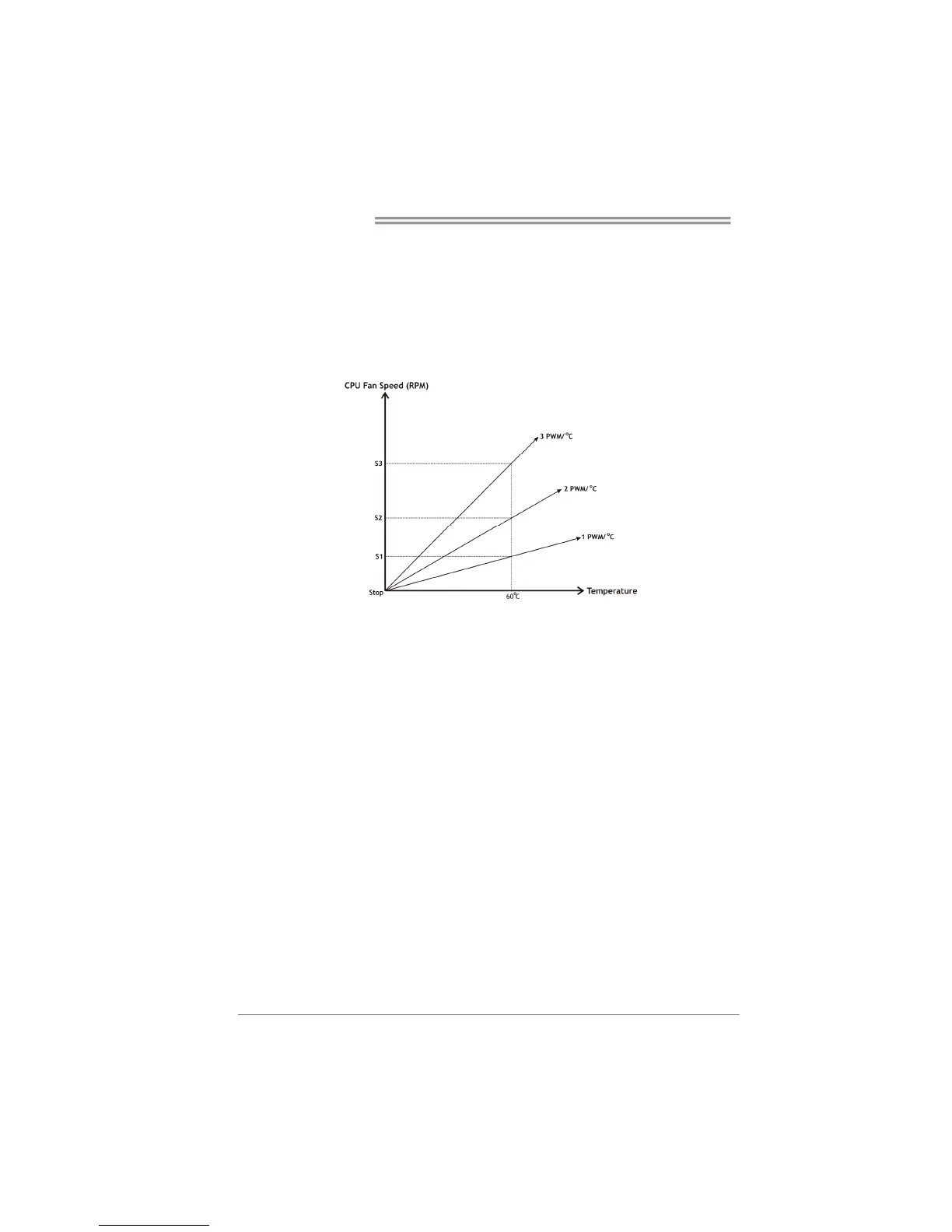
Slope PWM
Choices: 1 PWM Value/℃ (default), 2 PWM Value/℃, 4 PWM Value/℃, 8
PWM Value/℃, 16 PWM Value/℃, 32 PWM Value/℃, 64PWM Value/℃.
S1: CPU temperature is 60℃, and PWM value is 1 PWM/℃.
S2: CPU temperature is 60℃, and PWM value is 2 PWM/℃.
S3: CPU temperature is 60℃, and PWM value is 3 PWM/℃.
Increasing the value of slope PWM will raise the speed of CPU fan.
As in above diagram, when the CPU temperature reaches 60℃, the CPU
fan speed for 3 PWM/℃ is higher than 1 PWM/℃ (S1<S2<S3).



 To Next Page