Video Tutorials
Video instruction is available 24/7 to assist you with set-up.
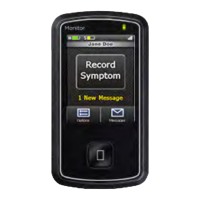
Monitor - Select Options tab, then press the HELP button.
www.gobio.com - Select Patients tab, select "videos" under MCOT™.
Table of Contents
• About Our Service 3
• Kit Contents 4
Before You Begin
3
1
• Step 1: Turn on the Monitor 5
• Step 2: Monitor Set-Up 6
• Step 3: Attach the Sensor to the Patch 7
• Step 4: Pair the Sensor and the Monitor 11
• Step 5: Patient Consent 12
• Step 6: Placement and Skin Preparation 13
• Step 7: Apply the Patch to Your Skin 15
• Step 8: Record a Baseline 17
Getting Started
5
2
• Record a Baseline (Manual Recording Option) 18
• Record Symptoms 19
• Removing the Sensor from the Patch 21
• Replacing the Patch 24
• Deactivation/ Return the Equipment 25
• Important Information 26
• Wear & Care – Charging the Sensor 27
• Wear & Care – Charging the Monitor 28
• Wear & Care – Showering Instructions 29
• Options 30
• Troubleshooting 31
Good to Know
18
3
• ADDENDUM to the PATIENT EDUCATION GUIDE 34
• TERMS AND CONDITIONS 36
• NOTICE OF CONFIDENTIALITY AND PRIVACY PRACTICES 37
Appendix
34


 To Next Page