Maintenance
52
Edit Cable List
The Cable List contains a list of known cable values. These procedure provide the
steps necessary to edit the Cable List and select Cable Lists. The Cable List that is
preloaded on the SiteHawk is named CableList.ini.
Edit Cable List on SiteHawk
Add Cable to Cable List
Note: cables in the default list cannot be changed using this method.
1. Press DTF icon.
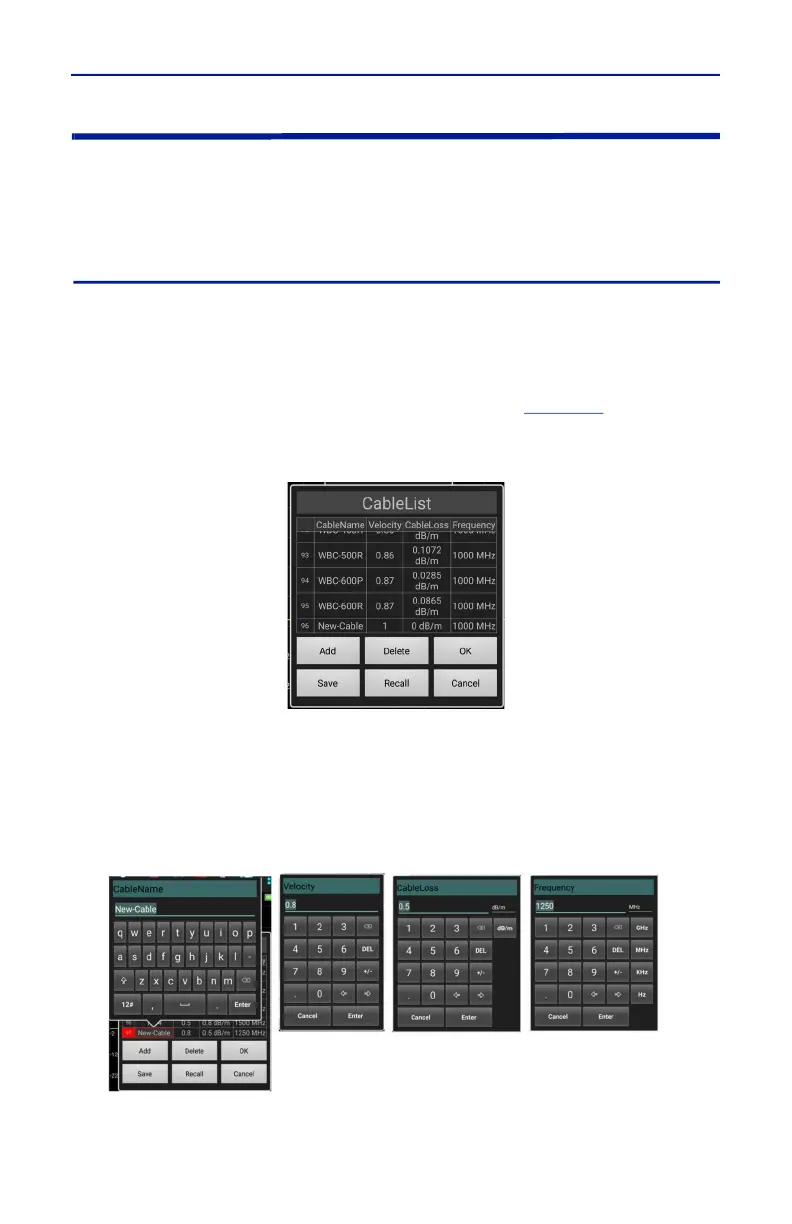
2. Press CableList option to display the Cable List. See
Figure 48
.
Figure 48 Cable List Dialog Box
3. Press Add button to add new cable.
4. Scroll to the bottom of the Cable List to see the new entry.
5. Press each cell for Cable name, Velocity, Cable Loss and Frequency to enter
the new cables information.
Figure 49 Enter Cable Data
6. After cable information is entered press OK.











 To Next Page