Default password
The web configuration panel is secured by a user-selectable password. The default password is:
birddog (one word, lower case).
To change the password simply login using the default password, navigate to the network tab in the web interface, and select
change password.
It is recommended to change this password in a network environment where PF120 is shared with other users (e.g. not private).
By entering this password, the user is granted full access to the PF120 configuration settings and could interrupt a live program.
AV
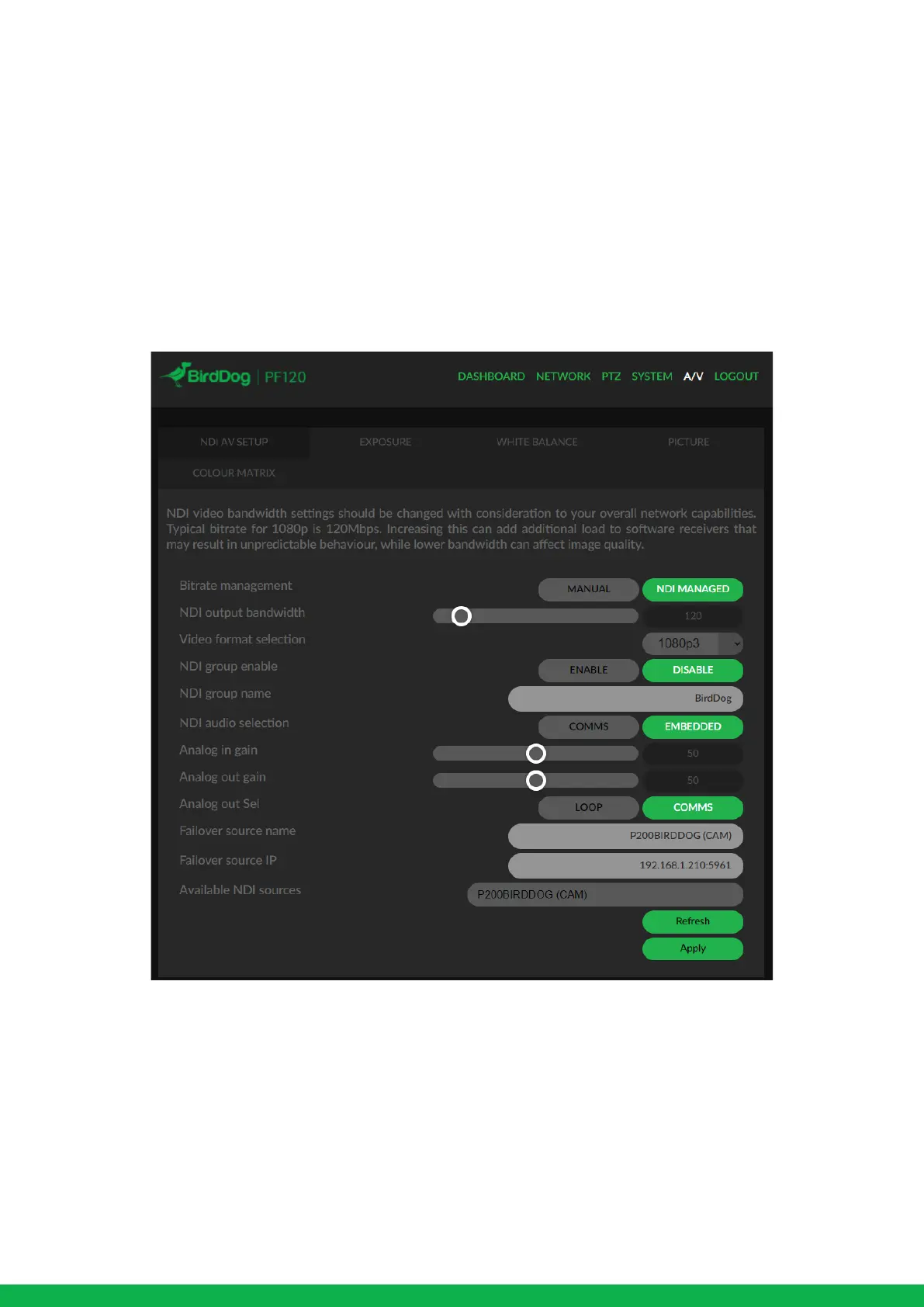
Bitrate Management
Birddog Devices allow you to set your target NDI output bitrate. This allows you to select a compression ratio that is more
efficient on your networking infrastructure (lower bandwidth) or higher image quality for critical footage. The scale allows you
to select anywhere from 60mbps to 360mbps.
By setting Bitrate Management to NDI MANAGED, the BirdDog device will manage the target bitrate in accordance with the
NDI® standard.
By selecting MANUAL you are able to manually select a target bitrate. NDI video bandwidth settings should be changed with
consideration to your overall network capabilities. Typical bitrate for 1080p is 120Mbps. Increasing this can add additional load
to software receivers that may result in unpredictable behavior, while lower bandwidth can affect image quality.


 To Next Page