Obtain Video Signal
The camera can simultaneously have HDMI video output, USB video output and NDI
®
video output.
HDMI HD Video signal
Connect the camera to a HD monitor/TV using HDMI cable.
1. Turn on the camera, video will display on the monitor after running initializing.
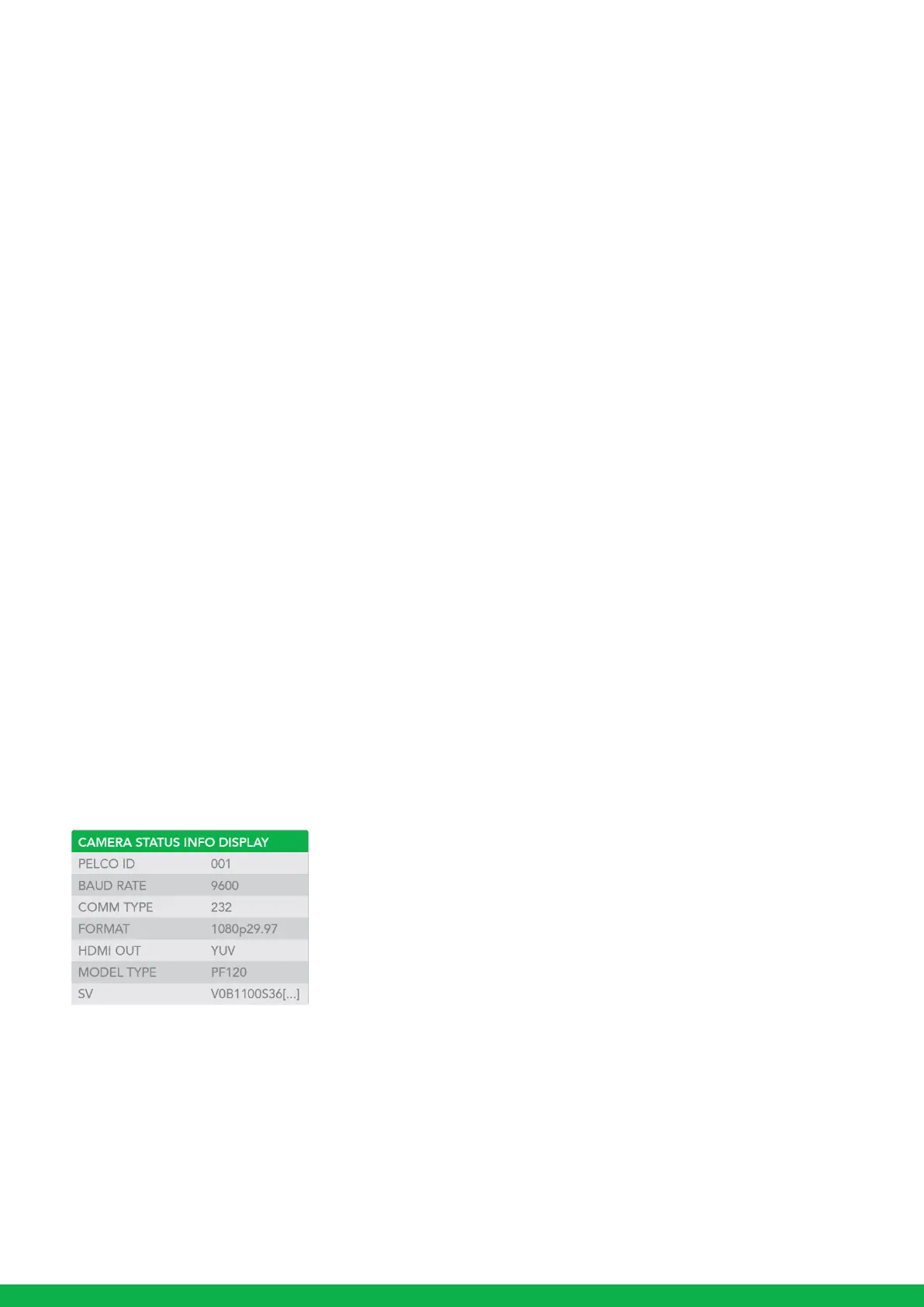
2. Information of the camera initial setting status will display for 5 seconds.
3. You can set the video format of the camera to the one you want to display.
IP Video Signal
The camera can simultaneously stream NDI
®
video output and HDMI video output.
1. Connect the camera to the network using Cat5/Cat6 network cable.
2. You need to have a web browser for product configuration.
3. PELCO address and Baud Rate setting on the camera must be as same as the setting on camera IP WEB interface.
4. To obtain NDI
®
video please configure your NDI
®
video network.
USB Video Signal
This camera supports USB 2.0 video (UVC protocol).
Camera Initial setting status Information
Information of the camera initial setting status will display for 5 seconds.
1. Camera PELCO ID for RS-485 control
2. Camera ID for IR Remote Controller
3. Baud Rate current setting
4. Control COMM Port current setting
5. Video format current setting
6. HDMI current setting
7. Model number
8. Firmware version



 To Next Page