10
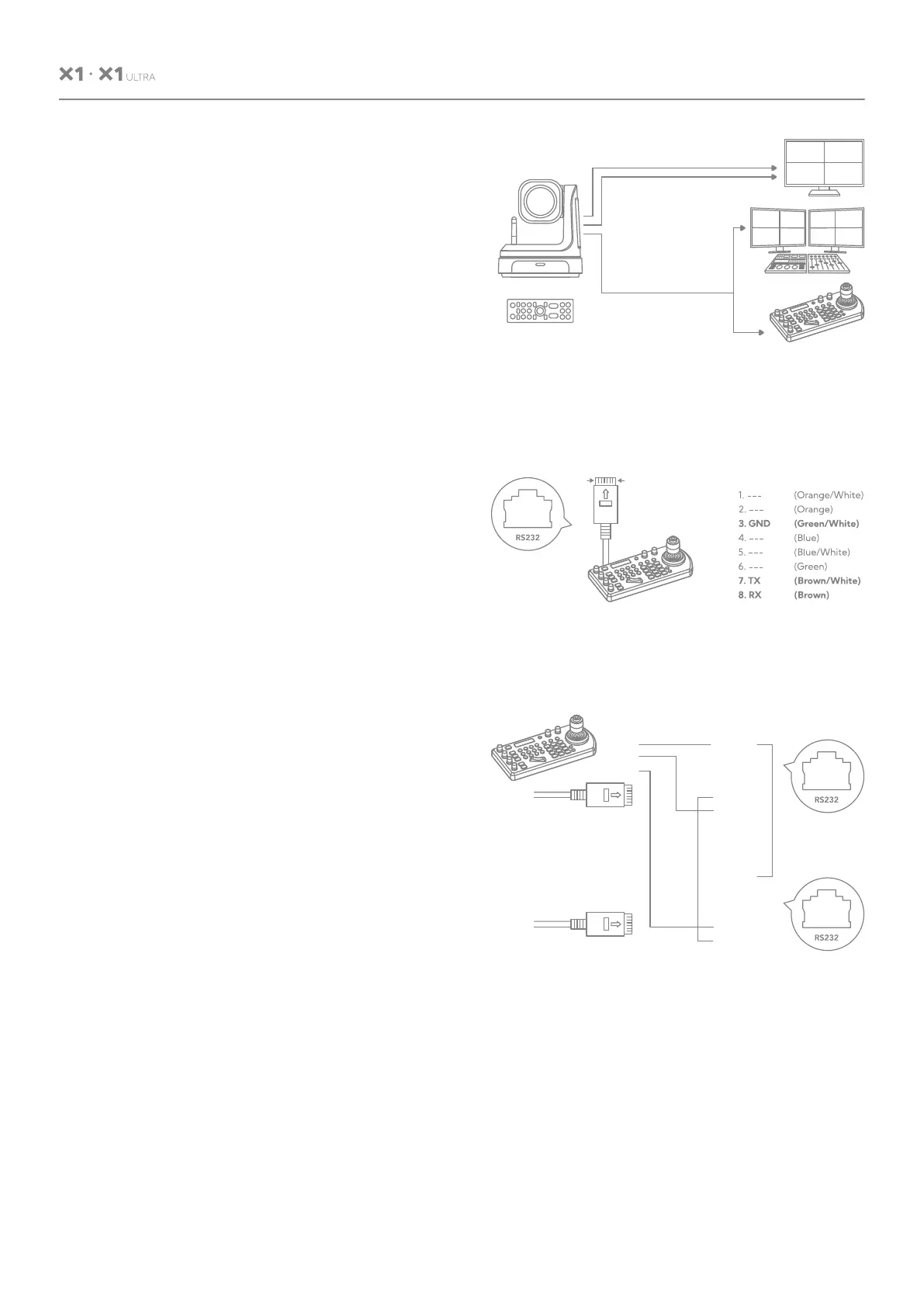
RS232 Connection:
• In order to use a RJ45 to RS232 (VISCA)
cable, the controller must be VISCA com-
patible.
• You can use CAT5/6 cable (T-568B stan-
dard pinout) to make an RS232 connection
by following the pin definition here on the
right side.
• You can use RS232 to daisy chain multiple
camera connection with a standard RS232
serial port controller as on the right side.
USER MANUAL
6.6 Using RS-232 (VISCA)
You can use the RS-232 port to connect to
optional controllers, such as a joystick control
keyboard, or control PC station, to operate the
camera, perform pan, tilt and zoom operations
and to use the Preset function using the
control buttons.
An application software that supports this unit
is needed if you use a PC station.
HDMI Video Signal
SDI Video Signal
Remote Control Signal
(RS422 (VISCA)
or RS485 (Pelco P/D))
IR Remote Controller
CAT5/6
Network Cable
1 8
1. ---
2. ---
3. GND
4. ---
5. ---
6. ---
7. TX
8. RX
1. ---
2. ---
3. GND
4. ---
5. ---
6. ---
7. TX
8. RX
RS232
GND
TX
RX
RS232 Serial port connection
on controller side.


 To Next Page