5
1
2
3
4
5
6
7
8
9
10 11
12
14
13
15
REMOTE CONTROL
4
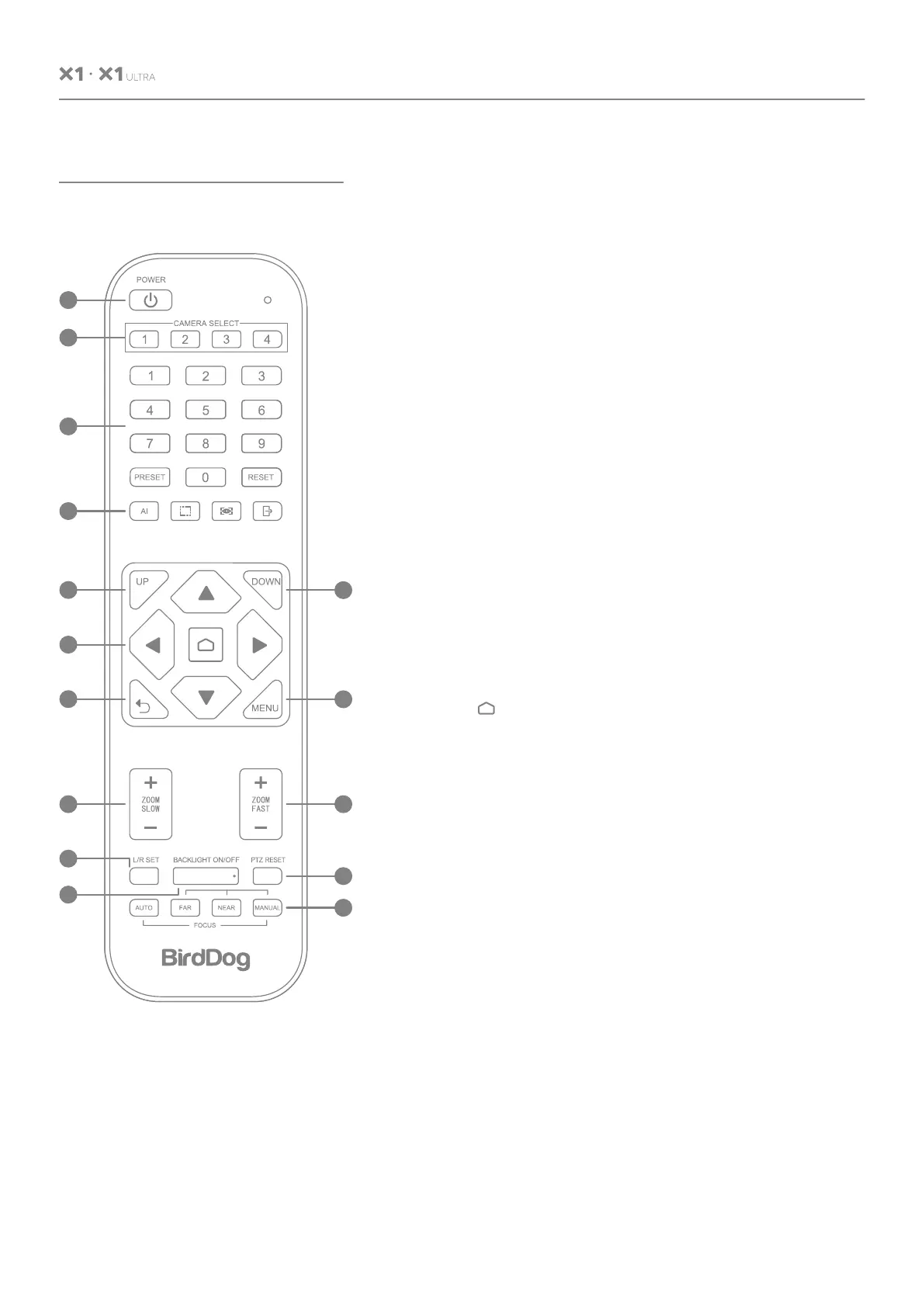
KEY DESCRIPTION
1. Standby/Power Key:
In standby, press to power on; After power on, press to
enter standby.
2. CAMERA SELECT Keys
Press to control the camera.
3. Position
Preset position setup keys, include PRESET and RESET.
Set the preset position.
Reset the preset position.
4. AI Tracking
Auto-framing, auto-traking, lock, exit.
5. UP
Filp image.
6. DOWN
Filp image.
7. PTZ Control Keys
PTZ move according to the arrow indicates.
Press to move PTZ back to the middle position.
8. Return/EXIT
Return to previous menu or exit menu.
9. MENU
Enter or exit OSD Menu.
10. ZOOM Slow Key
Zoom in or out slowly.
11. ZOOM Fast Key
Zoom in or out quickly.
12. L/R Set
Horizontal control flip, press and hold for 10 sec.
13. BACKLIGHT Key
Turn on/off backlight compensation.
14. PTZ Reset
Re-calibrate PTZ.
15. FOCUS Keys
Auto/Far/Near/Manual.
USER MANUAL


 To Next Page