7
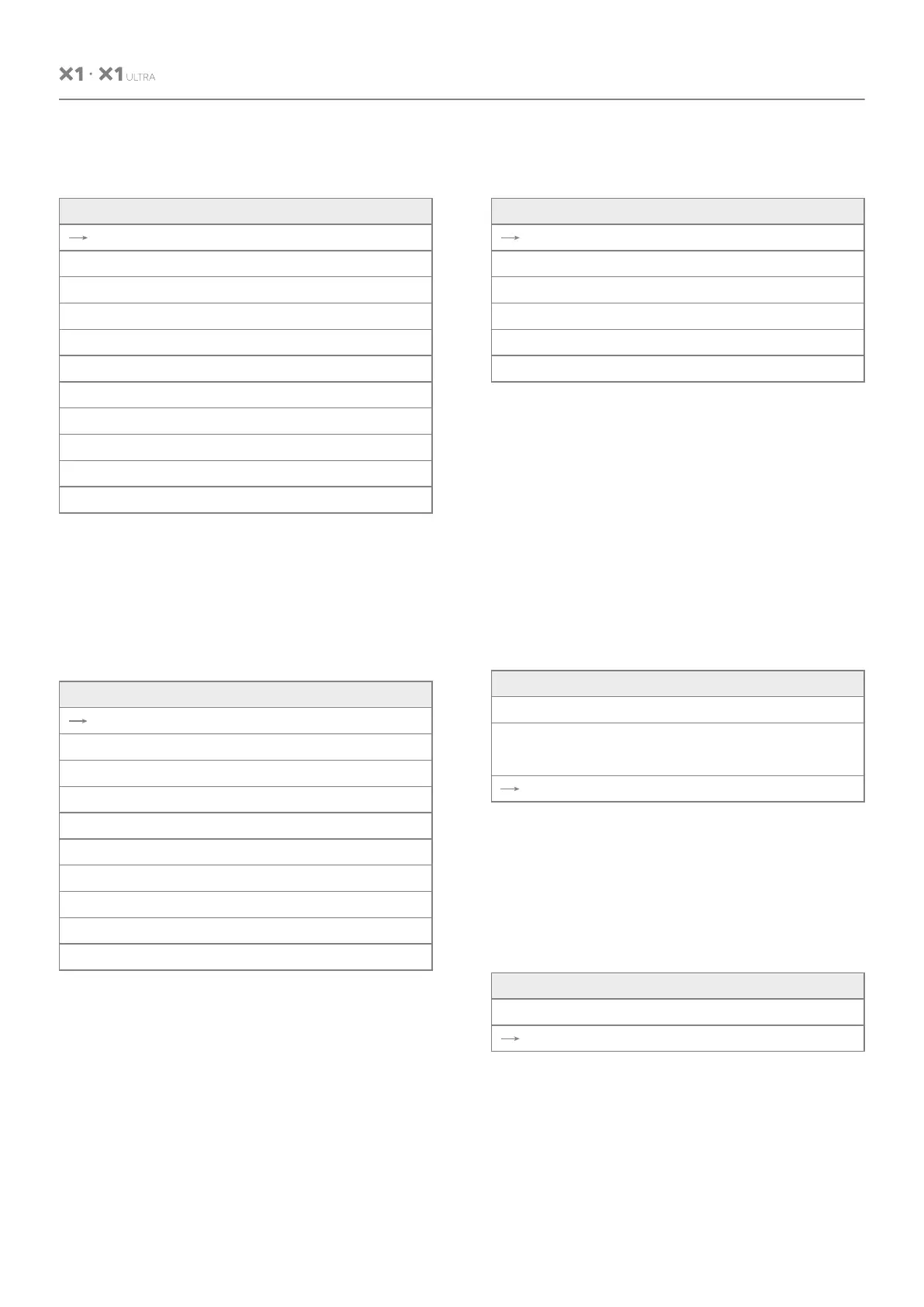
5.4 Level 2 Menu ImageWhen the WB mode is Manual, the sub menu
will be the following:
Flip: Enable/disable the picture up/down flip
Mirror: Enable/disable the picture left/right flip
Video Format: 1080P60/1080P50/1080P30/
1080P25/720P/60/720P/50
USB Mode: ISOC/BULK
USB mode: Adjust between Isochronous
transfers mode and Bulk transfers mode
Style Mode: Normal, PC, Bright
5.5 Level 2 Menu-Information
In manual WB mode, the followings value can
be adjusted. The Rgain and Bgain value can be
turned, the range is 0 to 99;
When the WB mode is VAR, the sub menu will
be the following:
The range for the color temp can be adjusted
between 2500K to 9000K.
Color
Brightness
Contrast
Hue
Saturation
Sharpness
WB Mode
Rtuning
Btuning
Rgain
Bgain
[Return]
50
50
50
50
50
Manual
50
50
50
50
Color
Brightness
Contrast
Hue
Saturation
Sharpness
WB Mode
Color Temp
Rtuning
Btuning
[Return]
50
50
50
50
50
VAR
2500K~9000K
50
50
Image
Flip
Mirror
Video Format
USB Mode
Style
[Return]
Off/On
Off/On
1090P60
ISOC/BULK
Normal/PC/Bright
Information
Model
Version
[Return]
X1 / X1 ULTRA
1.1.1.1
2024-01-01
Model: X1 / X1 ULTRA
Version: 1.1.1.1
Date: 2024-01-01
Notice: The version number here is just an
example, the actual parameters shall prevail.
Restore Default
Restore?
[Return]
No/Yes
USER MANUAL


 To Next Page