7
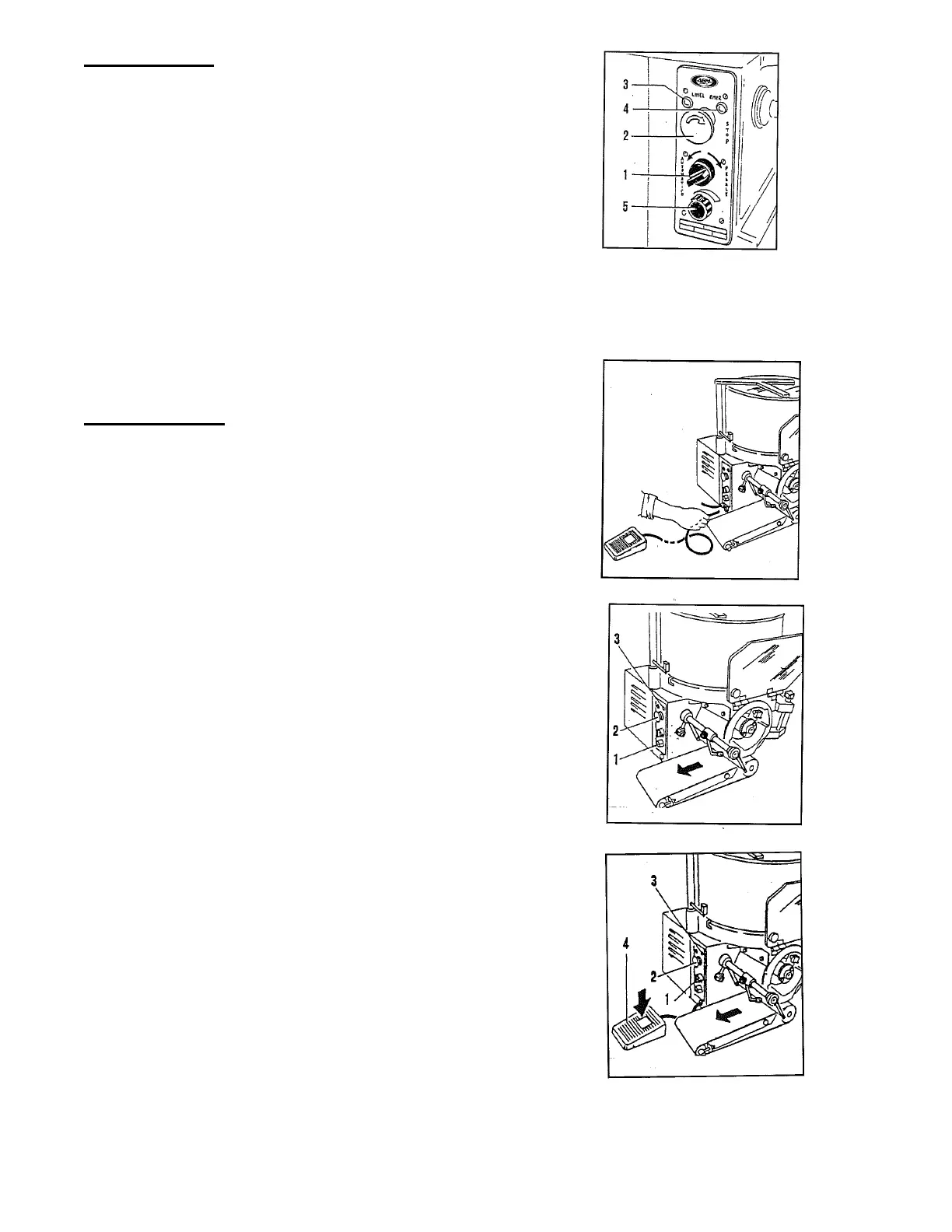
Control Panel
• Starting switch (automatic/manual) (1)
• Red stop button (2)
• Machine operating signal lamp (3)
• Machine stop signal lamp (4)
• Handle for speed regulation (5)
(only for model at variable speed)
Note – in the Model F4000 the regulation of the speed and the quantity of hamburgers
is made by rotating the regulating handle with a quantity of products variable from… to a
maximum of 4000 pieces per hour.
Operating Test
• Before controlling the operation, if you
have not already done, you must assemble
the hopper, assemble the conveyor belt,
close the cover and the front protection.
• Connect the footswitch, inserting the control
pipe into the bush on the control panel side.
• Connect the plug to the socket.
• Position the switch handle (1) on automatic.
• Verify the rotation of the drum and the
conveyor belt (see the arrow).
• Verify the lighting of the light.
• Push the stop button (2), the machine must
stop and the light (3) must light up.
• Position the switch handle (1) on manual.
• Press the footswitch.
• Verify the rotation of the drum and the
conveyor belt (see the arrow).
• Verify the lighting of the light.
• Push the stop button (2). The machine must stop
and the light (3) must light up.


 To Next Page