9
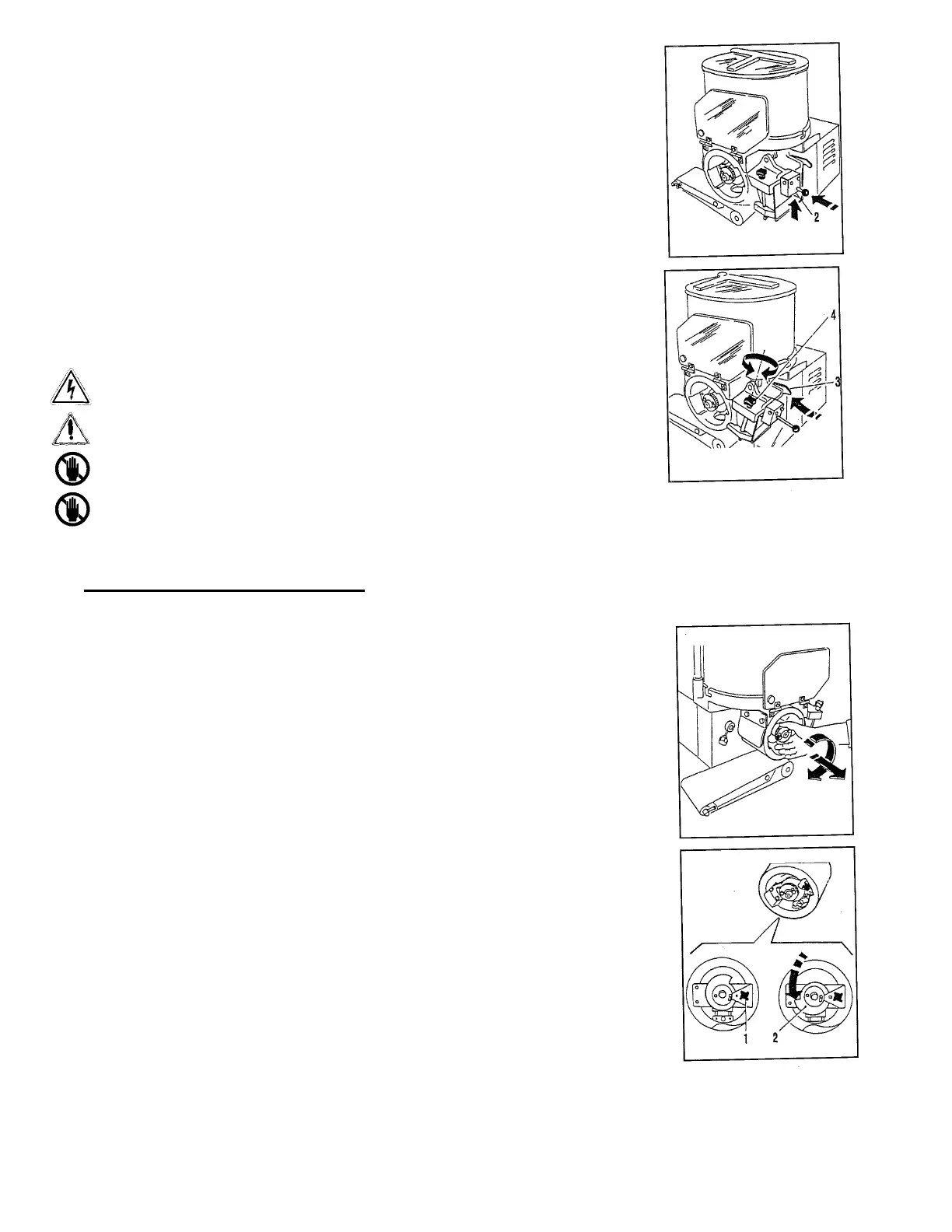
• Reassemble the papering attachment in the guide pins,
until the stop click.
• Release the spring using the button placed under
the papering attachment (2).
• Position the papering attachment, freeing the
locking lever (2).
• Regulate the center of the paper, turning the
centering knob (4).
Before cleaning the machine, always make sure that the machine
Is stopped and disconnected from main supply.
Never use high pressure sprays during cleaning.
Never use solvents, thinners, alcohol, etc. during cleaning.
Only use lukewarm water and some neutral detergent.
Product Thickness Regulation
The machine is regulated in the factory with a medium thickness; to obtain another
thickness, follow the instructions indicated below:
• Take out the regulation drum by operating on the
ring nut clockwise and taking out the drum.
• Loosen the stop knob of the gauging device (I).
• Turn the gauging device, to regulate the thickness (2).
• Lock the stop knob (1).
• Reassemble the drum, inserting it in the guide shaft,
until the stop click.


 To Next Page