Using the device
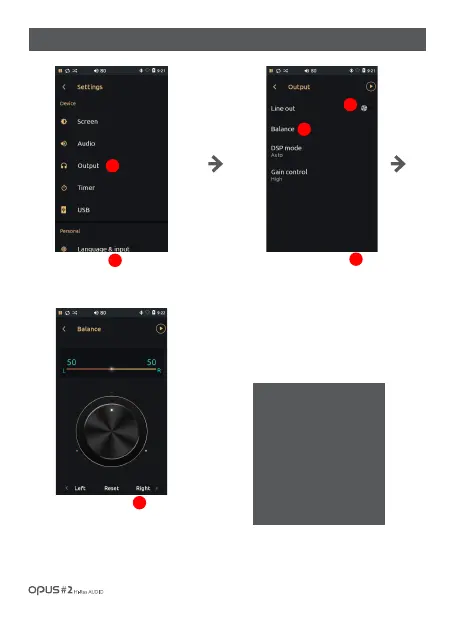
Press ‘Line out’ button to
switch it on or off.
If Line out is on, the volume
level is maximal and can not
be adjusted.
Press Balance menu to enter
a menu where you can adjust
balance between left and right.
Use slide bar to adjust Left, Right
volume. (Jog shuttle in the center may
also be used for volume adjustment.)
Press ‘Output’ in Device in
settings menu to enter Output
settings screen.
1
3
2
Attention!
When Line out function is on,
the volume level is set on
maximum that requires you
to keep earphones/head
phones farfrom ears. If there
is a connection to an audio
device, set the volume at its
minimum and then activate
Line out function.
/ 31
| ‘Output’ settings screen (1)
1
2
3



 To Next Page