G1 SCBA Radio Pairing Guide | BK Technologies
Rev. 12-3-2021
Page 6 of 10
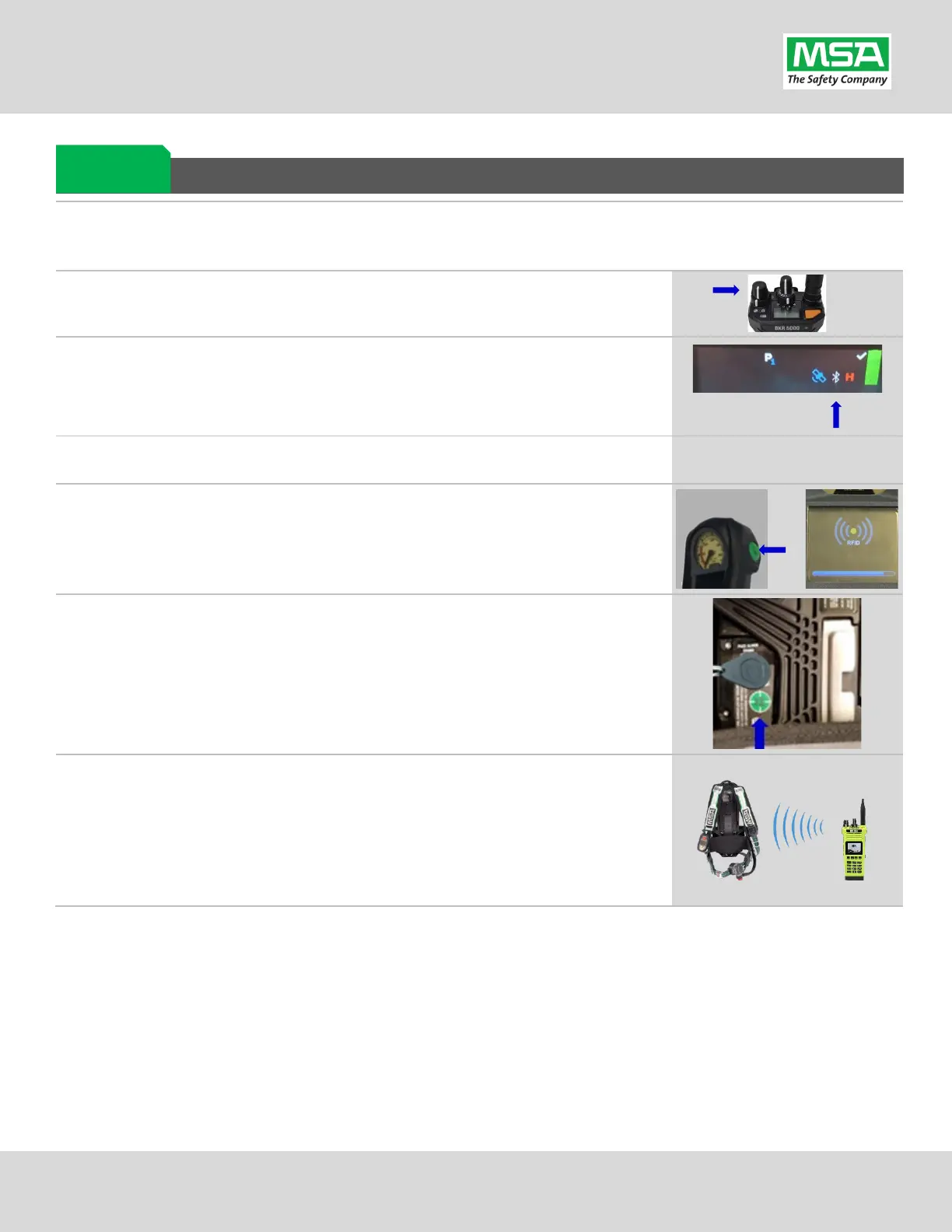
Pairing a G1 SCBA and BKR 5000 Radio
Ensure the BKR 5000 Radio is programmed correctly to connect with the G1 SCBA. Necessary and recommended settings
are listed in the “BKR 5000 Configuration Settings” page. Consult with your Radio Technician.
BKR 5000 Radio using the volume knob.
Bluetooth is “ON” : A white Bluetooth icon will appear with no slash
“/” and no connection dots “…”.
visible, enable the radio’s Bluetooth OR reconfigure radio.
either of the green Control Module buttons to activate the RFID
For iTic Control modules: Press & Hold Both Green Buttons.
r the Radio to the SCBA: Place the Radio Pairing Tag over the G1
RFID Target.
After the pairing tag is successfully read
, the SCBA should chirp, and the BT
BKR 5000 Radio is now paired and ready for use.
After a successful pairing, if the regulator is shut off, the G1 SCBA will not remain
connected to the radio, and the radio is available for non-Bluetooth use.
The G1 SCBA will automatically re-connect to the radio when the end user turns on
the G1 regulator & breathes.
If you encouter difficulty pairing the radio:
• Clear the pair information stored on the radio, as described in the “Clearing SCBA Pairing Info from the BKR 5000
Radio” section in the pages hereafter.
• For good measure clear the pairing information on the SCBA, as described in the “Clearing Radio Pair Info from
the G1 SCBA” section in the pages hereafter.
• Repeat the “Pairing a G1 SCBA and BKR 5000 Radio” procedure above.
Pairing G1 &
Radio


 To Next Page