6
1. 8 7 7. 8 7 7. 2 2 69 BLACKBOX.COM
NEED HELP?
LE AVE THE TECH TO US
LIVE 24/7
TECHNICAL
SUPPORT
1.8 7 7.87 7. 226 9
CHAPTER 2: OVERVIEW
2.3 WHAT’S INCLUDED
Before you install this switch, verify that your package contains the following items:
(1) 4K60 HDMI Dual-Head KVM Switch - 4-Port
(1) 5-VDC, 4-A power adapter
If anything is missing or damaged, contact Black Box Technical Support at 877-877-2269 or info@blackbox.com.
2.4 HARDWARE DESCRIPTION
2.4.1 FRONT PANEL
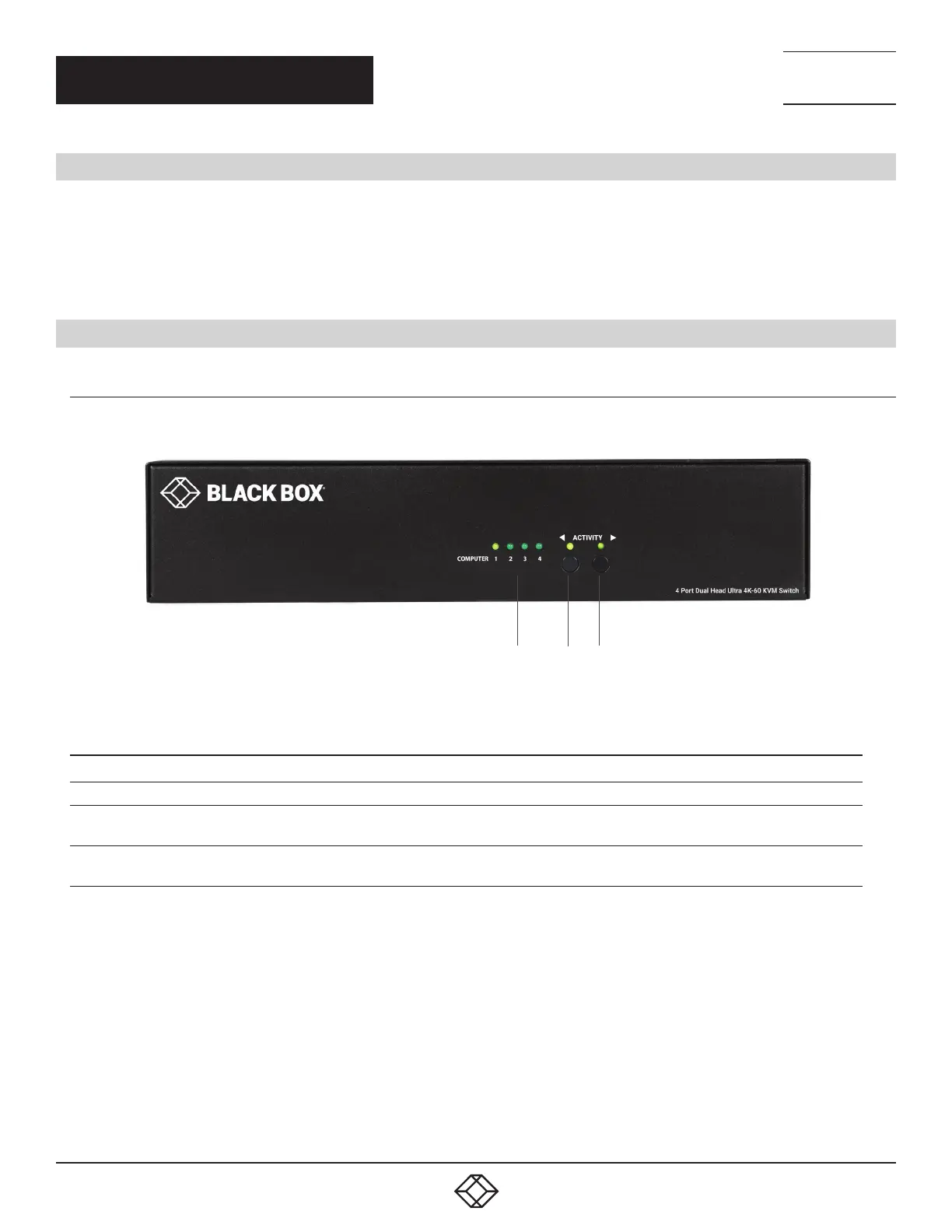
Figure 2-1 shows the front panel of the HD6224A. Table 2-1 describes its components.
1 2 3
FIGURE 2-1. FRONT PANEL OF THE HD6224A
TABLE 2-1. HD6224A FRONT-PANEL COMPONENTS
NUMBER IN FIGURE 2-1 COMPONENT DESCRIPTION
1 (4) Computer LEDs Computer 1, 2, 3, 4
2 (1) Activity button and LED
Press the button to navigate between connected computers.
LED lights when button is active
3 (1) Activity button and LED
Press the button to navigate between connected computers.
LED lights when button is active











 To Next Page