W ALL MOUNT INSTALLATION
1-7
403-002-018 Rev A
WALL MOUNT INSTALLATION
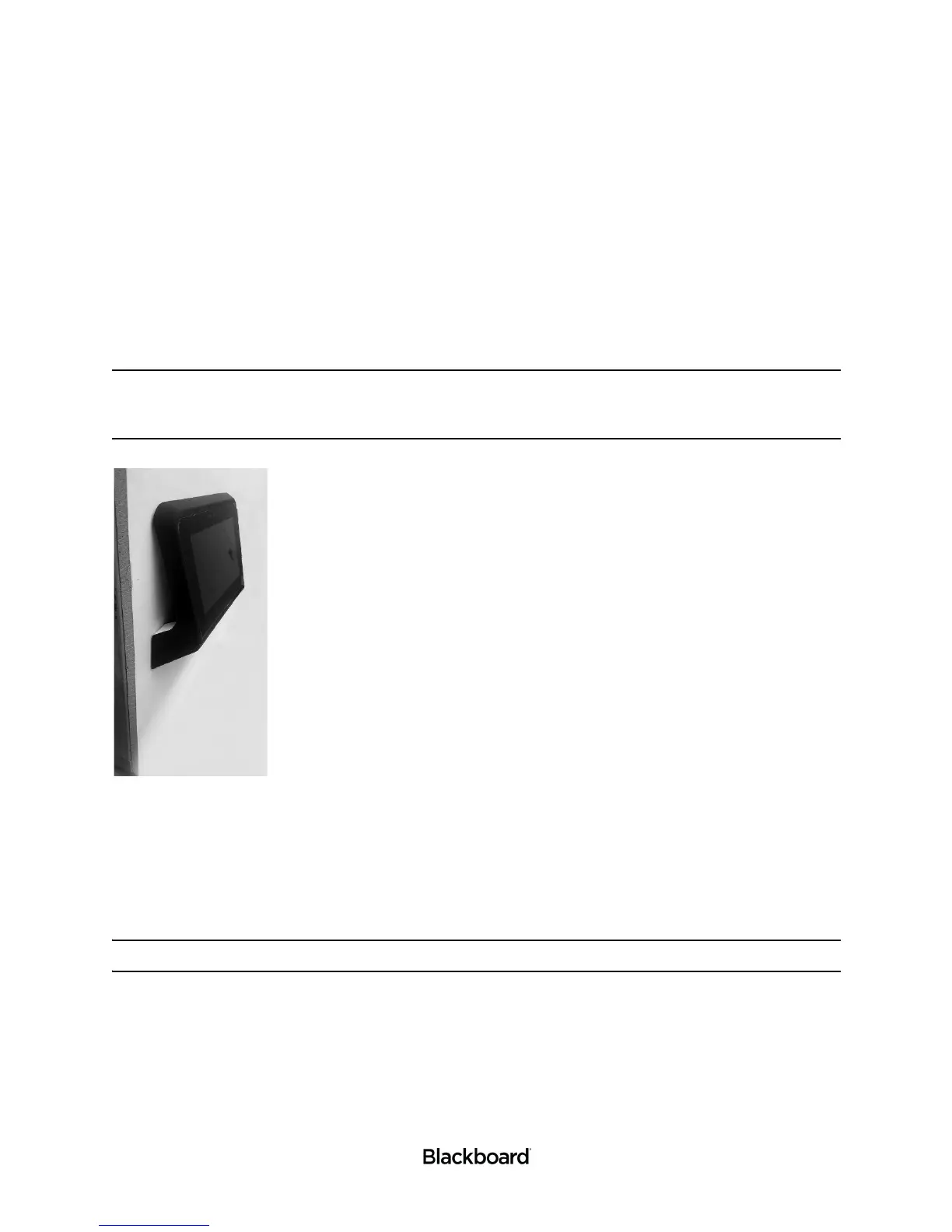
The PR5000 Reader ships with a mount kit. The kit is optional, but simplifies wall installation. Follow the
instructions in this section to properly mount your PR5000 Reader to a wall. Please review the wall mount
installation considerations before continuing. The Mount Kit is compatible with Video Electronics Standards
Association (VESA) 75 mounts (not included).
Note: The PR5000 includes a feature that allows you to rotate the screen 180 degrees. This is
helpful when mounting the reader to a wall. See: the Point of Sale (PR5000) Reader
Configuration Guide for instructions on how to enable and disable this feature.
Figure 1-6 Wall Mount Installation
Wall mount installation considerations:
• Wiring and Power Considerations reviewed.
• An electrical gang box to provide power and a route for communication cables.
The reader will be attached to this gang box.
Note: The electrical gang box and wiring should be installed by a trained technician.
• The location and the height of the reader should be selected to permit easy access.
• Ensure that Americans with Disabilities Act (ADA) requirements are met.
• In warm climates, the reader should be shaded from direct sunlight.
• The maximum external temperature of the reader must not exceed 104°F (40°C) to ensure that the internal temperature
limit is not exceeded.
• Ensure there is enough clearance for the operator to access the screen and swipe cards.


 To Next Page