Understanding the Control Panel
27
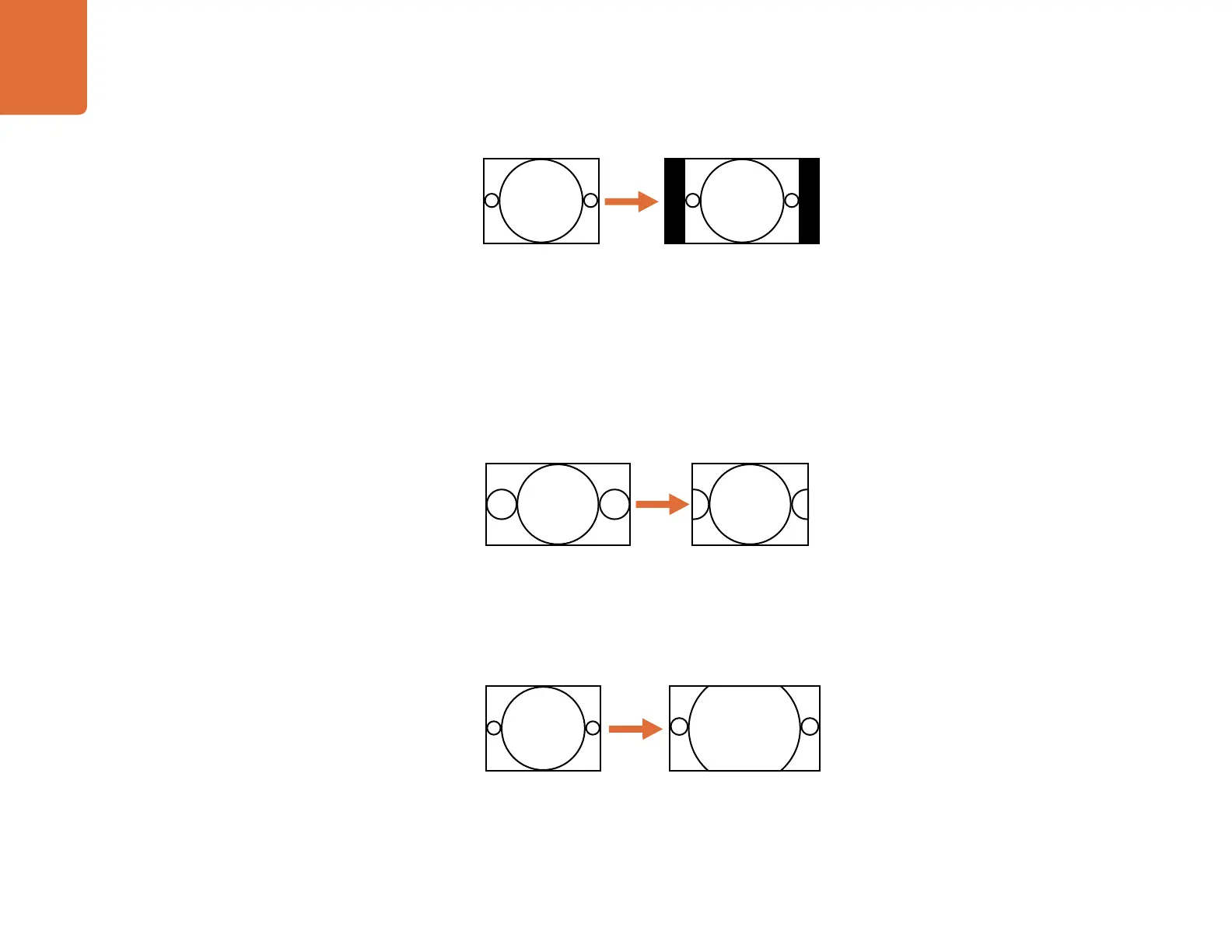
This aspect ratio yields an image with no loss of picture information, but the disadvantage is that it does not
fill the entire output display.
CCUT/ZOOM - Center Cut / Zoom
If the aspect ratio of the input video is 16:9 and is to be converted to a 4:3 display, as in a down conversion,
the original image will be cropped on the left and right sides, which is often called a “Center Cut,” so that
the center of the original image will fill the output display. This setting maintains correct geometry, but
results in a loss of picture on each side.
If the aspect ratio of the input video is 4:3 and it is to be converted to a 16:9 display, as in an up conversion,
the original 4:3 image will be cropped on the top and bottom, which is often called a “Zoom”, so that the
image will fill the output display. This setting maintains correct geometry, but results in a loss of picture on
the top and bottom.
This aspect ratio fills the entire output image while maintaining correct geometry, but results in a loss of
picture information.
16:9 Ratio Display4:3 Ratio Image
16:9 Ratio Image
4:3 Ratio Display
4:3 Ratio Image
16:9 Ratio Display


 To Next Page