Understanding the Control Panel
28
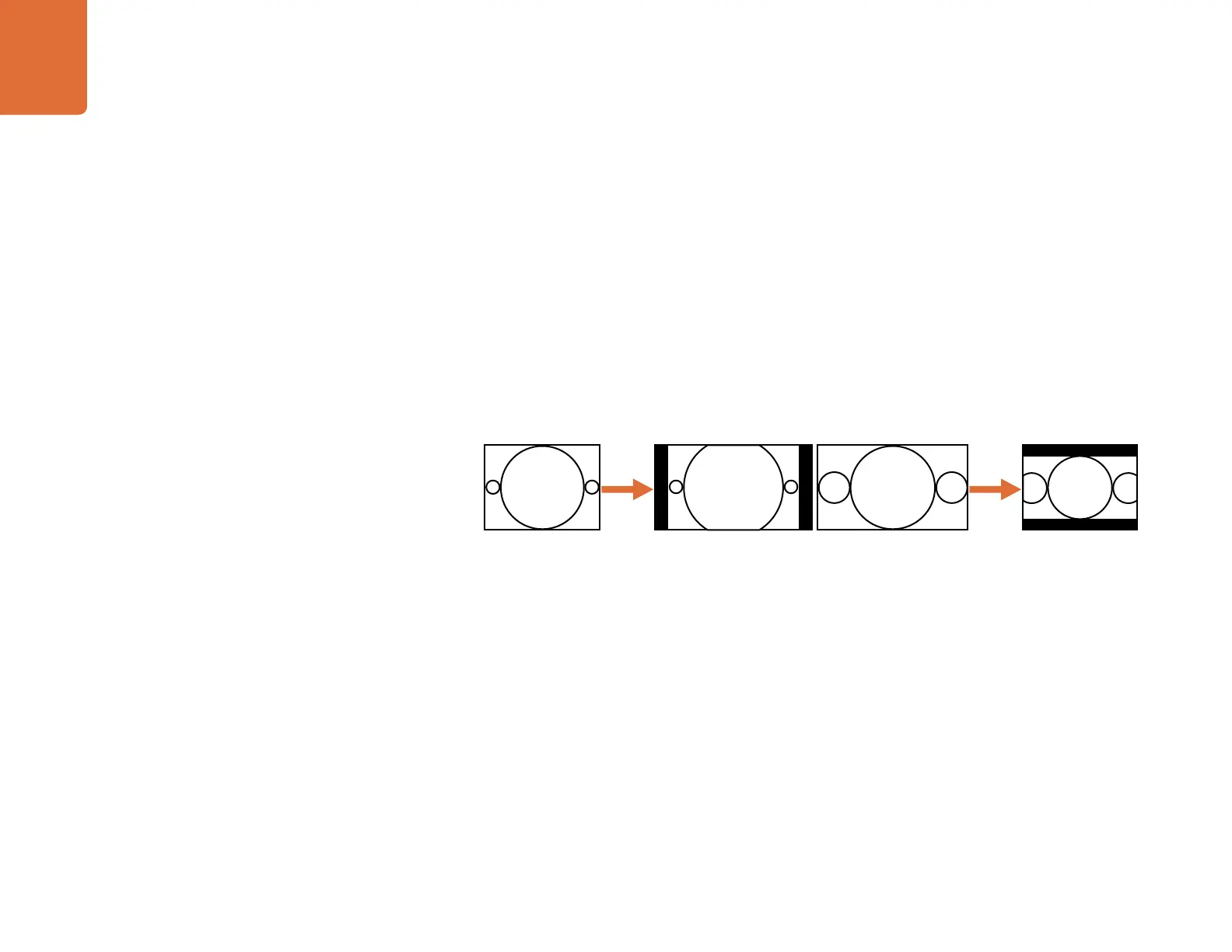
14:9
The fixed 14:9 mode is often used as a compromise between Center Cut and Letterbox in down conversions
and between Zoom and Pillarbox in up conversions. The 14:9 mode scales the input image to occupy a 14:9
ratio area of the output display.
If a 4:3 input aspect ratio is to be up converted to a 16:9 display, the input image will be zoomed to fill only
a 14:9 aspect ratio of the 16:9 output image, leaving a display with small bars on the left and right sides
(pillarboxed). A small amount of picture information will be lost from the top and bottom of the input image.
If a 16:9 input aspect ratio is to be down converted to a 4:3 ratio display, the input image will be zoomed to fill
a 14:9 aspect ratio of the 4:3 output image, leaving a display with bars at the top and bottom (letterboxed).
A small amount of picture information will be lost from the left and right of the input image.
This aspect ratio maintains correct geometry and results in a minor loss of picture information in both up
and down conversions.
Downconversion
4:3 Ratio Image
Upconversion
16:9 Ratio Image
4:3 Ratio Display
16:9 Ratio Display


 To Next Page