Page 19
POWER BUTTON
• Press to Turn Air Conditioner ON or OFF.
•
Will show on the remote LED screen when buttons are pressed to show that
the remote control is sending a signal to the air conditioner.
MODE BUTTON
• Press the button to scroll through COOL , DEHUMIDIFY , FAN ,
HEAT
(Heat model BPT08HWTB only) .
• The corresponding symbol will illuminate on the LED display to indicate which
mode is selected.
COOL
• Select the target temperature 64˚F-90˚F (18˚C-32˚C) by pressing the or
buttons until the desired temperature is displayed on the LED screen.
• Press the Fan Speed Button
to select Low, Medium, High or Auto Speed.
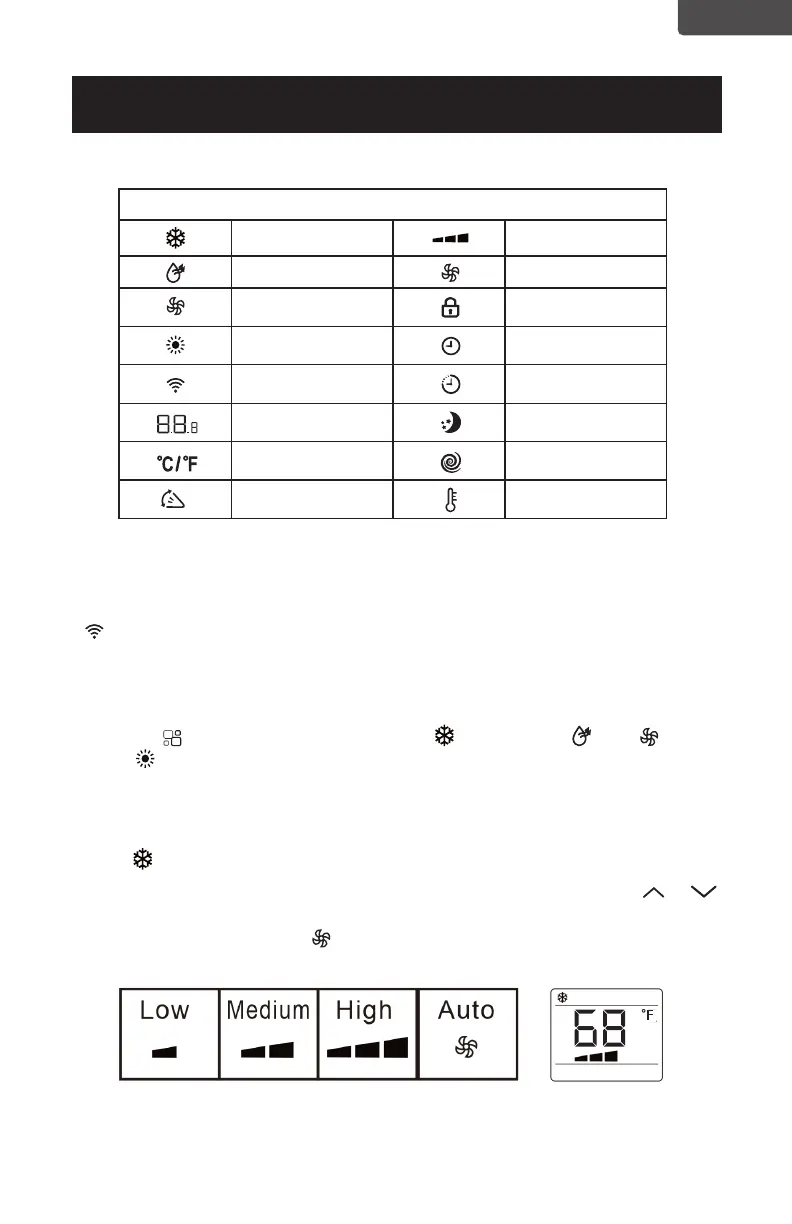
SET UP & USE
LED Display Indicators
Cooling mode Fan speed
Dehumidify mode Auto speed
Fan mode Child lock
Heat mode
(
Heat
model BPT08HWTB only)
Timer on
Signal Timer off
Display tempera-
ture or hours
Sleep
Fahrenheit or
Celsius
Turbo
Swing Follow me
ENGLISH



 To Next Page