9
ENGLISH
(Original instructions)
$
Thechargerisintendedfor
indooruseonly.
Readtheinstructionmanual
beforeuse.
Electrical safety
#
Yourchargerisdoubleinsu-
lated;thereforenoearthwireis
required.Alwayscheckthatthe
mainsvoltagecorrespondstothe
voltageontheratingplate.Never
attempttoreplacethecharger
unitwitharegularmainsplug.
u Ifthesupplycordisdamaged,itmust
bereplacedbythemanufactureroran
authorisedBLACK+DECKERService
Centreinordertoavoidahazard.
Labels on appliance
Thefollowingwarningsymbolsarefoundontheappliance
alongwiththedatecode:
Readthemanualpriortooperation.
Wearsafetyglassesorgoggleswhenoperating
thisappliance.
N
Wearsuitableearprotectorswhenoperatingthis
appliance.
Alwaysremovethebatteryfromtheappliance
beforeperforminganycleaningormaintenance.
K
Bewareofyingobjects.Keepbystandersaway
fromthecuttingarea.
R
Donotexposetheappliancetorainorhigh
humidity.
96
Directive2000/14/ECguaranteedsoundpower.
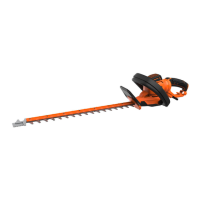
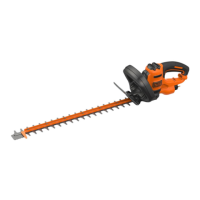
Features
Thisapplianceincludessomeorallofthefollowingfeatures.
1. Trigger
2. Lockoffbutton
3. Handle
4. Speedcontrolswitch
5. Auxiliaryhandle
6. Heightadjustcollar
7. Fliptoedgecollar
8. Trimmerhead
9. Edgewheel
10. Guard
11.Spoolhousing
12. Battery
Charging the battery (Fig. A)
Thebatteryneedstobechargedbeforerstuseand
wheneveritfailstoproducesufcientpoweronjobsthatwere
easilydonebefore.
Thebatterymaybecomewarmwhilecharging;thisisnormal
anddoesnotindicateaproblem.
Warning!Donotchargethebatteryatambienttemperatures
below10°Corabove40°C.Recommendedchargingtem-
perature:approx.24°C.
Note: Thechargerwillnotchargeabatteryifthecelltempera-
tureisbelowapproximately10°Corabove40°C.
Thebatteryshouldbeleftinthechargerandthecharger
willbegintochargeautomaticallywhenthecelltemperature
warmsuporcoolsdown.
u Plugthechargerintoanappropriateoutletbeforeinserting
thebatterypack.
u Insertthebatterypackintothecharger.
ThegreenLEDwillashindicatingthatthebatteryisbeing
charged.
ThecompletionofchargeisindicatedbythegreenLED
remainingoncontinuously.Thepackisfullychargedand
maybeusedatthistimeorleftinthecharger
Warning! Rechargedischargedbatteriesassoonaspos-
sibleafteruseorbatterylifemaybegreatlydiminished.
Charger diagnostics
Thischargerisdesignedtodetectcertainproblemsthatcan
arisewiththebatterypacksorthepowersource.Problems
areindicatedbyoneLEDashingindifferentpatterns.










 To Next Page