EasyManua.ls Logo

Blackweb BWA18AA008 - User Manual

Blackweb BWA18AA008
2 pages
Print Icon
To Next Page IconTo Next Page
Loading...
BWA18AA008
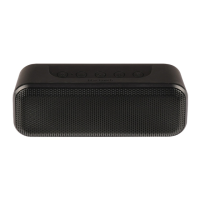
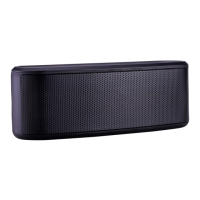
PREMIUM BLUETOOTH® SPEAKER
POWER:
Press and hold the Power button for 2 seconds to turn device ON/OFF.
VOLUME UP “ + ”:
Short press (< 0.5s) the button to turn up volume. Press and hold the button (2s) to go to
the next track.
VOLUME DOWN –”:
Short press (< 0.5s) the button to turn down volume. Press and hold (2s) the button to go
to the previous track.
INDICATOR LIGHT STATUS:
Power ON When the speaker is turned on, a solid blue light will appear momentarily.
Bluetooth pairing indicator When the speaker is turned on, a ashing blue and
red light indicates speaker is ready to pair. Once paired, the light will turn solid blue, then
turn o.
Power OFFWhen the speaker is turned o, the indicator light will momentarily turn
solid blue, then turn o.
Battery charging – While speaker is charging, the indicator light will turn solid red.
Once speaker is fully charged, it will turn o.
SPEAKER PAIRING:
To pair the speaker, follow these simple steps:
1. Make sure the smartphone, tablet, or computer you’re using with the speaker has
Bluetooth.
2. Turn on the speaker (press and hold the Power button for 2 seconds) and look for the
little blinking light.
3. Look for Blackweb SPRK A008 in your devices Bluetooth list, or click YES.
The device and Bluetooth will nd each other every time, so long as the speaker is set to
Bluetooth and your device’s Bluetooth is on. If you’re connecting to a computer, you may
have some extra steps on that end. You’ll have to get that information from the computer
company.
Auto o: If the speaker is on but is not connected to Bluetooth, it will shutdown after 2
minutes. Once paired, if the speaker is paused for 15 minutes or more it will automatically
shutdown.
DISCONNECTING DEVICE:
Long press the BLUETOOTH button up to 2 seconds to disconnect the speaker from the
device and enter into Pairing mode.
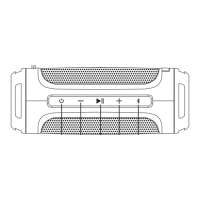
SPEAKER CONTROLS & FEATURES
Bluetooth Pairing Button
Power ON/OFF Button
Volume Up “+” / Next Track Button
Volume Down “-” / Previous Track Button
Play/Pause Button
USB Charging Port
(2000mA)
Line In
CALL HANDLING:
INCOMING CALL:
Answering and hanging up a call
When speaker is paired to your phone, short
press the PLAY/PAUSE button to answer the call. To hang up, short press the PLAY/PAUSE button.
Move call from speaker to device – If you are on the call and wish to move the call
from the speaker to your device, long press the PLAY/PAUSE button.
Reject an incoming callTo reject an incoming call, long press the PLAY/PAUSE
button for 3 seconds.
,,),36>;()3,-69*3(90*(;065Ì
Situation
Short Press
PLAY/PAUSE Button
Long Press
PLAY/PAUSE Button
First incoming call Pick up call Reject call
On call End call Move call from speaker to device
PAIR 2 FOR PARTY MODE:
1. Turn on both speakers. Press and hold the “+” and “-” buttons on each speaker until the
lights blink red and blue. This may take up to 2 seconds. You will hear a voice prompt
indicating the speakers have entered into Search mode.
2. It will take up to 15 seconds for the speakers to nd each other. Once paired, the light
will turn solid blue, and a tone with voice prompt will indicate “Speakers paired. It will
be followed by “Left Channel” and “Right Channel” voice prompts.
3. To unpair 2 speakers, press and hold the “+” and “-” buttons for up to 2 seconds.
AUX-IN MODE:
1.
Plug one end of the cord into the speaker and the other into the headphone jack on your device.
2. Turn on the speaker
3. Hit PLAY on your device.
4. You’ll have to play and pause the music from your device, not the speaker.
(Note: If you are in Party mode and you use the auxiliary cable, the music will only play from
the device it is hooked up to.)
USB CABLE:
25 cm Micro USB cable.

Question and Answer IconNeed help?

Do you have a question about the Blackweb BWA18AA008 and is the answer not in the manual?

Summary

Speaker Controls and Features

Power and Indicator Lights

Learn how to turn the speaker on/off, manage power states, and understand indicator lights.

Volume and Track Navigation

Adjust volume levels and navigate tracks using the speaker buttons.

Bluetooth Pairing and Connection

Step-by-step guide to pair the speaker with your devices via Bluetooth.

Call Handling Functions

Managing Incoming Calls

Instructions for answering, ending, rejecting, or transferring calls.

Advanced Connectivity Modes

Dual Speaker Party Mode

How to pair two speakers together for an enhanced audio experience.

Auxiliary Input Usage

Guide for connecting the speaker using a wired auxiliary cable.

Included USB Cable

Details on the provided Micro USB charging cable.

Important Safety and Usage Information

Splash Proof and Cleaning

Information on the speaker's IPX4 rating and recommended cleaning methods.

FCC Compliance Statement

Details regarding compliance with FCC Rules for radio frequency energy.

General Safety Precautions

Essential safety guidelines to follow when using the electrical product.

Environmental and Battery Disposal

Information on the product's battery and proper disposal methods.

Overview

This document describes the Blackweb Premium Bluetooth® Speaker, model BWA18AA008, a splash-proof (IPX4 rated) portable audio device designed for wireless music playback and call handling.

Function Description:

The Blackweb speaker allows users to stream audio wirelessly via Bluetooth from smartphones, tablets, or computers. It features controls for power, volume, track navigation, play/pause, and Bluetooth pairing. It also supports hands-free call handling, including answering, hanging up, moving calls between the speaker and device, and rejecting incoming calls. An AUX-in mode is available for wired connections, and a Party Mode allows two Blackweb speakers to be paired for a stereo audio experience.

Important Technical Specifications:

  • Model: BWA18AA008
  • Connectivity: Bluetooth, AUX-in (3.5mm jack)
  • Charging: USB (2000mA charging port)
  • USB Cable: 25 cm Micro USB cable
  • Splash Proof Rating: IPX4 (protected against splashing water from any direction)
  • Battery: Internal, non-replaceable lithium battery (disposal according to local guidelines)
  • Auto-off: Shuts down after 2 minutes if not connected via Bluetooth; shuts down after 15 minutes or more if paused while paired.

Usage Features:

Controls:

  • Power ON/OFF: Press and hold the Power button for 2 seconds.
  • Play/Pause: Short press the Play/Pause button.
  • Volume Up (+): Short press for volume up; press and hold (2s) for next track.
  • Volume Down (-): Short press for volume down; press and hold (2s) for previous track.
  • Bluetooth Pairing: Long press the Bluetooth button for up to 2 seconds to disconnect and enter pairing mode.

Indicator Light Status:

  • Power ON: Solid blue light momentarily.
  • Bluetooth Pairing: Flashing blue and red light (ready to pair); solid blue then off (paired).
  • Power OFF: Solid blue light momentarily.
  • Battery Charging: Solid red light (charging); off (fully charged).

Speaker Pairing (Bluetooth):

  1. Ensure the source device (smartphone, tablet, computer) has Bluetooth enabled.
  2. Turn on the speaker (press and hold Power button for 2 seconds); observe the blinking light.
  3. Search for "Blackweb SPRK A008" in the device's Bluetooth list and select it.
  4. The speaker and device will automatically connect in the future if both are in Bluetooth mode.

Call Handling:

  • Answer/Hang Up: Short press Play/Pause button.
  • Move Call (speaker to device): Long press Play/Pause button.
  • Reject Incoming Call: Long press Play/Pause button for 3 seconds.

Party Mode (Pairing 2 Speakers):

  1. Turn on both speakers.
  2. Press and hold the "+" and "-" buttons on each speaker until lights blink red and blue (up to 2 seconds). A voice prompt will indicate "Search mode."
  3. Speakers will find each other within 15 seconds. Once paired, the light will turn solid blue, and a tone with voice prompts will announce "Speakers paired," followed by "Left Channel" and "Right Channel."
  4. To unpair, press and hold the "+" and "-" buttons for up to 2 seconds.

AUX-in Mode:

  1. Plug one end of the 3.5mm cord into the speaker and the other into the headphone jack of the device.
  2. Turn on the speaker.
  3. Initiate playback on the device.
  4. Music playback (play/pause) must be controlled from the connected device. Note: In Party mode, AUX-in music will only play from the device it is connected to.

Maintenance Features:

  • Cleaning: Use a soft, dry towel. Avoid water, harsh cleaners, or anything that could harm internal mechanics. Ensure the charging and AUX flap are flush with the speaker for protection.
  • Battery: The product contains an internal, non-replaceable lithium battery. Dispose of it according to local, state, province, and country guidelines.
  • Safety: Do not place or store the product where it can fall into water or other liquids. Keep away from heated surfaces. Only place on dry surfaces, not wet surfaces or those with cleaning solvents.
  • FCC Compliance: This device complies with Part 15 of the FCC Rules. Any changes or modifications not expressly approved by the responsible party could void the user's authority to operate the equipment.
  • California Residents Warning: This product contains chemicals known to the State of California to cause cancer, birth defects, and other reproductive harm.

Blackweb BWA18AA008 Specifications

General IconGeneral
BrandBlackweb
ModelBWA18AA008
CategorySpeakers
LanguageEnglish

Related product manuals