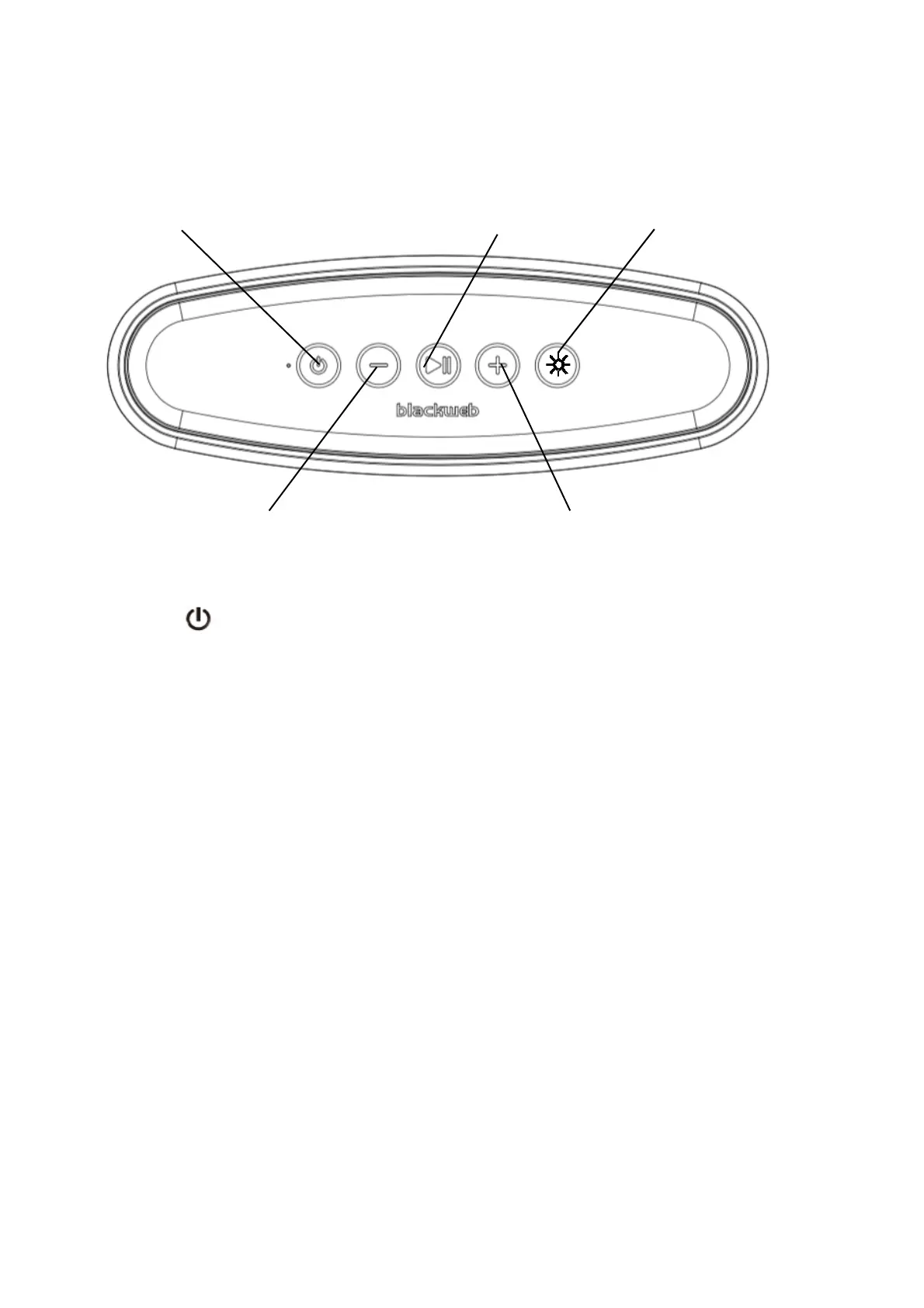
Power
Volume Down/Previous Track
POWER:
Press and hold the. Power button for 2 seconds
VOLUME +:
Short press (< 0.5s) the Volume Up + button to tur
to the next track.
VOLUME - :
Short press (< 0.5s) the Volume Down – buttons to
button to go to previous track.
INDICATOR LIGHT STATUS:
Power on
When the speaker is turned on, a solid
Bluetooth pairing indicator – When the speaker is t
the speaker is ready to pair. Once paired, the light
Power Off - when the speaker is turned off, the ind
turn off.
Battery charging – when speaker is charging, the in
fully charged, the light will turn off.
lay/Pause LED Program selector
olume Up/Next Track
o turn device on or off.
up volume. Press and hold the + button (3s) to go
turn down volume. Press and hold (3s) the –
blue light will appear momentarily.
urned on, a flashing blue and red light indicates
ill turn solid blue, then turn off.
icator light will momentarily turn solid blue, then
dicator light will turn solid red. Once the speaker is












 To Next Page