2
1
Settings
CHOOSE A NETWORK…
Connection
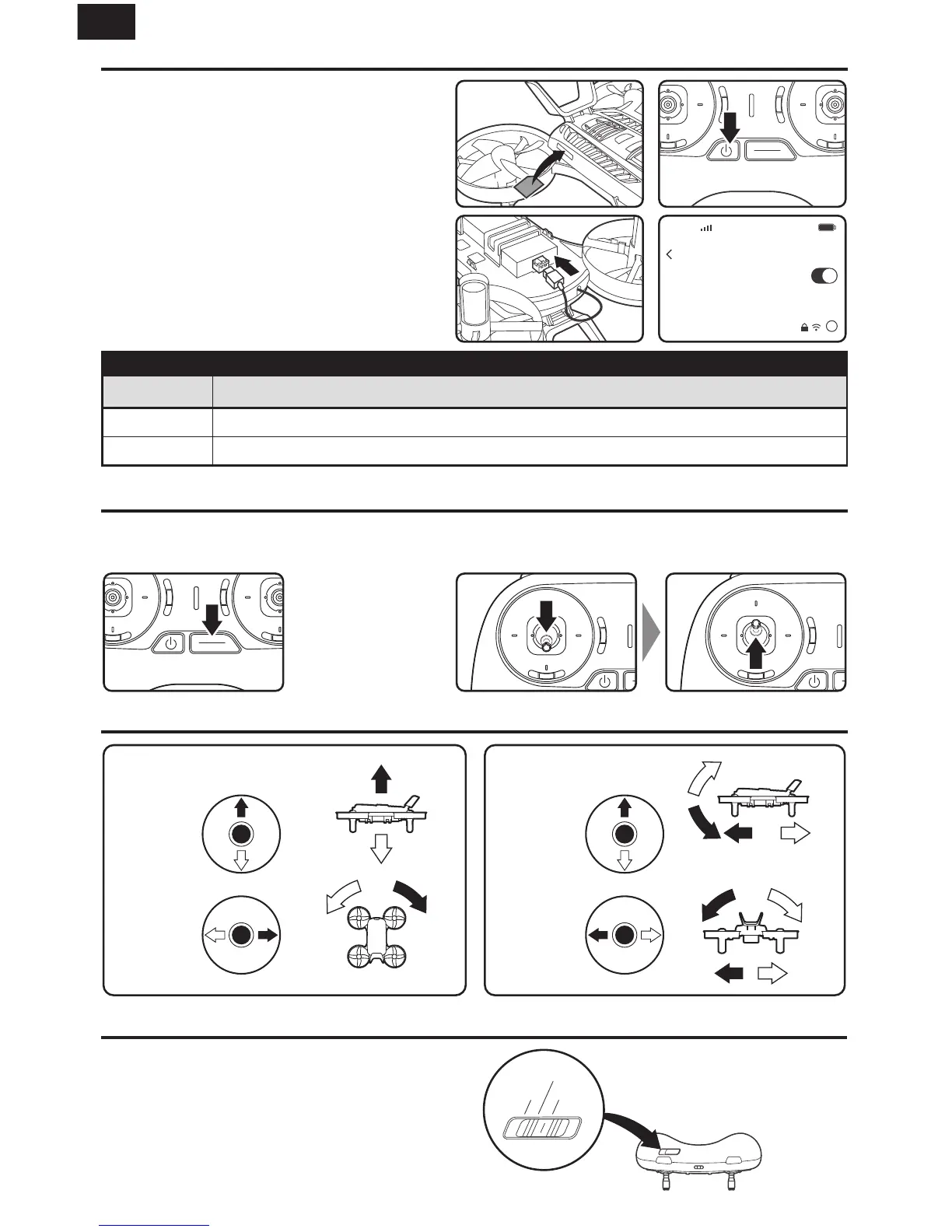
Taking O
Flight Controls
1. Insert the SD card.
2. Press and hold the power button to power
on the transmitter.
3. Insert the flight battery into the battery
compartment and plug the connector
into the battery.
4. Connect to the Wi-Fi network using your
phone settings.
Name: idxhd_xxxxxxx
Password: 1234567890
1. Press and hold the
START/STOP button.
2. Push the throttle down to the bottom then up (slowly)
to take off.
Left Stick Right Stick
Throttle
Up/Down
Elevator
Up/Down
Rudder
Left/Right
Aileron
Left/Right
Turn
Right
Turn
Left
Up
Down
Left
Forward
Right
Backward
Flight Mode 1
Flight Mode 2/3
- Altitude Mode
- Angle Mode
Flight Mode Introduction
Mode 1
Altitude Mode The aircraft will maintain its flying
altitude. Its bank angle is limited. When the sticks
are released, the aircraft will return to level flight.
Angle Mode The aircraft’s bank angle is increased.
When the sticks are released, the aircraft will return
to level flight.
Mode 3
Mode 2
WiFi
Destination WiFi Channel
US Band 1: channel 36,40,44,48 Band 4: channel 149,153,157,161,165
EU/AU Band 1: channel 36,40,44,48


 To Next Page