4848
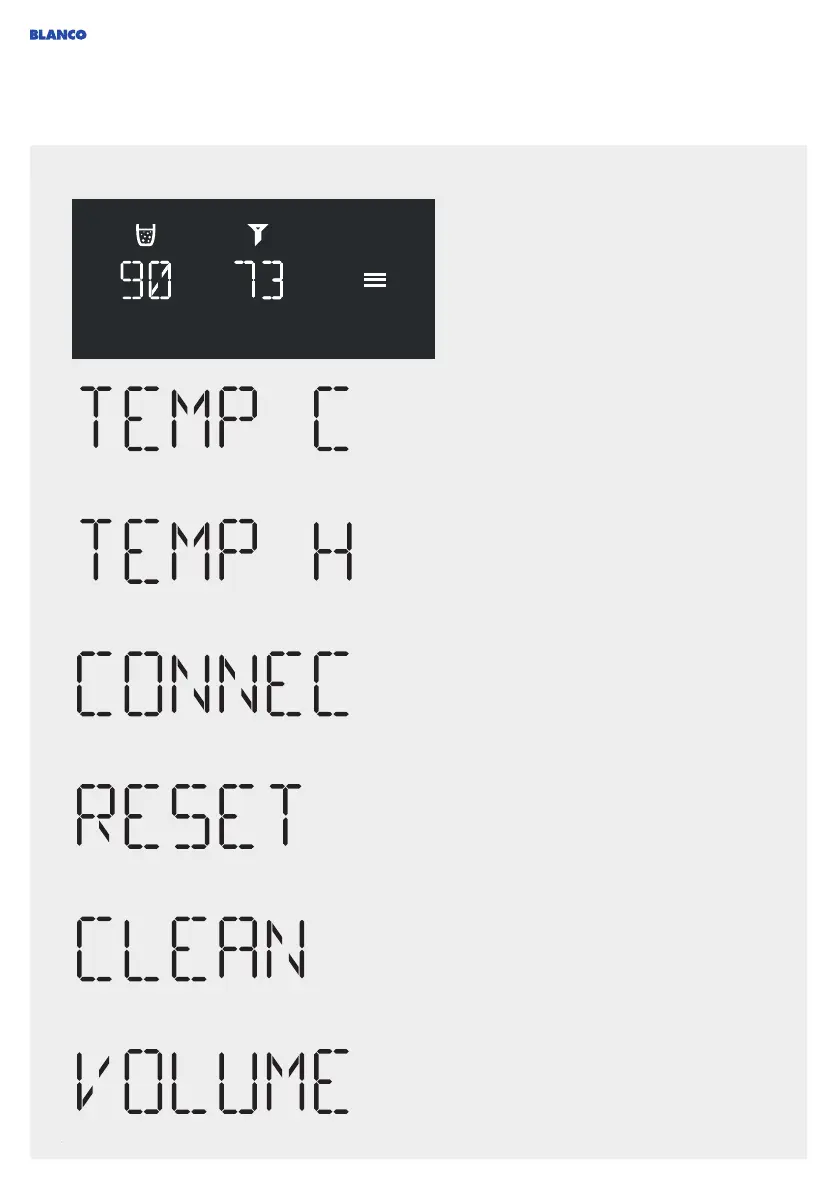
Water conditioning unit - Menu display
You can use the menu button to access
the menu to configure all parameters.
You can use the arrow keys that will then
appear to select the setting parameters.
After pressing OK to confirm, the current temperature for the
3 cold water types (still, medium and sparkling) is displayed.
You can adjust the temperature between 6 °C and 10 °C
using the arrow keys. The LOW setting is below 6 °C and
cools the water to the minimum possible temperature with
its maximum cooling performance (also see notes on
temperature settings on page 49).
After pressing OK to confirm, the current temperature for
hot water is displayed. This temperature can be changed
between 65 °C and 100 °C using the arrow keys (also see
notes on temperature settings on page 49).
Press OK for 3 seconds to start the cleaning program. The
cleaning procedure will then start and run automatically (see
page 52).
After pressing OK to confirm, the display shows the
connectivity mode to link with an app: CON OFF = inactive
connectivity module and CON ON = active connectivity
module. You can use the arrow keys to change the mode
and confirm by pressing OK. CONRES resets the connection
settings (also see notes on using the app on page 49).
Press OK for 3 seconds to reset to factory settings. Note
that this also resets the timer for cleaning, which can cause
hygiene problems. It is thus recommended to clean the
system after each reset.
Press OK for 3 seconds to start calibration. The calibration
routine will then start automatically and you can use it to
reset the quantities dispensed (see page 56). The adjustment
wheel on the mixer tap must not be set to '0' when you start
the calibration process.



 To Next Page