52
Cleaning & filter change
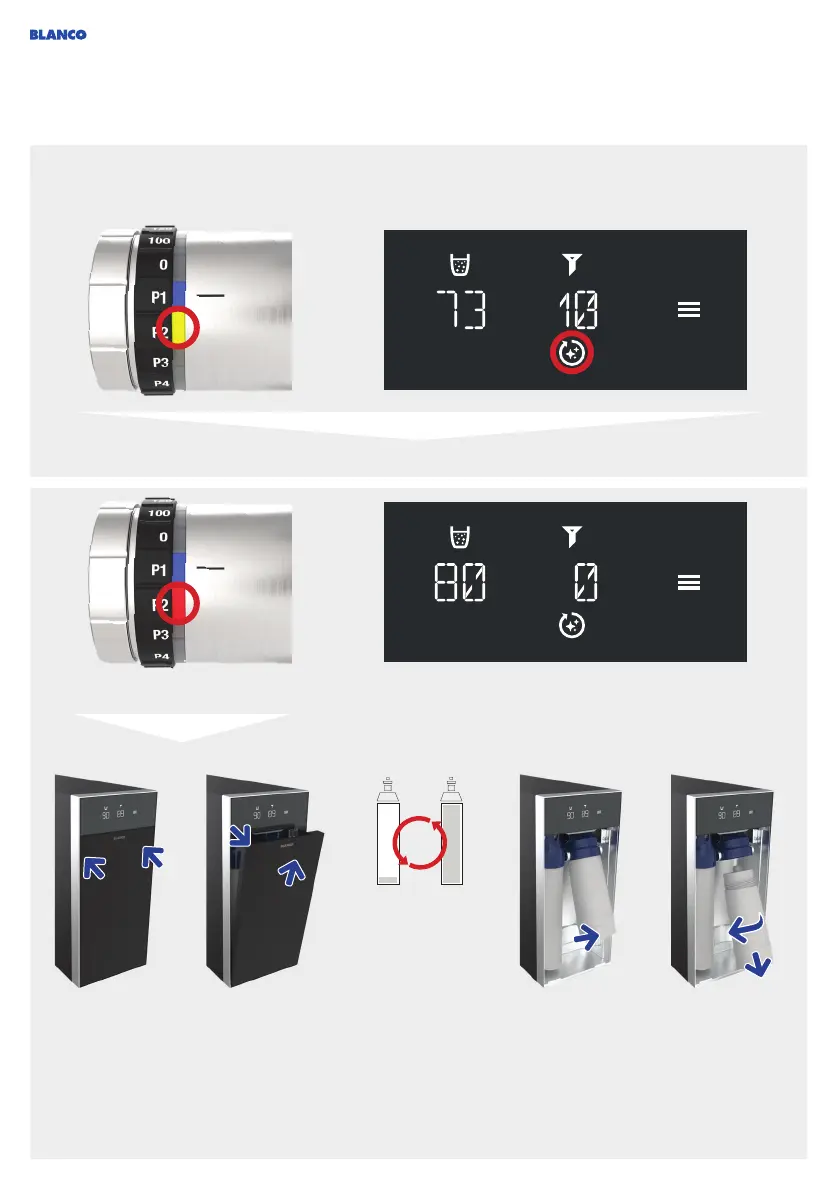
Tap on the top of
the front flap on
both sides to open
the front flap (tap
to open).
Move the top
of the front flap
outwards and
remove by pulling
upwards.
The CO
2
cylinder
needs to be filled to
at least 20 % of its
capacity for
cleaning. If the
remaining amount
for CO
2
is less than
20 %, the CO
2
cylinder must be
replaced first (see
Changing CO
2
cylinders, page 50).
Tilt the filter for-
wards.
Unscrew filter
(anticlockwise)
and remove.
As a basic rule, cleaning and a filter change is required after the filter capacity has been reached (in
litres) or after 6 months. The system also needs to be cleaned if no processed water has been dispen-
sed for 3 weeks. This is monitored electronically and displayed if necessary.
Cleaning and filter change is
now required.
Notification that service life is coming to an end and cleaning and filter change will soon be required.
A filter change and cleaning are firmly interlinked: It is
only possible to change the filter within the cleaning
program.
+
+



 To Next Page