535
Cleaning & filter change
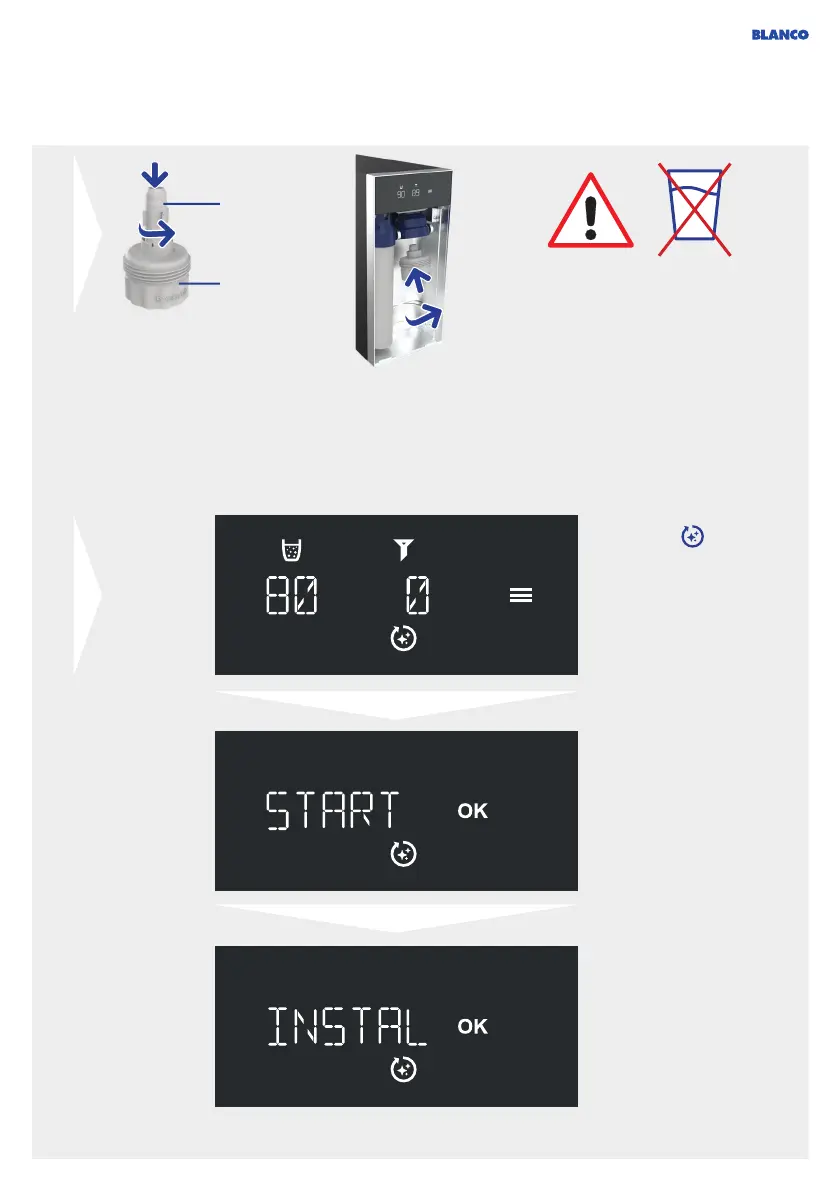
Press Clean to start
the cleaning process.
Alternatively, you can
also start the cleaning
program in
the menu (see Menu,
page 48).
Press OK for 3 seconds
to start the cleaning
process.
Press OK to confirm that
the EasyCare adapter
is inserted. The system
will then empty all tanks,
which will cause slight
splashing from the outlet.
This is normal.
Screw the EasyCare
adapter (with the Easy-
Care tab inserted) into
the mount for the filter,
turning clockwise.
EasyCare tab with
integrated cleaning
tablet
EasyCare
adapter
The EasyCare adapter and
EasyCare tab are required
for cleaning. You have
received them with the
system. You can purchase
the EasyCare tab for further
cleaning processes
separately in the BLANCO
Shop online.
WARNING! IMPORTANT!
Do NOT drink the water flushed
out at any time during the entire
cleaning process.
Do NOT disconnect the system from
the power supply or close the water
inlet (corner valve) during cleaning.
The water outlets should always be
positioned over the sink to prevent
water damage.



 To Next Page