54
Cleaning & filter change
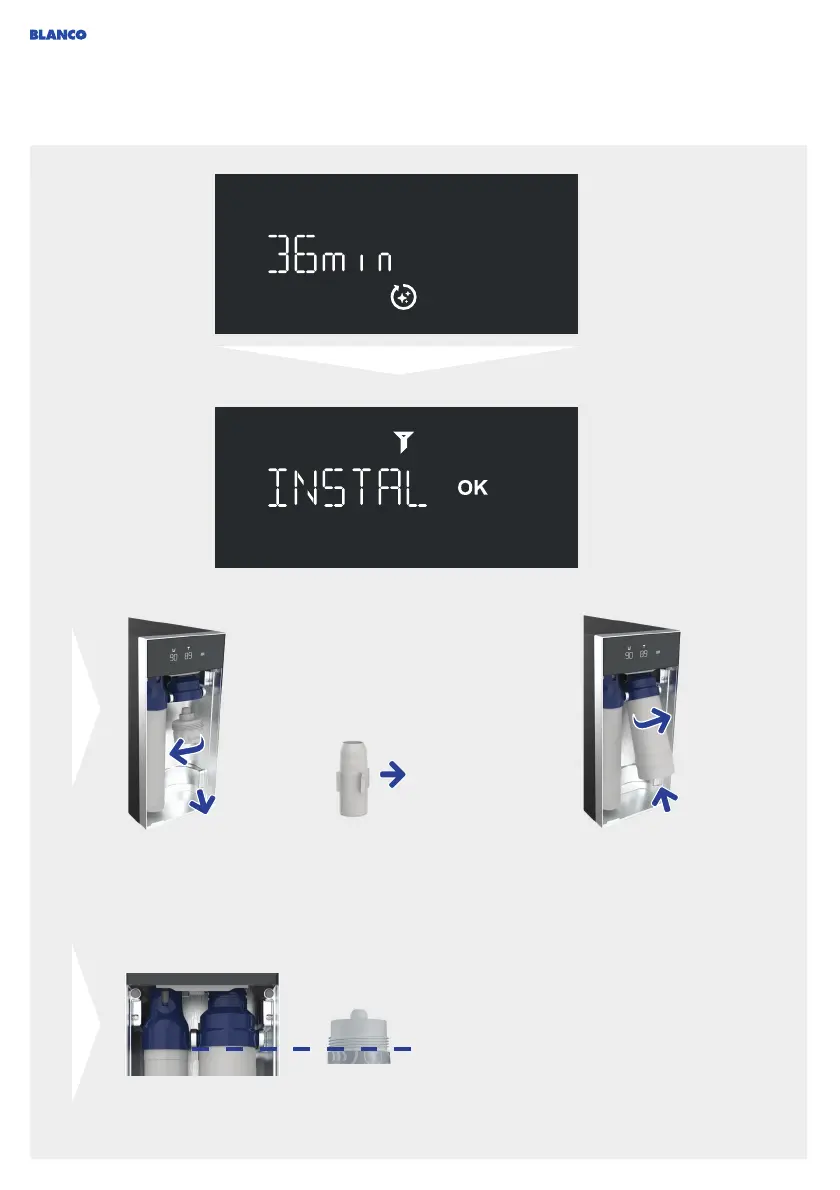
The cleaning program
has started and will now
run automatically.
The remaining running
time is shown on the
display.
The EasyCare adapter
must be unscrewed after
about 3 minutes and a
new filter inserted.
A flashing yellow LED
ring on the mixer tap
indicates when you need
to do this.
Screw filter until it will go no further so that the
threaded socket is no longer visible.
Unscrew the EasyCare
adapter with module
from the mount, turning
anticlockwise.
Remove EasyCare tab
from the adapter and
dispose of it in the
household waste. Keep
adapter for re-use.
The EasyCare tab can
only be used once:
Screw a new filter into position,
turning it clockwise about twice.
When inserting the filter, ensure
that it is straight when fitted, NOT
at an angle.



 To Next Page