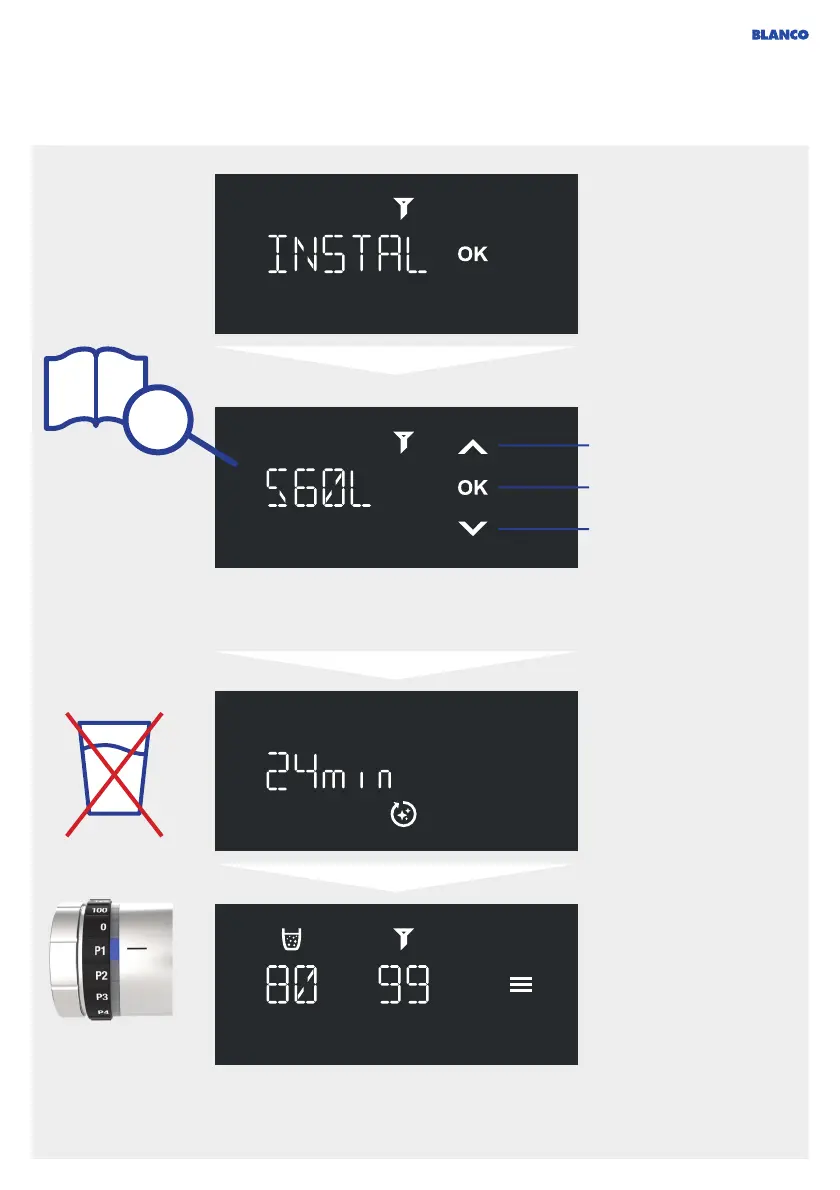
555
Cleaning & filter change
Press OK to confirm
that the filter is inserted.
The cleaning program
continues to run
automatically.
The remaining running
time is shown on the
display.
Note: CO
2
is used during
the cleaning program. This
amount is automatically
deducted from the
remaining capacity. A
deviation from the capacity
before cleaning is therefore
normal.
+
Confirm
-
+
The local water hardness is required to determine the correct filter capacity.
Note that if you use a central water softening system, this changes the hardness level in your
household. It is no longer the same level as the one that your water supply company indicates.
Find the filter capacity
for your local water
hardness in the filter
documentation. Enter
number manually. Then
press OK to confirm.
The remaining filter time
is reset and indicates
99 % again. The
system has been
cleaned and is ready
to operate again.
560L



 To Next Page