Processed water
45
You can use the side sensor to stop the
flow of water at any time.
Still water flushes through the system for
a short time when dispensing of medium
or sparkling water is interrupted.
You can use the side sensor to stop
the flow of water at any time.
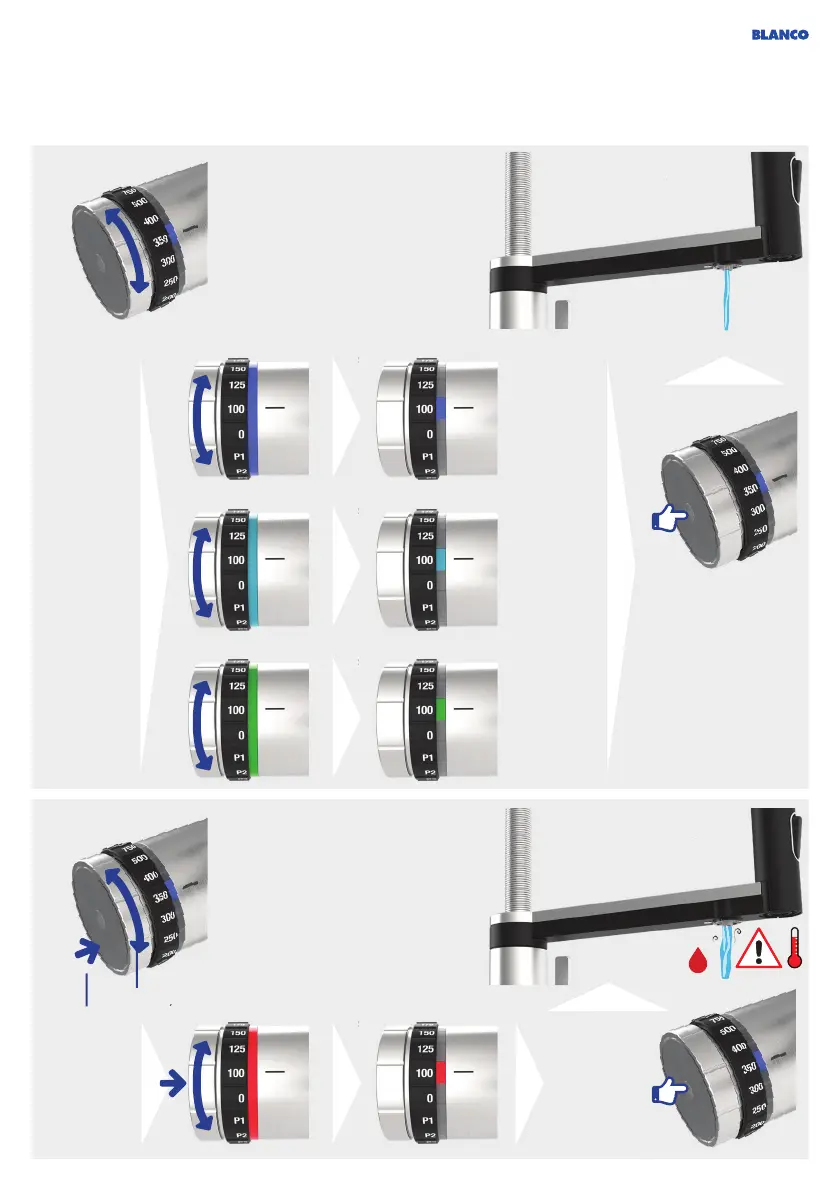
Touch the side
sensor to activate
the water dispensing.
Touch the side
sensor to
activate the
dispensing of
hot water.
Turn the
adjustment
wheel:
Selection of
cold water
type
Press and turn
the adjustment
wheel two
times:
Selection of
hot water
+
2x (click)
Sparkling
water
1 sec
1 sec
1 sec
1 sec
Medium
sparkling
water
Still water
ec
ec
ec
ou can use the side sensor to sto
he flow of water at any time.
You can use the side sensor to stop the
ow o
water at an
time
till water flushes throu
he s
m fo
short time when dispensin
of medi
r s
water
s
nterr
After activating the hot water mode by pressing
and turning over 2 notches, hot water can be
dispensed for 10 seconds. The system then
switches back to the previously selected water
type (cold).
Cold
Hot



 To Next Page