www.blaubergventilatoren.de
S21
10
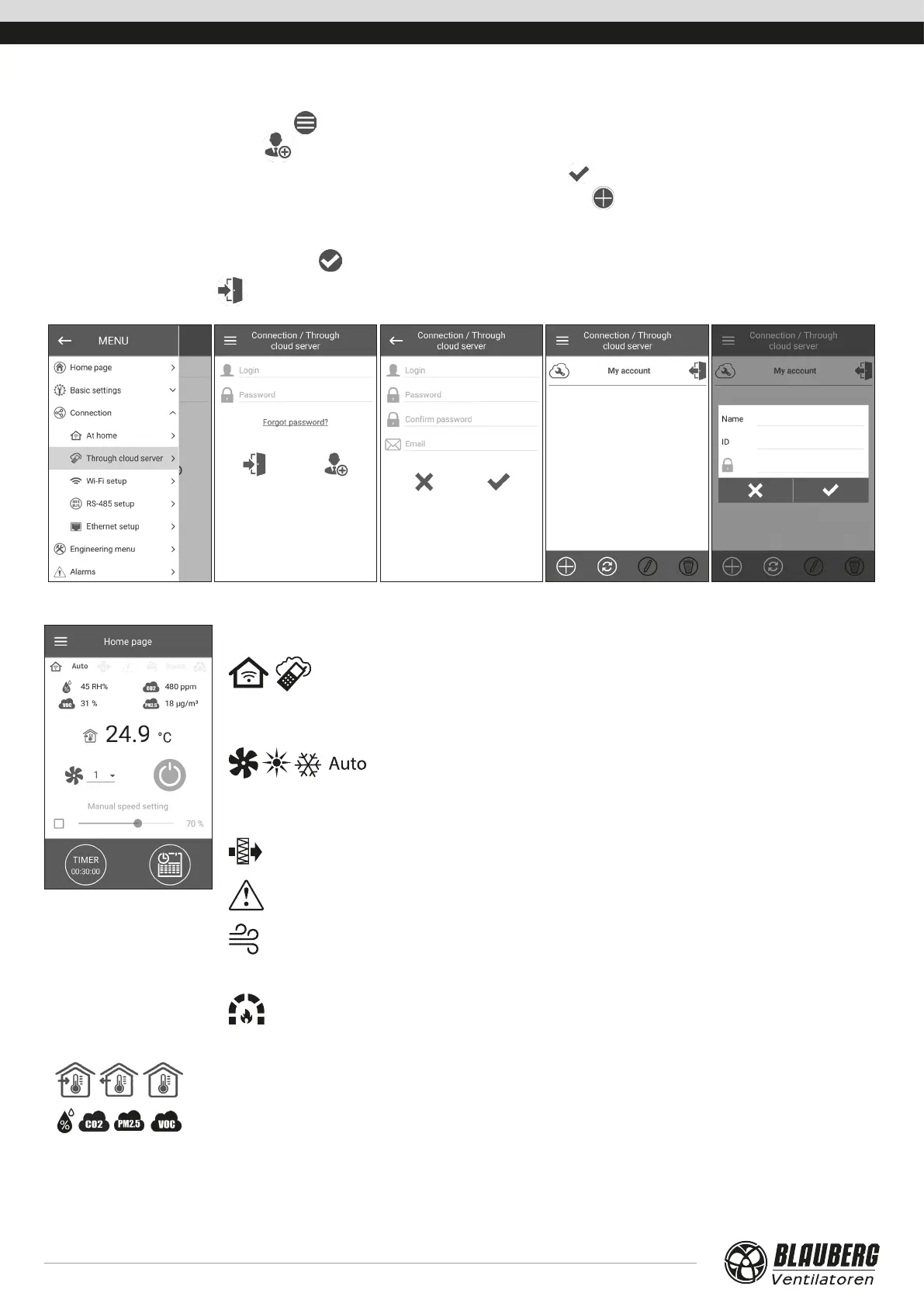
Creating an account to control the unit through a cloud server
Open the mobile app and go to MENU ( ) -> CONNECTION -> THROUGH CLOUD SERVER:
1. To add a new account, press the
button.
2. Enter a login, a password and an e-mail address for password recovery. Then press
.
3. The app will log into the newly created account automatically. Add a new connection
.
4. Enter a random name of the unit and an ID number (shown on the control board and on the unit casing) as well as a unit password
(by default: 1111).
5. Confirm the entered data by pressing the
button.
6. To exit the account, press
.
HOME PAGE
Indicators:
Current type of unit connection. Home connection or connection via a cloud
server through Internet respectively.
Current operation mode of the unit.
Ventilation only (no temperature control, heat recovery only),
ventilation + heating (the unit warms up the outdoor air by means of the
electric heater or with the outdoor air heat), ventilation + cooling (the unit
only cools air by means of the cooler or with the outdoor air cold), auto (the
control system automatically determines if air heating or cooling is necessary)
correspondingly.
Filter replacement indicator.
Red colour – alarm indication, orange colour – warning indication.
Electric heater cooling indicator (preheating or reheating) before switching off the
unit.
Boost
Boost mode indication.
Fireplace mode indication.
Sensor readings:
Current temperature of the selected sensor, which controls the air temperature (in the supply air duct, in the
extract air duct and in the room respectively).
Current values for the humidity sensor, СO
2
, РМ2.5, and VOC correspondingly. The screen displays the setpoint
value for a particular type of sensor connected to the circuit board (hereinafter «main sensor») or if no external
sensor is connected - the information from the one built into the control panel (if present). The indicator colour
provides the following information: gray - no sensor detected; blue - sensor working normally; red - sensor
signal exceeds the pre-set value.



 To Next Page