76
5.3 CLASSIC 475™
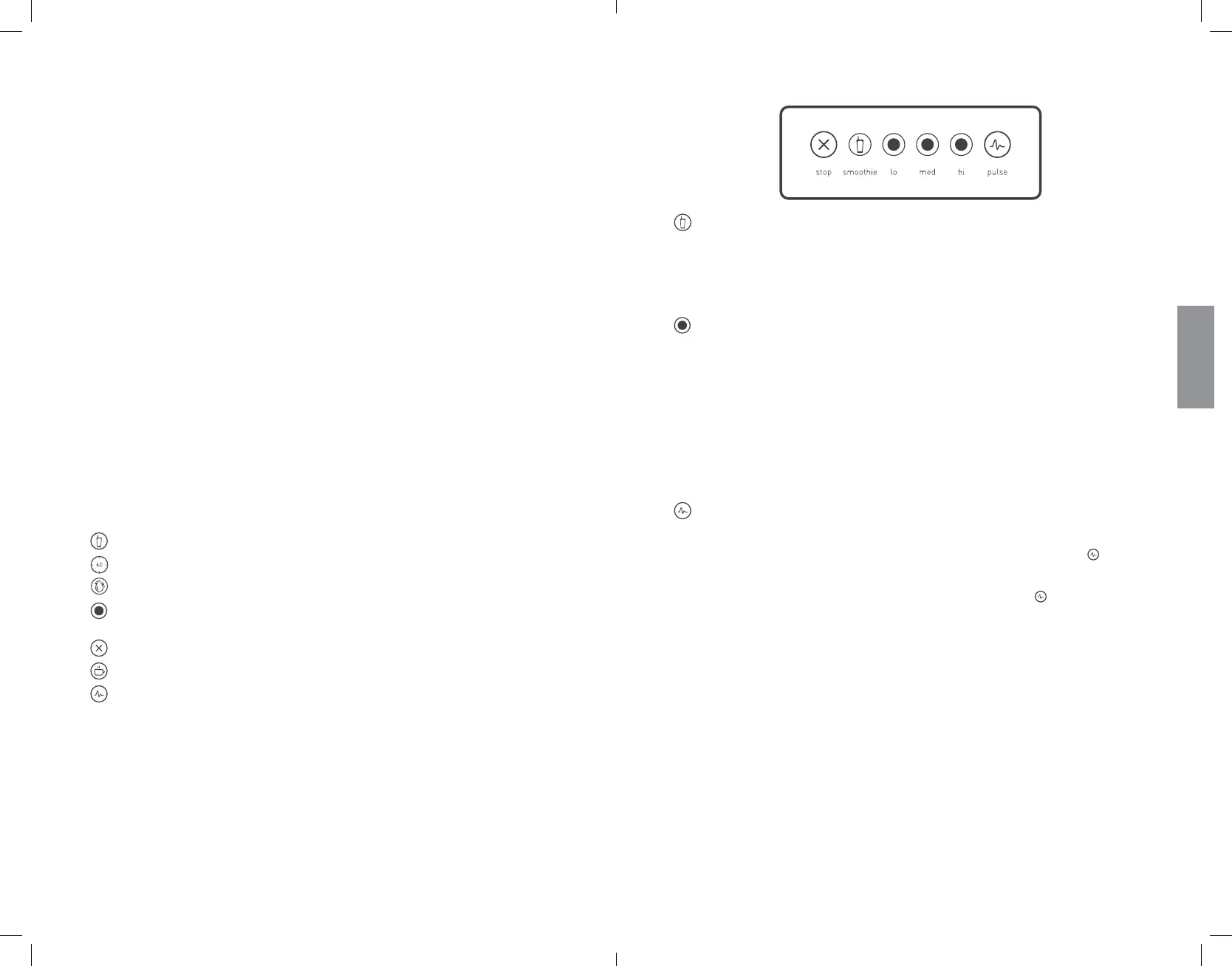
SMOOTHIE
This cycle is designed specifically for various types of smoothies and thick
drinks that frequently use dense or frozen ingredients� It slows down and
speeds up automatically during the course of the cycle� This allows the blender
to draw the ingredients into the blending vortex, creating the desired texture�
INCREMENTAL SPEEDS
The Classic 475 comes with three incremental speed cycles that allow you to
completely customize the consistency of the product you are blending�
• Lo
• Medium
• Hi
You can switch to a different speed at any point during the cycle. To stop the
cycle at any point while blending, press Stop.
PULSE
The Pulse function is used for chopping, mincing, whipping, or other momentary
tasks that do not require a long blend cycle� You can also use Pulse
to quickly
stir a blended product before serving it�
The Pulse setting runs at speed 7 and only while the Pulse button remains
pressed� When the button is released, the motor shuts off�
SECTION 5: OPERATIONAL OVERVIEW
5.1 QUICK RECIPE INSTRUCTIONS –
Use these steps to get started right away.
1� Choose a recipe�
2� Gather all of the ingredients�
3� Load the blender jar as indicated in the recipe�
4� Attach the blender lid to the jar; ensure that it is securely in place�
5� Turn on the main power switch located on the back of the blender motor base�
6� Place the blender jar onto the base, making sure the jar is securely and fully seated
on the motor base�
7� Press the touch pad button indicated in the recipe once (or as indicated in the recipe)�
8� When the cycle is complete, remove the blender jar from the motor base�
9� Remove the jar lid and serve as indicated in the recipe�
10� For the best cleaning results, clean the blender immediately after blending�
(See Section 6�1 CLEANING AFTER USE)
5.2 ALL ABOUT BLEND CYCLES
Blend cycles are timed cycles designed for specific types of blending� These
one-touch cycles speed up, slow down, and shut off automatically, so results are
perfect every time�
Each blender in the Classic series features a number of pre-programmed cycles
and settings that provide a wide range of results and functions:*
Smoothie — For fruit smoothies, green smoothies, milkshakes
One-Touch Timed — Used to blend ingredients for a 60-second or 90-second cycle
Clean — Automatic cleaning cycle
Incremental Speed —
50-second cycles that blend at Lo, Medium-Lo,
Medium, Medium-Hi, and Hi speeds
Stop — Stops the blender at any point while blending
Hot Soup — For soups, hot chocolate, syrups, fondues
Pulse — Used to quickly stir, chop, or mince at a high speed
*Interfaces and cycles will vary depending on the model number
ENGLISH









 To Next Page