This document is a user manual for the Blizzard Auto-Fill Water Boiler, model AF10. It provides essential information for safe operation, installation, maintenance, and troubleshooting of the device.
Function Description:
The Blizzard Auto-Fill Water Boiler is designed to provide hot water. It utilizes a stepwise heating technique where electrodes at each water level and an accurate thermistor send digital signals to a microcomputer. The computer then controls the heating element and magnetic valve to heat water layer by layer, preventing repeated heating and increasing productivity. The system ensures that all dispensed water has been boiled only once, making it healthy and safe for consumption. It operates automatically, filling water when needed and heating it to a preset temperature. The device includes safety features such as dry burning protection and high-temperature alarms. An LED display shows the current water temperature and operating status, including error codes for troubleshooting.
Important Technical Specifications:
- Applicable Water Source: Municipal water or other potable water, pH between 6.5-8.5, from a filtered soft water supply.
- Enter Water Pressure: 0.2-0.4 MPa (Rate of flow ≥ 4 L/min). If the pressure is outside this range, a filter and pressure regulator may be required.
- Enter Water Temperature: 0-40°C (above 5°C, not freezing).
- Input Voltage: ~220-240V ± 10%.
- Humidity: 10-60% (non-condensing).
- Ambient Temperature: 5-40°C.
- Model: AF10.
- Dimensions (MM): A: 190, B: 630, C: 240, D: 360, E: 300.
- Power: 2500W.
- Frequency: 50Hz.
- Capacity: 10L.
- Productivity: 35L/h.
- Faucet: 1.
- Waterproofing Grade: IPXO.
- Grounding: Type "I" appliance, requires sturdy connection to a grounding device according to electricity regulations.
Usage Features:
The water boiler features an intuitive control panel with several buttons and indicator lights:
- Power Switch (Button): Electrifies the circuit board, displays "ELL" (for initial fill or low water) and temperature. Long press for 5 seconds to turn off the display board while the machine remains on.
- Timing Switch (Button): Used for programming the timing function when in standby/off mode.
- Set (Button): For setting parameters.
- Plus (+) and Minus (-) Buttons: To adjust parameters.
- Yellow Light (Heating Indicator): On when the machine is heating or reheating; off when heating stops.
- Red Light (Low Water/Inflow Indicator): On when the chamber lacks water and the machine is filling; off when filling stops.
- Green Light (Magnetic Valve/Drinkable Indicator): On when the magnetic valve starts filling the chamber or when water has reached the preset temperature (93°C) and is drinkable; off when the magnetic valve stops or water is undrinkable.
- Timing Function (Green Light): On when timing is active, allowing time settings.
- Error Indicator (Red Light): On when a machine failure occurs, displaying "Er" followed by an error code.
- Drinkable Indicator (Green Light): On when water reaches preset temperature and is ready to drink.
Machine Data Adjustment:
- With the machine OFF (long press "Switch" button), long press "Set" for 3 seconds to display data.
- Use "Plus" and "Minus" buttons to adjust data.
- Press "Set" to switch between parameters or exit, and data is automatically saved.
- Preset temperatures (heating, drinking, return difference) are factory set and cannot be changed by the user.
- Current time, "Timer On" (start working time), and "Timer Off" (stop working time) can be set.
Error Codes and Troubleshooting:
- Erd: Drinking water thermoprobe failure. Solution: Check connection for looseness.
- ErH: Heating thermoprobe failure. Solution: Clean scale, check connection.
- Er1: Inflowing failure (water fill > 45 minutes). Solution: Check water resource, magnetic valve.
- Er2: Heating failure. Solution: Replace heating element.
- ELL: Water leakage. Solution: Check water resource, magnetic valve (replace if needed), connection of thermo probes.
- Timing indicator flashing: Circuit failure in the timer. Solution: Replace display board or circuit board.
Maintenance Features:
- Periodic Inspection:
- Connection: Check for hot or loose plug/power line daily.
- Drain Outlet: Check for blockages monthly.
- Chamber Cleaning: Clean both chamber and surface at least once a season. Use a nylon bundle to clean scale from thermo probe and heating element. Loosen drain outlet nut to drain waste water.
- General Maintenance:
- Turn off power and water, and drain water from the chamber if not used for a long time (e.g., holidays) to prevent part burn-in and extend service life.
- Clean thermo probes and heating element to prevent scaling. Commercial cleansers can be used. Recommended to be done by a skilled technician once a season.
- After cleaning/maintenance, check that the seal ring is undamaged and fixed, then fasten it. Perform one or two heating cycles to ensure no steam leakage. This should be done by a skilled technician.
- Regularly drain water from the drain outlet at the back of the machine. Cut off power and water, and wait for water to cool before draining. Avoid knocking the machine or using sharp metal tools for cleaning.
- If cool water flows from the overflow tube or the machine doesn't heat, stop use immediately. Check if the magnetic valve is blocked or the heating element is damaged; clean or replace as needed.
- When cleaning the machine's exterior, cut off power and wipe with a cloth. Do not use corrosive cleansers, flush directly, or soak.
- If the power wire is damaged, replace it with a YZW Type, heat-resistant, and anti-corrosion power wire after cutting off main power. Other power wires are forbidden.

 Need help?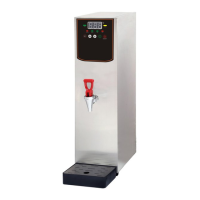

 To Next Page
 General