EasyManua.ls Logo

Blomberg BGR30420SS - Page 25

Blomberg BGR30420SS
56 pages
Print Icon
To Next Page IconTo Next Page
To Previous Page IconTo Previous Page
Loading...
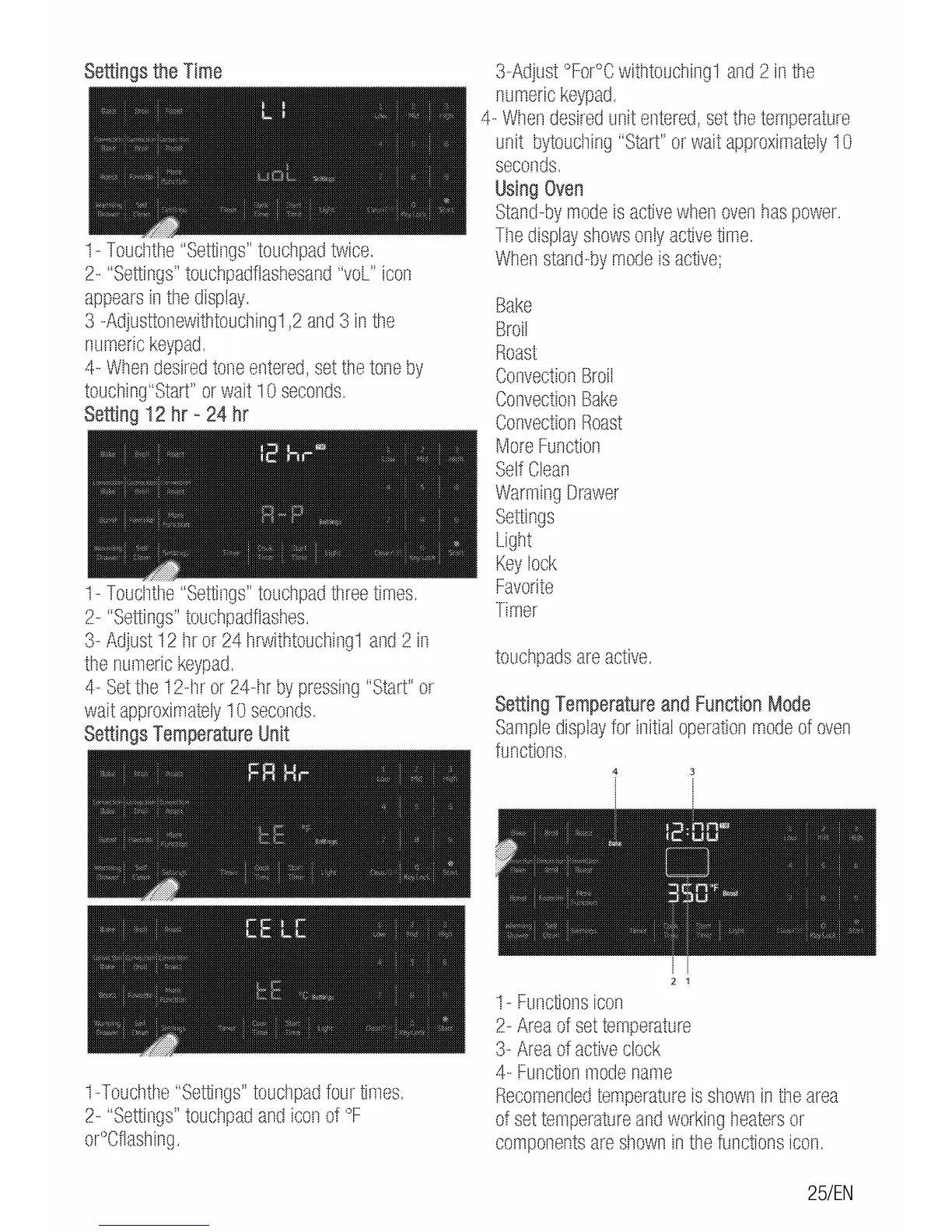
Settings
the
Time
1-
Toucllthe
;<Settings"
touchpad
twice.
2-
"Settings''
touchpadflashesand
"vol''
icon
appears
in
the
display.
3
-Adjusttonewithtouclling1
,2
and
3
in
the
numeric
keypad.
4-
Wtlen
desired
tone
entered,
set
the
tone
by
touching"Start"
or
wait
10
seconds.
Setting
12
hr
-
24
hr
1-
Toucllthe
;<Settings"
touch
pad
three
times.
2-
"Settings"
touchpadflashes.
3-
Adjust
12
llr
or
24
hrwithtouching1
and
2
in
the
numeric
keypad.
4-
Set
ttle
12-tlr
or
24-rlr
by
pressing
"Start"
or
wait
approximately
10
seconds.
Settings
Temperature
Unit
1-Toudlthe
;<Settings"
touctlpad
four
times.
2-
"Settings"
touchpad
and
icon
of
oF
or"Cflashing.
3-Adjust
°FOr°C
withtouching1
and
2
in
the
numeric
keypad.
4-
Wr1en
desired
unit
entered,
set
the
temperature
unit
bytouclling
"Start"
or
wait
approximately
1 0
seconds.
Using
Oven
Stand-by
mode
is
active
when
oven
has
power.
Tile
display
shows
only
active
time.
When
stand-by
mode
is
active;
Bake
Broil
Roast
Convection
Broil
Convection
Bake
Convection
Roast
More
Function
Self
Clean
Warming
Drawer
Settings
Light
Key
lock
Favorite
Timer
touchpads
are
active.
Setting
Temperature
and
Function
Mode
Sample
display
for
initial
operation
mode
of
oven
functions.
2 1
1-
Functions
icon
2-
Area
of
set
temperature
3-
Area
of
active
clock
4-
Function
mode
name
Recomenlied
temperature
is
sl10wn
in
the
area
of
set
temperature
and
working
heaters
or
components
are
sl1own
in
the
functions
icon.
25/EN

Related product manuals