EasyManua.ls Logo

Blomberg BGR30420SS - Tips for Saving Energy; Initial Operation; Settings Menu; Setting the Clock

Blomberg BGR30420SS
56 pages
Print Icon
To Next Page IconTo Next Page
To Previous Page IconTo Previous Page
Loading...
Tips
for
saving
energy
The
following
information
will
help
you
to
use
your
appliance
in
an
ecological
way,
and
to
save
energy:
Use
dark
colored
or
enamel
coated
cook-
ware
in
the
oven
since
the
heat
transmis-
sion
will
be
better.
While
cooking
your
dishes,
perform
a
preheating
operation
if it
is
advised
in
the
user
manual
or
cooking
instructions.
Do
not
open
the
door
of
the
oven
frequently
during
cooking.
Try
to
cook
more
than
one
dish
in
the
oven
at
the
same
time
whenever
possible.
You
can
cook
by
placing two
cooking
vessels
onto
the
wire
shelf.
Cook
more
than
one
dish
one
after
another.
The
oven
will
already
be
hot.
Defrost
frozen
dishes
before
cooking
them.
Use
pots/pans
with
cover
for
cooking.
If
there
is
no
cover,
energy
consumption
may
increase
4
times.
Select
the
burner
which
is
suitable
for
the
bottom
size
of
the
pot
to
be
used.
Always
select
the
correct
pot
size
for
your
dishes.
Larger
pots
require
more
energy.,
Initial
Operation
Before
first
usage
of
your
appliance,
don't
forget
to
remove
the
sticker
on
the
control
panel.
moke
and
smeli
rnay
ern
it
for
a
couple
of
~--•Ilours
during
tile
initial
operation.
This
is
quitenormaL
Ensure
that
Hw
roorn
is
we
!I
ventilated
24/EN
to
remove
the
srnoke
and
smell.
Avoid
direc-
tlyinlla!ing
the
srnoke
and
the
srnell
Hmt
ern
its.
Default
setting
for
ciock
is
12:00
afier
initial
Active
time
setting
automatically
reset
when
power
failure.
Please
set
the
clock
again.
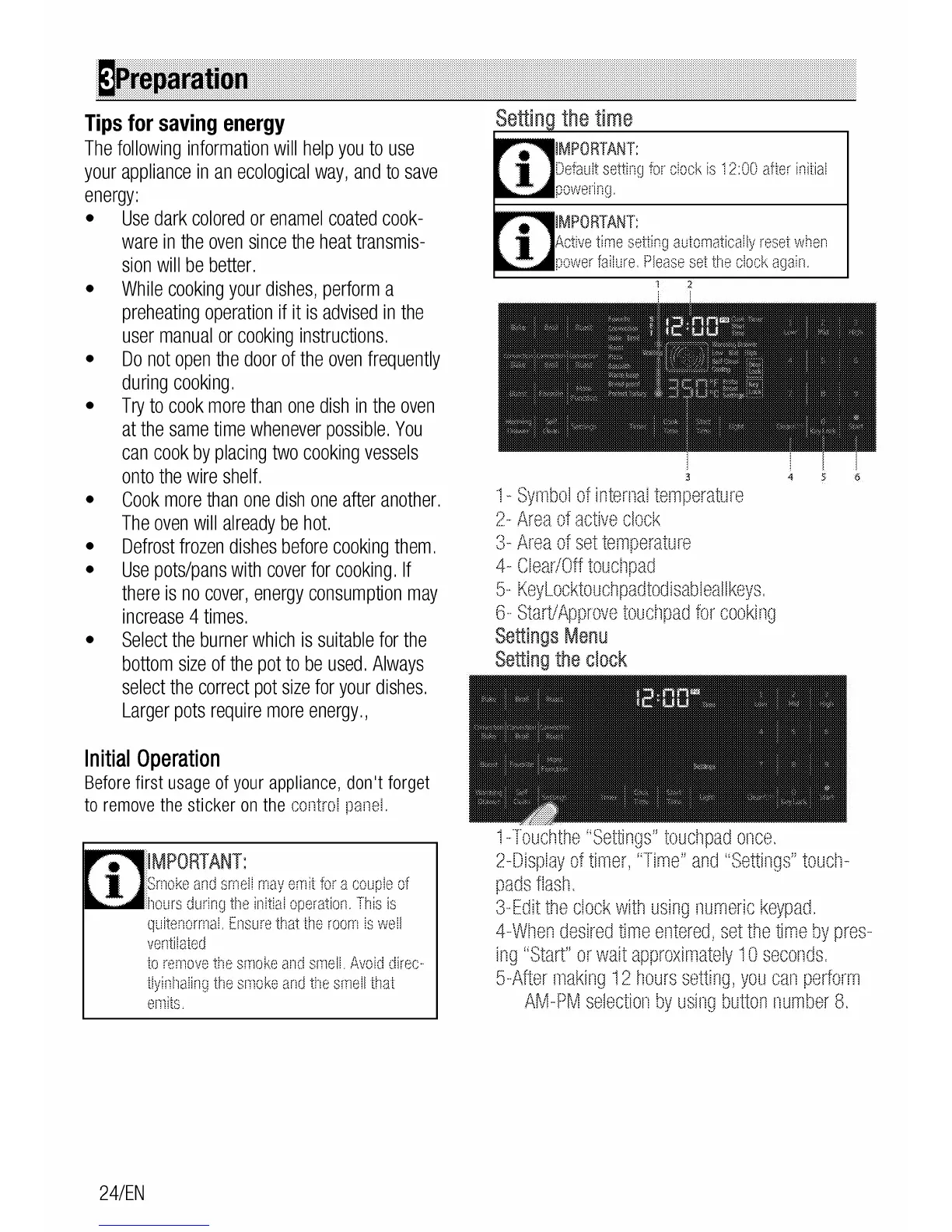
1-
Symbol
of
internal
temperature
2-
Area
of
active
clock
3-
Area
of
set
temperature
4-
Clear/Off
toucllpad
5-
Keylocktouchpadtodisableallkeys.
6-
StarVApprove
toud1pad
for
cooking
Settings
Menu
Setting
the
clock
1-Touchthe
"Settings"
touctlpad
once.
2-Display
of
timer,
"Time"
anrJ
"Settings"
toucll-
pads
flash.
3-Edit
the
clock
with
using
numeric
keypad.
4-Wilen
desired
time
entered,
set
the
time
by
pres-
ing
"Start"
or
wait
approximately
10
seconds.
5-After
making
12
hours
setting,
you
can
perform
AM-PM
selection
by
using
button
number
8.

Related product manuals