CallLogs
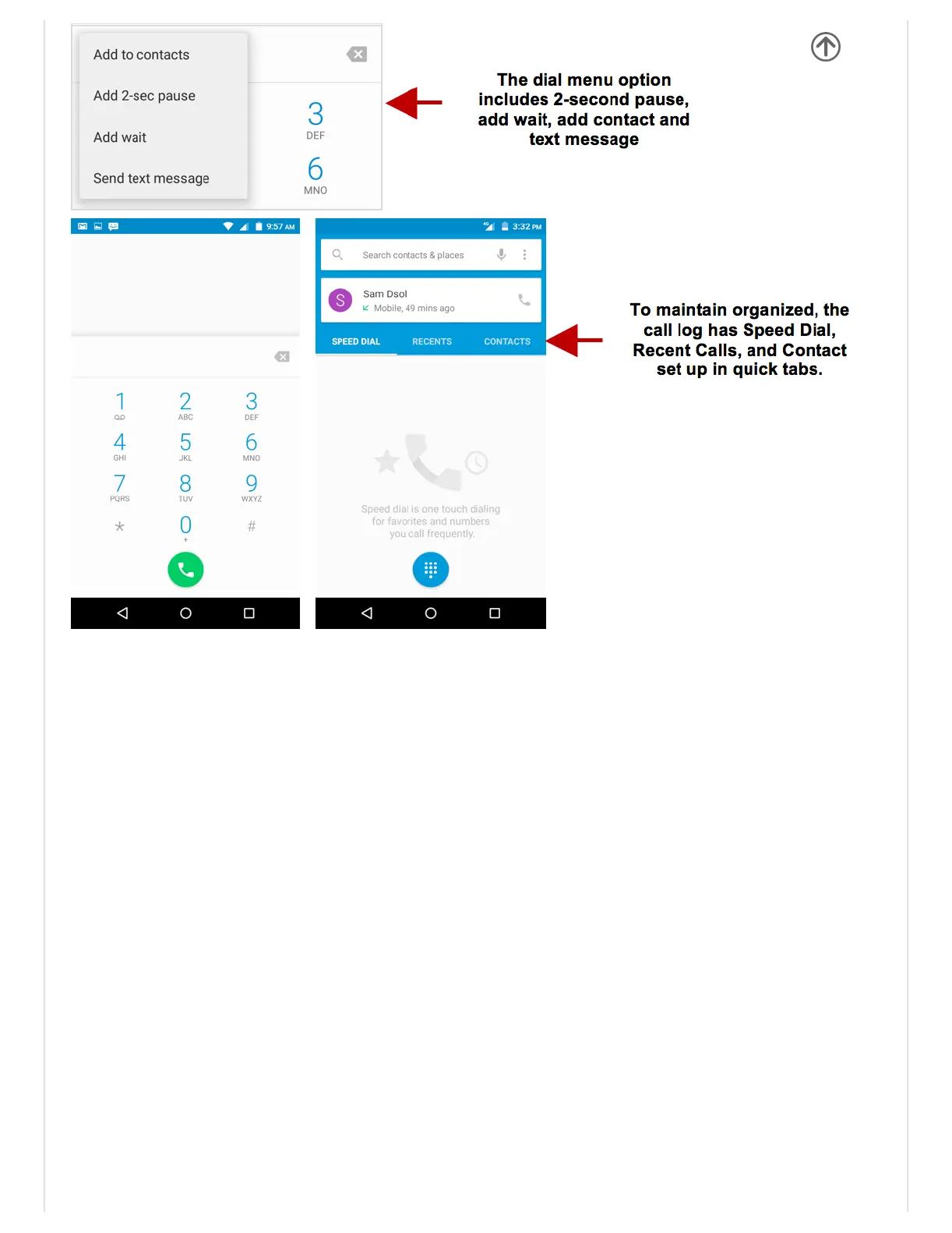
Everytelephonenumbercalledandreceivedwillbesavedinthephonescalllog.All
numbersinthecalllogcanbedialedbyclickingthedialicononthescreen,byclickingon
thecontacttileinthespeeddialtab,orbyclickingonthecontactandselectingcallbackin
therecenttab.Whenthenumberappearsonthelist,clickittoviewdetails.Todeleteacall
fromthecallhistory,pressthemenukeyandselectdelete.Youmayremoveoneormultiple
calls.
CallOptions
Therearedifferentoptionsthatcanbeusedinthecallloganddialinginterface.Youmay
pressthemenukeywhileinthegeneraldialinginterfaceandadjustcallsettings,entercall
history,clearyourfrequentlydialednumbers,andaddanewcontact.
NotificationsBar
Thenotificationbarislocatedonthetopofthescreenwhichcontainsusefulandimportant
informationregardingyourphoneandtheapplicationsthatareinstalled.


 To Next Page