Need help?
Do you have a question about the BlueParrott C400-XT and is the answer not in the manual?
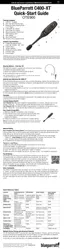
Displays battery level via MFB indicator light during charging and operation.
Describes headset functionality when powered by the charger, including indicator behavior.
Details correct positioning of the headset for optimal noise cancellation and fit.
Instructions for powering the headset on, off, and entering standby mode.
Guides users through pairing the headset with a mobile phone via NFC or manual methods.
Explains how to make, answer, and end calls using voice commands or buttons.
Provides methods for rejecting incoming calls via voice or button presses.
Explains connecting to multiple devices simultaneously for enhanced productivity.
Describes an alternative pairing method initiated by the headset itself.
Instructions for redialing the last outgoing or incoming call via voice or buttons.
Details handling incoming calls during an active call, including acceptance and rejection.
How to initiate phone's native voice assistants (Siri, Google Now) from the headset.
Methods for muting the headset microphone during calls using buttons or the Parrott Button.
How to transfer audio between the headset and the phone during a call.
Instructions for enabling or disabling the headset's visual indicator lights.
Procedure to clear the headset's stored Bluetooth device pairings.
Steps to restore the Parrott Button to its factory settings.
The BlueParrott C400-XT is a versatile headset designed for clear communication, particularly in noisy environments, offering a range of features for ease of use and maintenance.
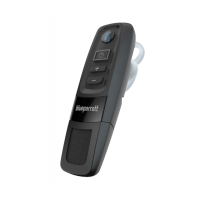
The primary function of the C400-XT is to provide high-quality audio for calls and other audio streaming, while also offering advanced noise-canceling capabilities to ensure clear transmission of your voice. It operates wirelessly via Bluetooth, allowing for hands-free communication with compatible devices such as cell phones. The headset supports both single-device and multiple-device connections through its Multipoint Mode, enabling seamless switching between two Bluetooth devices. It also features voice command functionality, allowing users to manage calls and headset settings without physical interaction. The headset is equipped with a flexible microphone boom for optimal positioning and indicator lights to provide visual feedback on its status.
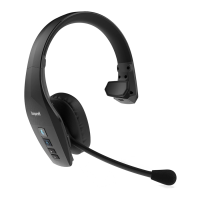
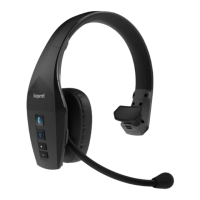
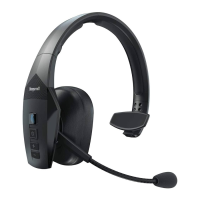
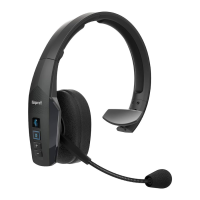
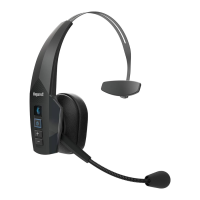
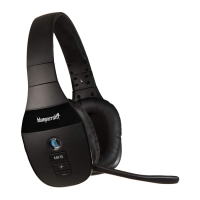
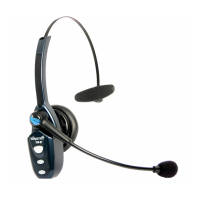
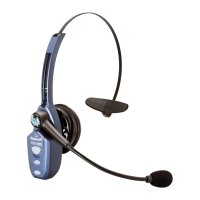
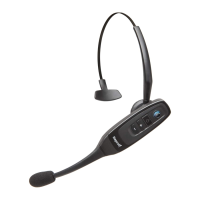
The C400-XT offers flexible wearing options, including Over-The-Head and Behind-the-Neck styles, to ensure comfort and a secure fit. The Over-The-Head style is reversible for use on either the left or right side, and both left and right versions of the Behind-the-Neck style are included. Users can choose between leatherette or foam ear cushions for personalized comfort. Proper positioning of the microphone, about one finger's width from the corner of the mouth, is crucial for achieving the best noise-canceling performance. The headband can be gently flexed to adjust its tightness.
Getting started with the C400-XT involves powering it on or off by holding the Multifunction Button (MFB) for a specified duration, accompanied by voice prompts like "power on" or "power off." Once powered on, the headset enters Standby Mode and attempts to connect to the last paired device.
Pairing the headset with a phone can be done in two ways: NFC (One-Touch) Pairing or Manual Pairing. For NFC pairing, users simply place the NFC zone of their cell phone against the headset's NFC zone until the phone registers the headset, then follow the on-screen prompts. Manual pairing is initiated by either activating headset voice recognition and saying "pair mode," or by holding the MFB from a powered-off state until "Pair Mode" is announced and the indicator light flashes blue rapidly. The headset remains visible for pairing for 120 seconds. During manual pairing, users search for "BP C400-XT" on their phone's Bluetooth list and may need to enter a passcode of "0000." Accepting the phone book access request enables caller ID in the headset.
Call management is intuitive. To make a call, dial the number on the phone, and the audio will be heard in the headset. Ending a call is done by pressing the MFB once. Answering an incoming call can be done by saying "answer" when ringtones or caller ID are heard, or by pressing the MFB once. To reject an incoming call, users can say "ignore" or press and hold the MFB for two seconds, which transfers the call to voicemail if available.
The headset supports advanced call features such as Call Waiting/Rejecting a Call. If on an active call and a second call comes in, a low tone notification will be heard. Users can accept the incoming call and end the active call (press MFB once to end, then once again to answer), accept and place the active call on hold (quickly press MFB twice), or reject the incoming call and continue the active call (press and hold MFB for 1-2 seconds).
Voice commands are a key feature, allowing hands-free control. By pressing the Parrott Button (or holding the Volume Up button if the Parrott Button is reconfigured), users can activate voice commands and say phrases like "answer," "ignore," "what can I say?" (for a list of commands), "pair mode," "am I connected?", "check battery," "redial," "callback," or "cancel."
The Parrott Button is a customizable feature. By default, it mutes the headset during a call and activates voice commands when not on a call. However, it can be reconfigured for other functions, such as speed dialing a specific number or launching a phone application, by downloading a dedicated app for Android, iOS, or PC. If reconfigured, voice commands can still be activated by pressing and holding the Volume Up button.
Muting the microphone during a call can be done by quickly pressing the Parrott Button (if not reconfigured) or by pressing and holding the Volume Up button for 1-2 seconds. A reminder tone sounds every 10 seconds while muted.
Audio transfer between the headset and the cell phone during a call is possible by pressing and holding the Volume Down button for 1-2 seconds. The headset indicator lights can be toggled on or off by a quick press of both Volume Up and Volume Down buttons simultaneously.
Charging the headset is straightforward. The USB charging cable connects to the headset's USB charging port. A red indicator light signifies charging, turning blue and staying blue when fully charged. A complete charge takes approximately 3.5 hours for a fully discharged battery, providing over 24 hours of talk time. The headset can operate while charging via the USB cable, though connecting the USB cable mid-call will reset the headset and transfer the call back to the phone.
The C400-XT includes features for managing paired devices and resetting settings. The headset has pairing memory for up to eight devices. To reset the headset's internal paired devices list, power on the headset, then press and hold the Volume Up and Volume Down buttons together for 6-10 seconds until two low tones are heard. After this, power off the headset, and the pairing memory will be cleared.
To reset the Parrott Button to its factory defaults (voice command and mute) and clear the pairing memory, power on the headset, then press and hold the Parrott Button and the Volume Down buttons together for 6-10 seconds until two quick purple flashes appear on the MFB. After this, the headset will re-enter pairing mode.
 General
| Headset type | Monaural |
|---|---|
| Product type | Headset |
| Product color | Black |
| Wearing style | Head-band, Neck-band |
| Operating keys | Volume +, Volume - |
| Volume control | Button |
| Country of origin | China |
| Recommended usage | - |
| Protection features | Water resistant |
| Phonebook access profile (PBAP) | Yes |
| International Protection (IP) code | IP54 |
| Number of simultaneously connected devices (max) | 2 |
| USB connector | Micro-USB |
| Wireless range | 91.4 m |
| Bluetooth version | 4.0 |
| Bluetooth profiles | HSP |
| Connectivity technology | Wireless |
| Voice guidance languages | English |
| Impedance | 32 Ω |
| Ear coupling | Supraaural |
| Headphone frequency | 20 - 20000 Hz |
| Microphone type | Boom |
| Microphone frequency | 100 - 10000 Hz |
| Battery type | Built-in battery |
| Standby time | 500 h |
| Package depth | 76 mm |
| Package width | 133 mm |
| Package height | 175 mm |
| Package weight | 250 g |
| Master (outer) case width | 607 mm |
| Master (outer) case height | 341 mm |
| Master (outer) case length | 325 mm |
| Master (outer) case weight | 6070 g |
| Harmonized System (HS) code | 85183000 |
| Quantity per master (outer) case | 10 pc(s) |
 Weight and Dimensions
| Weight | 50 g |
|---|

 To Next Page