
 Need help?
Do you have a question about the BlueParrott B350-XT and is the answer not in the manual?
Lists essential accessories for headset setup and use.
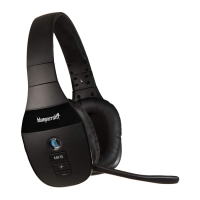
Instructions on adjusting the headband's metal part for a comfortable fit.
Step-by-step guide to powering the headset on and off using the multifunction button.
Detailed steps for pairing the headset with a smartphone via Bluetooth connection.
Guide on establishing a connection using NFC technology between smartphone and headset.
Explains how to answer, end, and reject calls using headset buttons and voice commands.
Explains default and configurable functions of the Parrott Button for voice commands or other tasks.
Details how the headset manages multiple incoming and ongoing calls simultaneously.
Lists available voice commands and provides instructions on how to use them with the headset.
Describes the capability to connect to and manage multiple smartphones simultaneously.
Instructions on how to reset the headset to its factory default settings and clear paired devices.
Provides answers to common questions regarding the headset's features and operation.
Guidelines on how to properly care for and clean the headset to maintain its battery and physical condition.
 General
| Impedance | 32 Ω |
|---|---|
| Driver unit | 36 mm |
| Ear coupling | Supraaural |
| Headphone frequency | 20 - 20000 Hz |
| Headphone sensitivity | 123 dB |
| Microphone mute | Yes |
| Microphone type | Boom |
| Microphone frequency | 100 - 10000 Hz |
| Microphone sensitivity | -47 dB |
| Microphone direction type | Bidirectional microphone |
| Cables included | USB |
| Battery type | Built-in battery |
| Standby time | 500 h |
| Battery capacity | 300 mAh |
| Battery recharge time | 3 h |
| Headset type | Monaural |
| Product type | Headset |
| Certification | CE, C-Tick, FCC, IC, TELEC, WEEE |
| Product color | Black |
| Wearing style | Head-band |
| Volume control | Buttons |
| Country of origin | China |
| Recommended usage | Office/Call center |
| International Protection (IP) code | IP54 |
| Storage temperature (T-T) | -10 - 45 °C |
| Operating temperature (T-T) | -10 - 60 °C |
| USB connector | Micro-USB |
| Wireless range | 100 m |
| 3.5 mm connector | No |
| Bluetooth version | 5.0 |
| Bluetooth profiles | A2DP, HFP, HSP |
| Connectivity technology | Wired |
| Frame material | Rubber, Stainless steel |
| USB cable length | 1 m |
| Microphone cartridge | 6 mm |
| Mobile operating systems supported | Android, iOS |
| Master (outer) case width | 400 mm |
| Master (outer) case height | 206 mm |
| Master (outer) case length | 290 mm |
| Master (outer) case weight | 3540 g |
| Harmonized System (HS) code | 85183000 |
| Quantity per master (outer) case | 16 pc(s) |
| Package depth | 75 mm |
| Package width | 172 mm |
| Package height | 175 mm |
| Package weight | 300 g |
 Weight and Dimensions
| Depth | 140 mm |
|---|---|
| Width | 165 mm |
| Height | 50 mm |
| Weight | 247 g |

 To Next Page
