Need help?
Do you have a question about the BlueParrott B450-XT and is the answer not in the manual?
Important safety note about prolonged exposure to high volume levels and hearing damage.
Details how the headset operates from battery or USB-C power and notes about mid-call connections.
Guide on how to pair the headset with a phone, including NFC pairing.
Instructions for manually pairing the headset using voice commands or buttons.
Step-by-step guide to connect the headset to a cell phone via Bluetooth.
Steps to make a call using the headset and end it.
How to answer an incoming call using voice commands or by pressing buttons.
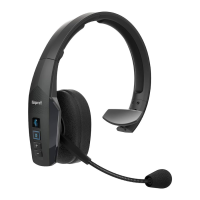
Guidance on positioning the microphone near the mouth for optimal noise-canceling performance.
How the headset supports connecting to and switching between two Bluetooth devices simultaneously.
 General
| MP3-player | No |
|---|---|
| Control type | Buttons, Touch |
| Headset type | Monaural |
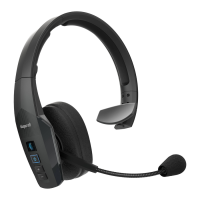
| Product type | Headset |
| Product color | Black |
| Wearing style | Head-band |
| LED indicators | Yes |
| Operating keys | Volume +, Volume - |
| Volume control | Button |
| Country of origin | China |
| Recommended usage | Calls/Music |
| Storage temperature (T-T) | -10 - 45 °C |
| Operating temperature (T-T) | -10 - 60 °C |
| USB connector | USB Type-C |
| Wireless range | 100 m |
| Bluetooth version | 4.0 |
| Connectivity technology | Wireless |
| Battery type | Built-in battery |
| Impedance | 30 Ω |
| Ear coupling | Circumaural |
| Headphone frequency | 150 - 6800 Hz |
| Microphone type | In-line |
| Sustainability certificates | RoHS |
| Package depth | 75 mm |
| Package width | 172 mm |
| Package height | 175 mm |
| Package weight | 370 g |
| Master (outer) case width | 475 mm |
| Master (outer) case height | 235 mm |
| Master (outer) case length | 338 mm |
| Master (outer) case weight | 3300 g |
| Harmonized System (HS) code | 85183000 |
| Quantity per master (outer) case | 10 pc(s) |
 Weight and Dimensions
| Weight | 148 g |
|---|

 To Next Page