
 Need help?
Do you have a question about the BlueParrott M300-XT SE and is the answer not in the manual?
List of accessories provided with the BlueParrott M300-XT headset, including USB cable and ear gels.
Guidance on selecting the correct EarGel size for optimal comfort and sound quality in the ear canal.
Instructions on how to ensure the ear gel fits firmly in the ear for best audio quality and comfort.
Steps to turn on the BlueParrott M300-XT headset, including LED indicators and audio cues.
Steps to turn off the BlueParrott M300-XT headset, including LED indicators and audio cues.
Instructions for pairing the headset with a smartphone via Bluetooth, including entering pair mode.
Guide on connecting the headset to a smartphone using NFC technology for simplified pairing.
How to answer, end, reject calls, and activate voice assistants using the headset controls.
Details on the default function of the BlueParrott button and how to configure it for other actions.
Instructions for managing multiple incoming and active calls on the headset.
Information on connecting the headset to two smartphones simultaneously using multipoint mode.
How to update the BlueParrott M300-XT headset firmware using the dedicated BlueParrott app.
Steps to reset the headset to factory settings, clearing paired devices.
Links and information to access FAQs for the BlueParrott M300-XT headset.
Guidelines for proper care and storage to maintain headset battery life and prevent damage.
Detailed steps for cleaning the headset using mild soap and water, avoiding harsh chemicals.
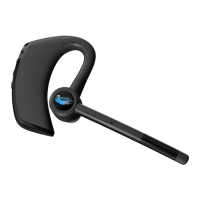
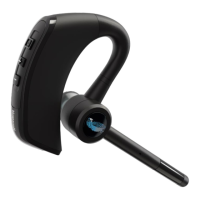
The BlueParrott M300-XT SE is a Bluetooth headset designed for clear communication and extended use, particularly in environments where background noise is a concern. Its primary function is to facilitate hands-free calls and audio playback, offering a robust solution for professionals who need reliable communication on the go.
The core function of the BlueParrott M300-XT SE is to provide high-quality audio for calls and media, while simultaneously reducing ambient noise for both the user and the listener. It achieves this through a combination of advanced microphone technology and ergonomic design. The headset is equipped with two microphones specifically engineered to block out up to 80% of background noise, ensuring crystal-clear conversations even in noisy environments. This feature is particularly beneficial for truck drivers, field workers, or anyone operating in loud settings.
The headset supports Bluetooth connectivity, allowing it to pair with smartphones and other compatible devices. It offers a significant wireless range, enabling users to roam up to 300ft/100m from their paired Bluetooth devices without losing connection. This "walk and talk" capability enhances mobility and convenience, freeing users from being tethered to their phones.
A key feature is the customizable BlueParrott Button™. By default, this button mutes the microphone, providing quick control over call privacy. However, its functionality can be reconfigured using the BlueParrott app to perform various other tasks. These include speed dial, push-to-talk (PTT) functionality, accessing a second paired mobile device, or checking the battery level. This customization allows users to tailor the headset to their specific workflow and preferences, making it a versatile tool for different professional needs.
The M300-XT SE is designed for all-day conversations, boasting up to 14 hours of talk time on a single charge. This extended battery life ensures that users can rely on the headset throughout their workday without frequent recharging. When it does need to be charged, it utilizes a USB-C port, offering modern convenience and faster charging capabilities.
The headset is designed for ease of use, with intuitive controls for managing calls, adjusting volume, and interacting with voice assistants.
Proper care and maintenance are essential to ensure the longevity and optimal performance of the BlueParrott M300-XT SE.
The BlueParrott M300-XT SE is a comprehensive communication tool designed for durability, clarity, and user-friendliness, making it an ideal choice for demanding professional environments.
 General
| Wearing style | Over-the-ear |
|---|---|
| Wireless range | Up to 100 meters |
| Talk time | Up to 14 hours |
| IP rating | IP54 |
| Bluetooth | Bluetooth 5.1 |
| Microphone | 2-microphone technology |
| Compatibility | Works with most Bluetooth-enabled devices |
| Noise Cancellation | Advanced noise-cancelling with 80% noise reduction |

 To Next Page