
 Need help?
Do you have a question about the BlueParrott BPB-35020 and is the answer not in the manual?
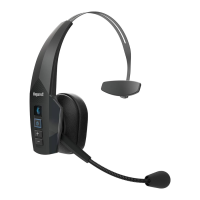
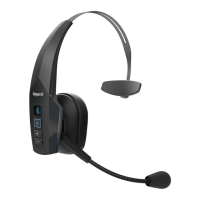
The BlueParrott B350-XT BPB-35020 is a headset designed for communication, offering customizable features primarily through its dedicated Parrott Button. This device aims to enhance user experience by providing quick access to various functions, making it suitable for professionals who require reliable and efficient communication.
The core function of the BlueParrott B350-XT is to facilitate clear audio communication, both for listening and speaking. It integrates with smartphones via the BlueParrott app, available on both Android and iOS platforms, to unlock its full range of customizable features. The standout feature is the programmable Parrott Button, which can be configured to perform several actions based on user preference.
While specific technical specifications like frequency response, driver size, or battery capacity are not detailed in the provided document, the emphasis is on its software integration and customizable controls. The headset is designed to connect wirelessly to a phone, implying Bluetooth connectivity. The BlueParrott app is a critical component for its functionality, indicating a reliance on modern smartphone operating systems for configuration and extended features. The device supports third-party Push-To-Talk (PTT) apps, and its functionality can be further extended using the BlueParrott software development kit (SDK), suggesting a robust and adaptable software architecture. It also supports voice commands, specifically in English, which is a key feature for hands-free operation.
The BlueParrott B350-XT offers a variety of usage features, primarily centered around the customizable Parrott Button:
Mute/Unmute: Users can quickly mute or unmute the headset microphone during a call, providing privacy and control over their audio input. This is a fundamental feature for professional communication, allowing for quick interruptions or private conversations without disconnecting from a call.
Battery Status Announcement: A press of the Parrott Button can trigger an announcement of the headset's current battery status. This feature is crucial for managing power and ensuring the headset remains operational throughout the day, preventing unexpected power loss during important calls.
Speed Dial: The headset can be programmed to dial a specific number or phone contact with a single press of the Parrott Button. This streamlines the calling process for frequently contacted individuals or emergency numbers, saving time and effort.
Push-To-Talk (PTT): The Parrott Button can be configured to work with third-party PTT applications. This is particularly useful in professional environments such as logistics, construction, or security, where instant communication with a group is essential. The availability of an SDK further allows for custom integration with specialized PTT solutions.
Use as Multifunction Button (MFB): When configured as an MFB, the Parrott Button can perform standard call management functions. This includes answering incoming calls, ending ongoing calls, and activating the voice assistant on the connected phone (e.g., Siri, Google Assistant). This versatility makes the headset a comprehensive tool for managing phone interactions hands-free.
MFB for Second Paired Device: For users who connect their headset to multiple devices, the Parrott Button can act as an MFB for a second paired device. This allows for answering/ending calls or activating the voice assistant on the secondary device, enhancing multitasking capabilities and device management.
Voice Command: The headset recognizes and executes voice commands in English. This hands-free control mechanism allows users to perform various actions without physically interacting with the headset or phone. The specific list of available voice commands would be detailed in the device's user manual, offering a convenient way to manage calls, check status, or initiate other functions.
The provided document does not explicitly detail maintenance features in terms of physical upkeep or software updates. However, the reliance on a companion app (BlueParrott app) suggests that software updates for the headset's firmware would likely be managed through this application. This approach ensures that the device can receive bug fixes, performance improvements, and potentially new features over its lifespan, contributing to its long-term usability and relevance. The "Device dependent" note for certain features implies that some functionalities might vary based on the specific model or firmware version, highlighting the importance of keeping the device updated. Regular charging, as indicated by the battery status announcement feature, is a key aspect of maintaining operational readiness.
 General
| Brand | BlueParrott |
|---|---|
| Model | BPB-35020 |
| Category | Headsets |
| Language | English |

 To Next Page