Operation
12
This section displays the charge/discharge status and navigates to detailed product information.
Homepage
Powering on: Press the power button either on AC500 or B300S and hold for at least 1s to start
up the combo.
AC/DC Output: Tap the ‘AC ON/OFF’ or ‘DC ON/OFF’ to enable or disable.
Powering Off: Press the power button either on AC500 or B300S to shut down the combo.
Note:
Turn on the DC power to enable wireless charging.
When connected to the grid or PV, the combo turns on automatically.
Note:
The combo turns off automatically upon 4 hours:
a: No input and output b: AC and DC output off
Powering On/Off
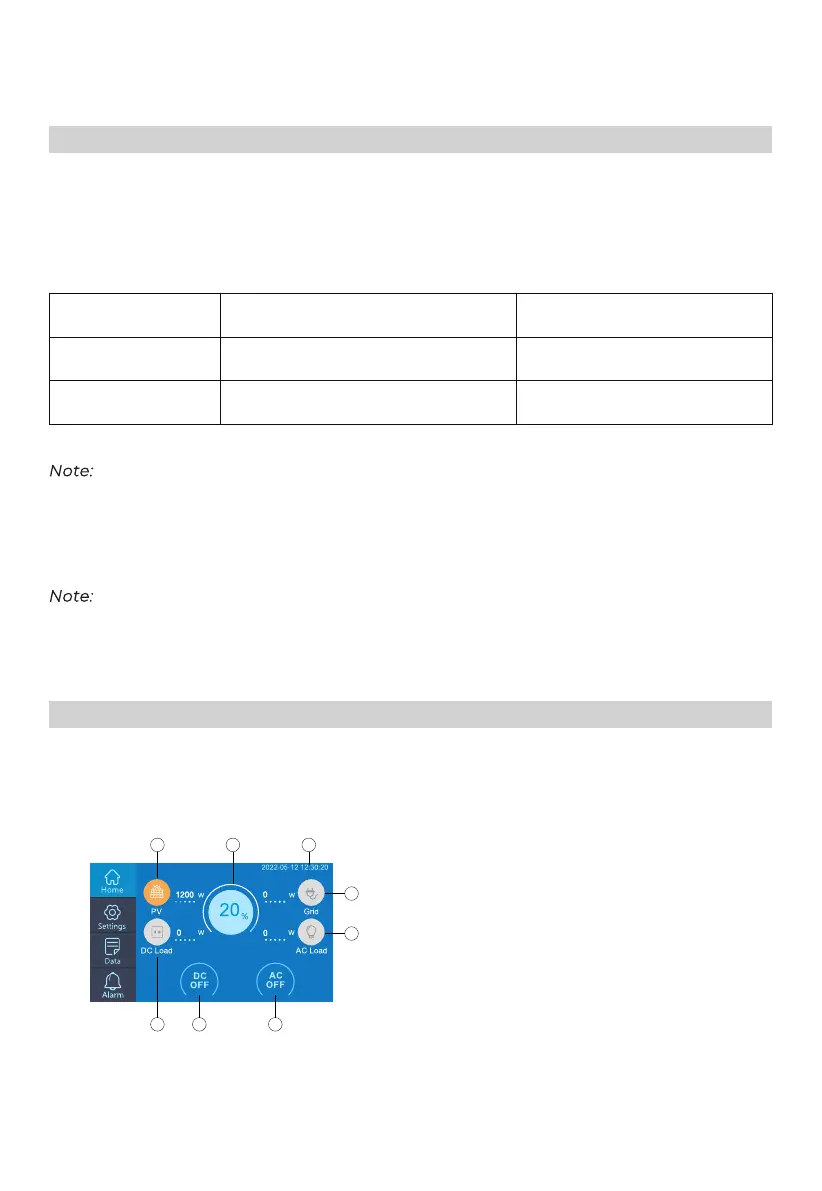
LCD Screen
a: PV Input
b: Battery Capacity
c: Date/Time
d: DC Load
e: DC ON/OFF
f: AC ON/OFF
g: Grid Input
h: AC Load
Operation Green Light(On the Buttons) LED Indicator(On B300S)
Powering On
Powering Off
ON
OFF
ON
OFF
a
b
c
h
g
e
d
f


 To Next Page