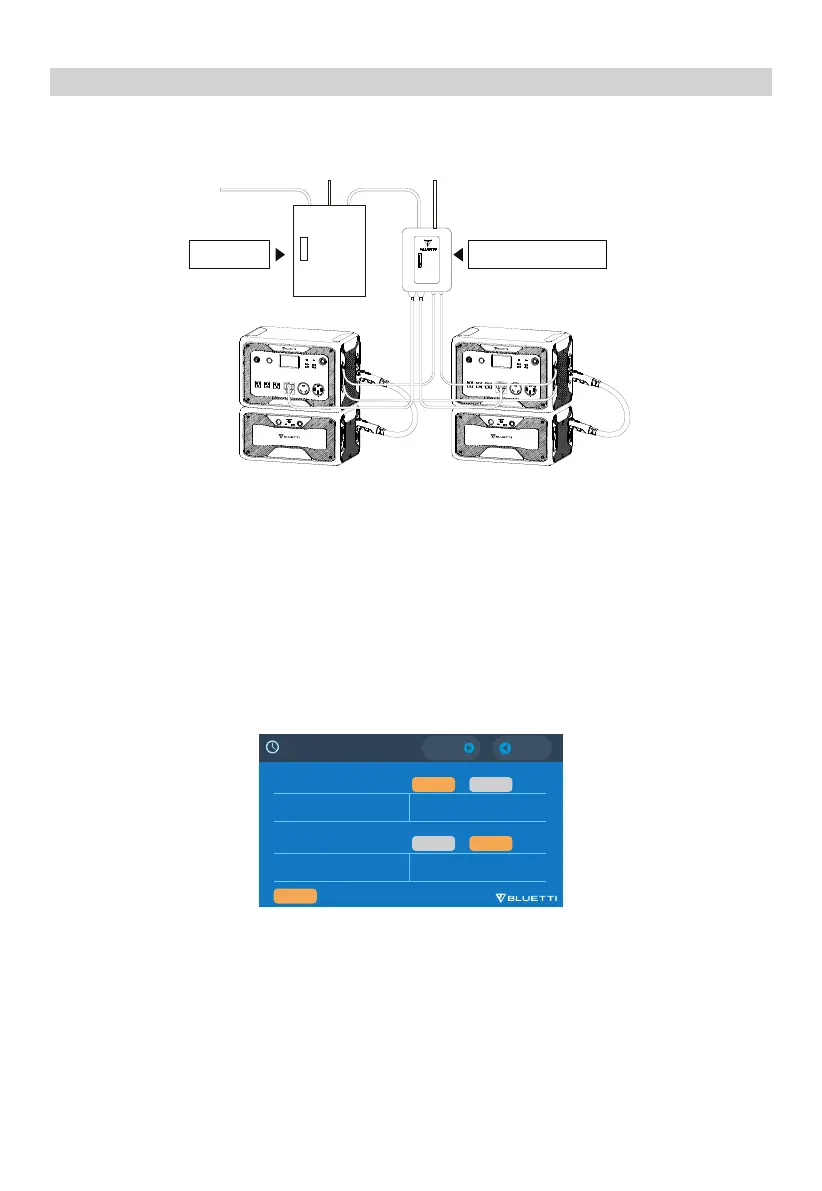
The combo is set at standard UPS by default. The grid first charges the combo, followed by
the devices on AC output ports. When the grid fails, the combo automatically steps in and
powers the devices.
Standard UPS
Set the ‘Time Control UPS’ as the working mode.
Charge Time: Select off-peak electricity consumption time to charge the combo by the grid.
Discharge Time: Select the time to power the loads connected to the smart home panel.
Battery SOC Low: When power level drops to this SOC, the combo stops powering loads
automatically.
Battery SOC High: The combo charges to this SOC from the grid, then from other power sources.
Time Control UPS
20
UPS
Tie the AC500 + B300S combo to the grid with the smart home panel.
Connect the critical loads to the AC output of AC500.
Smart Home PanelMain Panel
3HULRG
6WDUW
+ +
0
0
(QG
(')1
(')1
7LPH6HWWLQJ
(')1
(')1
4+>:
5HVHW
3HULRG
6WDUW
+ +
0
0
(QG
:RUNLQJ0RGH
:RUNLQJ0RGH
ɋKDUJH
'LVFKDUJH
ɋKDUJH
'LVFKDUJH


 To Next Page