Display
Selecting display readings
Switch on the ignition.
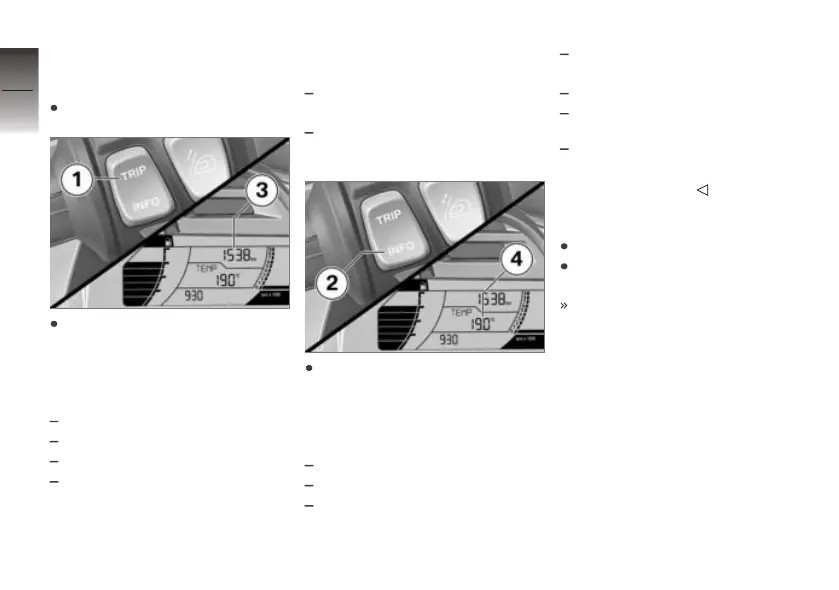
Briefly press TRIP 1 in each
case to select the display in
section 3.
The following data can be dis-
played:
Odometer
Trip distance 1 TRIP 1
Trip distance 2 TRIP 2
Automatic trip distance
TRIP A is automatically reset
when at least five hours pass
after switching off the ignition
and the date has changed.
Fuel reserve reached: Distance
traveled since this point in time
Call up the settings menu:
SETUP
Briefly press INFO 2 in each
case to select the display in
section 4.
The following data can be dis-
played:
Ambient temperature TEMP
Average speed ØSPEED
Average fuel consumption
ØFUEL
Current fuel consumption
FUEL
Date DATE
Oil level indicator OIL
with Tire Pressure Control
(TPC/RDC)
OE
RDC tire pressures
Resetting tripmeter
Switch on the ignition.
Select the trip distance
recorder.
The desired trip distance
recorder is displayed.
4
46
z
Operation


 To Next Page