G12�Driver�Assistance�Systems
19.�Cruise�Control
128
If�the�function�is�active,�it�can�be�interrupted�by�pressing�the�RES/CNCL�button.�The�distance�and
speed�will�no�longer�be�maintained�and�the�set�speed�is�greyed�out�in�the�instrument�cluster.
The�driver�can�select�a�desired�distance�in�four�stages�using�the�left-hand�multifunction�button�on�the
multifunction�steering�wheel�(MFL).�The�last�selected�following�distance�is�saved�depending�on�the
key�being�used.
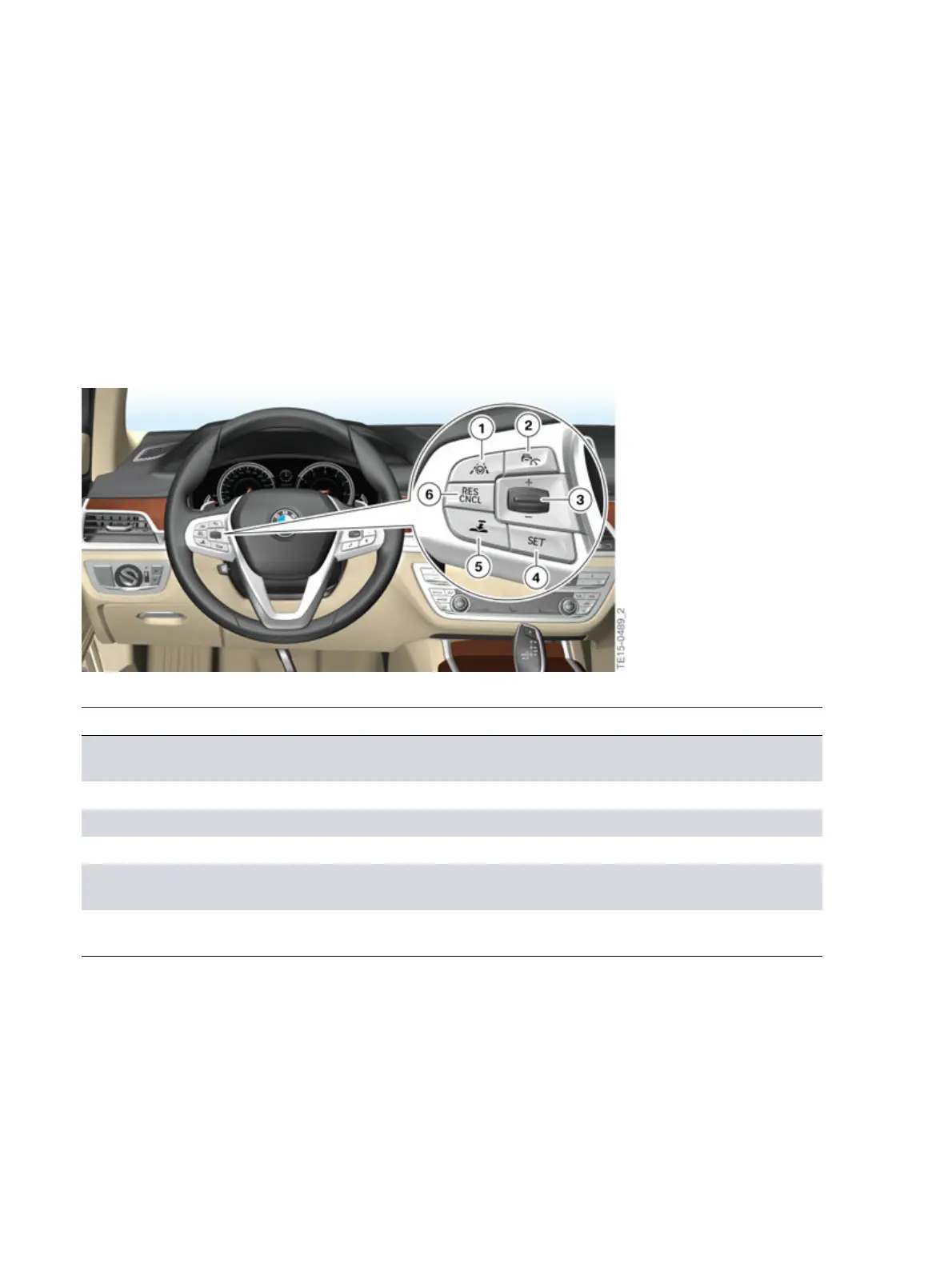
• The�following�graphic�shows�the�button�assignment�for�the�assistance�systems�on�the
multifunction�steering�wheel�(MFL)�in�vehicles�with�the�Active�lane�keeping�assistant�including
traffic�jam�assistant:
G12�buttons�for�ACCStop&Go�with�Active�Driving�Assistant�Plus�II�optional�equipment�(OE�5AT)
Index Explanation
1 Button�for�activating�or�deactivating�the�lane�keeping�assistant�including�traffic
jam�assistant
2 Button�for�activating�or�deactivating�ACC�Stop�&�Go
3 Rocker�switch�for�changing�the�set�speed
4 “SET”�button�for�setting�the�speed�of�cruise�control
5 Button�for�adjusting�the�distance�of�the�driver's�vehicle�to�the�vehicle�driving
ahead
6 Button�for�calling�up�a�saved�set�speed/temporarily�switching�off�the�cruise
control
The�following�conditions�must�also�be�satisfied�for�activation:
• Seat�belt�fastened�and�doors�closed
• Drive�position�"D"�engaged�and�brake�pressed
• Engine�running
• Parking�brake�not�activated
• Camera�and�radar�sensor�operational
• No�system�faults�detected.


 To Next Page
 Loading...