G12�Driver�Assistance�Systems
19.�Cruise�Control
129
The�system�is�interrupted�automatically�in�the�following�situations:
• If�the�brakes�are�used
• If�the�selector�lever�position�is�moved�out�of�position�"D"
• If�the�Dynamic�Traction�Control�(DTC)�is�activated�or�the�Dynamic�Stability�Control�(DSC)�is
deactivated
• If�the�Dynamic�Stability�Control�(DSC)�is�performing�an�adjustment
• If�the�seat�belt�is�unfastened�and�the�driver's�door�is�opened�in�a�stationary�vehicle
• If�the�system�has�not�detected�an�object�for�a�long�time,�e.g.�on�rarely�frequented
sections�of�road�with�no�distinct�edge
• If�the�detection�range�of�the�radar�is�impaired,�e.g.�due�to�contamination�or�heavy�precipitation
• Following�a�longer�immobilization�period,�if�the�vehicle�has�been�decelerated�to�a�standstill
by�ACC�Stop&Go.
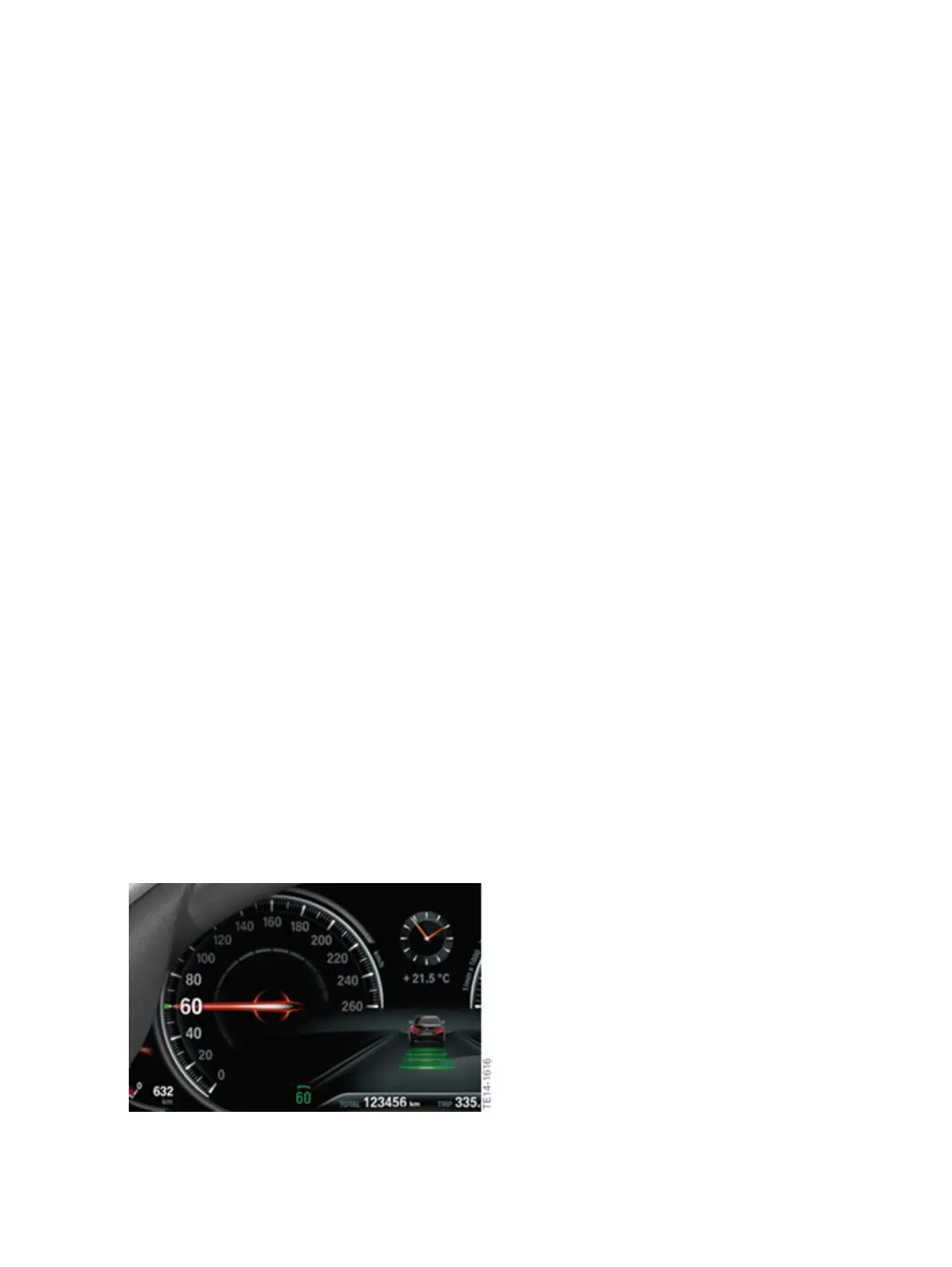
The�set�speed�is�indicated�in�the�instrument�cluster�in�the�familiar�way;�by�a�mark�that�moves�round
the�speed�reading.�If�ACCStop&Go�is�activated,�this�mark�is�green,�whereas�in�"Standby"�mode�it�is
grey�and�the�last�set�speed�is�displayed.�After�the�ACCStop&Go�function�is�activated�or�after�the�driver
has�adjusted�the�set�speed,�the�current�digital�value�is�displayed.�If�the�distance�is�changed,�a�symbol
appears�briefly�as�an�acknowledgement.�The�symbol�screen�masks�are�for�example�the�set�speed�and
the�distance�bar.�With�each�subsequent�operation�the�display�is�shown�for�another�three�seconds.
The�distances�set�by�the�driver,�as�well�as�the�distances�to�any�vehicles�driving�ahead,�that�must�be
maintained�to�ensure�a�safe�distance�are�displayed�between�the�two�round�instruments�(speed�reading
and�engine�speed�display).�The�distance�setting�is�stored�for�the�ID�transmitter�currently�being�used.
Like�for�DCC,�it�is�also�necessary�that�the�symbol�screen�masks�are�complemented�if�necessary�with
notes�in�the�instrument�cluster�for�ACC�Stop�&�Go.
With�active�control�the�displays�are�also�shown�in�the�Head‐Up�Display�(optional�equipment�OE�610).
If�the�system�can�no�longer�adjust�a�safe�distance,�for�example�due�to�very�high�differential�speeds,
then�the�driver�is�prompted�to�take�over�the�vehicle�handling�by�a�flashing�red�vehicle�symbol�and�an
acoustic�signal.
Display
Displays�in�the�instrument�cluster�when�ACC�Stop&Go�is�activated


 To Next Page