G12�Driver�Assistance�Systems
15.�Cameras
75
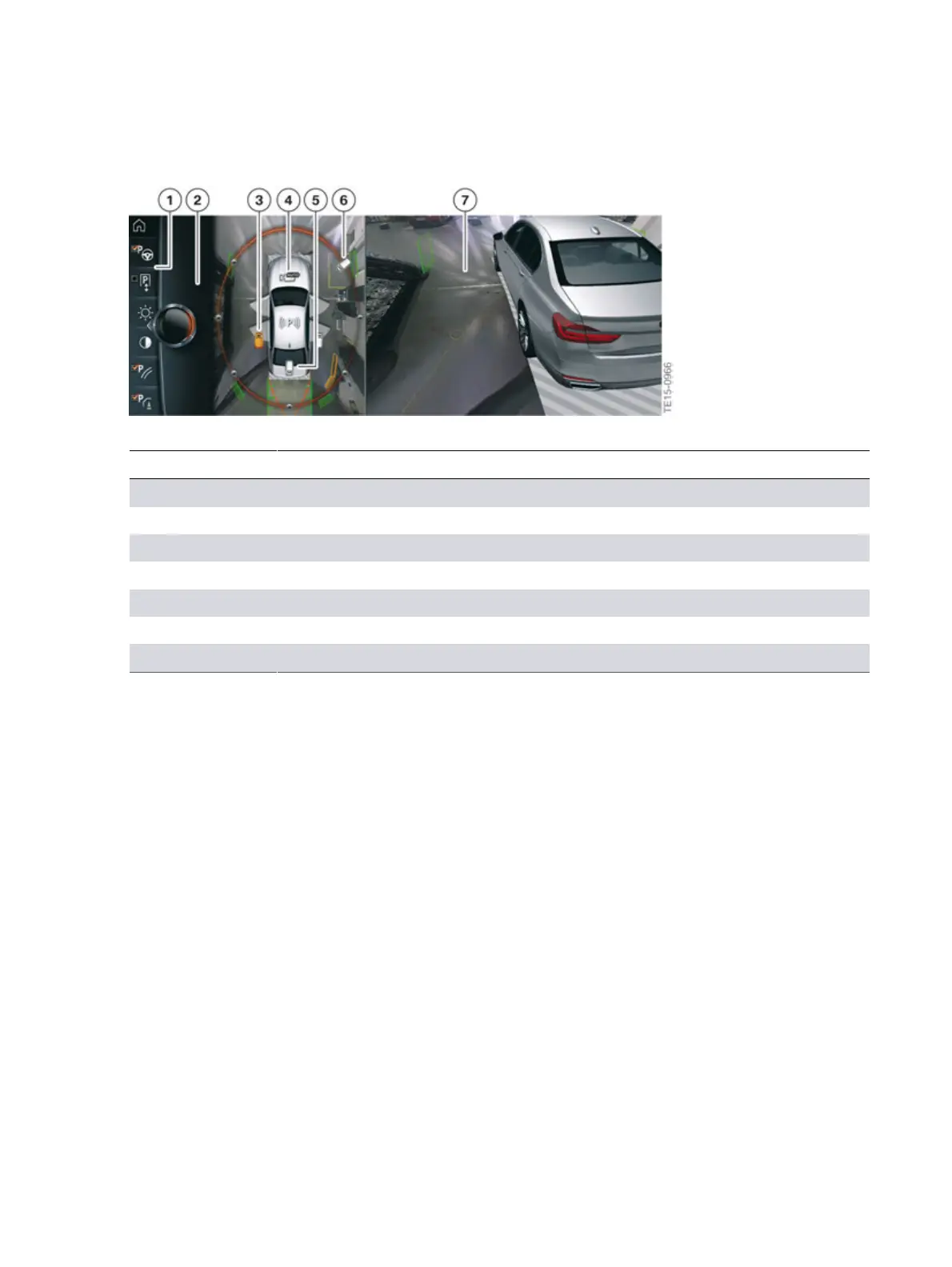
G12�exterior�cameras�view�(camera�angles)�on�the�CID
Index Explanation
1 Toolbar
2 Selection�window
3 Side�view
4 Automatic�camera�angle
5 Reversing�camera
6 Moving�camera�angle
7 Camera�image
Other�settings�and�options�can�be�found�in�the�toolbar,�depending�on�the�vehicle�equipment.
The�following�functions�may�be�available:
• Switching�the�"Parking�Maneuver�Assistant"�function�on�and�off
• "Brightness"�range�of�adjustment
• "Contrast"�range�of�adjustment
• Switching�the�"Parking�assistance�lines"�on�and�off
• Switching�the�"Obstacle�marking"�on�and�off
• Activating�the�"Car�wash"�function
• "Settings"�menu�(various�settings�can�be�made,�such�as�use�of�the
activation�points�with�Panorama�View)



 To Next Page